
Fotor
Online photo editor and design tool with AI enhancement, background removal, headshots and an AI agent.
Best for Budget all in one photo editing and design
Used Fotor and liked it? Upvote it. One upvote per person. Upvotes come from visitors, not from us, and never change "Our ranking".
What it does
Fotor is an online photo editor and design platform built for both everyday users and professionals. Users upload images or provide text prompts to enhance photos, isolate subjects, replace backdrops, or generate new visual artwork. The software delivers downloadable high resolution images and creative assets for personal profiles, print projects, and ecommerce listings.
Read more: 5 features and how people use themShow less
-

AI photo blur remover
Detects blur causes and reconstructs missing details to convert blurry pictures into sharp images. Combines deblurring algorithms with resolution upscaling to restore facial features, documents, and product images.
Use caseAn ecommerce seller fixes blurry product photos caused by missed focus or camera shake before posting listings on Amazon.
From fotor.com/features/unblur-image · image from Fotor -
AI background remover
Identifies the main subject in an image and cuts away the backdrop automatically within seconds. Exports clean cutouts as transparent PNGs while preserving fine details like hair and animal fur.
Use caseA print on demand shop owner cuts out pet portraits to create clean graphics for mugs and shirts.
From fotor.com -
Batch photo editor
Processes large image sets simultaneously instead of adjusting files one by one. Applies consistent background removal, deblurring, or background replacements across up to fifty images in a single batch session.
Use caseA studio photographer uploads a set of fifty blurry event photos to deblur and restore all files in one turn.
From fotor.com/features/unblur-image -
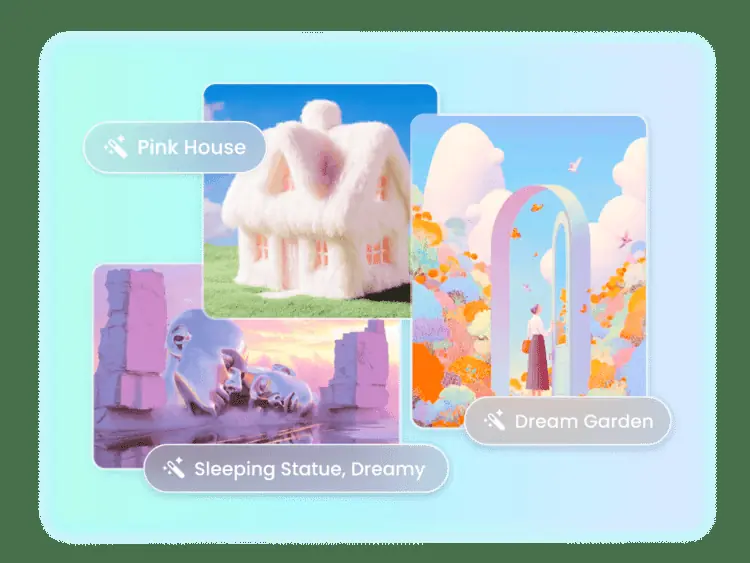
AI image generator
Transforms written descriptions into digital images, logos, three dimensional characters, and artwork using AI. Produces new visual scenes directly from text prompts.
Use caseA creator turns written ideas into digital illustrations and 3D character art by describing what they want to see.
From fotor.com · image from Fotor -
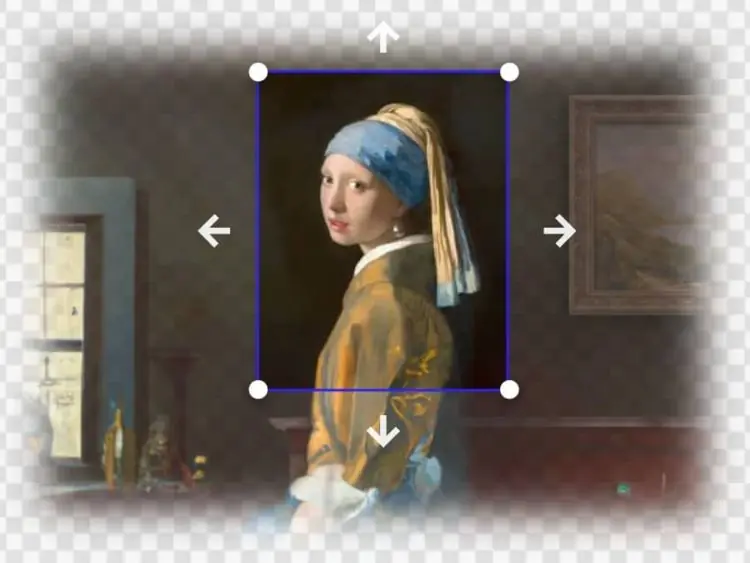
AI image extender
Uses outpainting AI to generate new visual elements beyond an image boundary. Expands existing scenes to fit alternative aspect ratios without compromising original visual content.
Use caseA designer extends the borders of a photo to adjust its aspect ratio for a different display format.
From fotor.com · image from Fotor
Written from Fotor's own website, checked . Each feature links to the page it comes from; images are Fotor's own.
Every plan
| Plan | Monthly | Billed yearly | Per | What it includes |
|---|---|---|---|---|
| Basic (Free) | Free | $0 | per account | Limited credits, normal JPG/PNG/PDF export, 512 MB storage |
| Pro | Not listed | $3.99 | per account | HD + transparent PNG export, AI batch edit, 2 GB storage, 10 concurrent generations |
| Pro+ | Not listed | $5.83 | per account | 100 GB storage, 30 concurrent generations |
| Max | Not listed | $13.99 | per account | 500 GB storage, 50 concurrent generations |
| AI Headshot packs | Not listed | Not listed | one time | $26.99 (20) / $37.99 (40) / $50.99 (80 images) |
| Credit top up | Not listed | Not listed | one time | $19.99 one time credit pack |
From Fotor's own pricing page, checked . Prices are in US dollars per month; "billed yearly" is the monthly price when you pay for a year up front.
Before you pay
- Unused credits roll over
- Partial
What Fotor says
Unused credits will roll over as long as you're subscribed, up to 5 months of accumulation
Source page - Watermark on the free plan
- No
What Fotor says
allows anyone to edit as many images as they want and export the edited photos without watermarks.
Source page - Export your data
- Yes
Only what Fotor's own pages state, with the quote behind each answer. Anything they don't publish is left out rather than guessed.
Getting started with Fotor
- Upload or drag and drop a photo into the online photo editor.
- Edit the photo by adjusting lighting and color, applying effects, and adding text or stickers.
- Download the finished photo in JPG, PNG, or PDF format and share it.
Written from Fotor's own help pages: fotor.com/
Fotor video tutorials
Independent creators on YouTube, not Fotor or us. The video loads from YouTube only when you press play.
What the free plan includes
Limited free credits, 1 concurrent generation, 512 MB storage, normal quality exports
Questions people ask about Fotor
Is Fotor free?
Yes, there is a free plan: Limited free credits, 1 concurrent generation, 512 MB storage, normal quality exports.
Do unused Fotor credits roll over?
Partly: some unused credits carry over, with limits. Source
Does the Fotor free plan add a watermark?
No, free plan output has no watermark. Source
Is Fotor’s online photo editor free to use?
Yes, Fotor offers a free plan allowing users to edit unlimited images and export them without watermarks, with the option to upgrade to Pro for advanced features. Source
Where this came from
Plans, prices and limits were copied from Fotor's own pages and the other sources listed, then checked .
- fotor.com/pricing/
- pricingsaas.com/companies/fotor
- fotor.com/
- fotor.com/features/remove-object-from-photo/
How we collect prices and rank tools · Is something wrong? Correct this listing
Others that do the same job
 Picsartpicsart.com
All in one AI photo and design editor with background removal, retouching, generative fill and templates.
- Green flag: Free plan
 Luminar Neo (now Luminar)skylum.com/luminar
AI powered photo editor with sky replacement, generative erase and portrait tools, sold as a lifetime license.
- Green flag: Refunds within 30 days
- Red flag: Renamed
Free trial · One time payment
Visit site Luminar Neo (now Luminar) (opens the tool's site) Let's Enhanceletsenhance.io
Cloud AI upscaler and enhancer that boosts resolution, fixes compression and corrects color for print ready images.
- Green flag: Free plan
- Red flag: Free plan watermark
Midjourneymidjourney.com
Subscription text to image and image to video generator known for highly artistic, stylized results via web and Discord.
- Red flag: No free plan
 Designs.aidesigns.ai
All in one AI suite for logos, graphics, videos, voiceovers and copy from one dashboard.
- Green flag: Free plan
- Red flag: No refunds
 Vismevisme.co
Design platform for presentations, infographics, documents and social graphics with AI generation and brand kits.
- Green flag: Free plan
- Green flag: Cancel online
- Green flag: No card for trial
- Red flag: Free plan watermark