
Freepik AI (Magnific)
Renamed: Magnific
Freepik's all in one AI creative suite, now branded Magnific, bundling image/video generators, upscaler and stock assets.
Best for Multi model AI images plus stock assets
Used Freepik AI and liked it? Upvote it. One upvote per person. Upvotes come from visitors, not from us, and never change "Our ranking".
What it does
Freepik AI, now branded as Magnific, is an all in one creative suite that unites leading generative AI models with a vast stock asset library. Users input prompts, image references, or brand guidelines to generate and edit images, produce cinematic videos, compose audio, and upscale visual assets. It is built for individual designers, creative agencies, and enterprise teams seeking unified production workflows.
Read more: 6 features and how people use themShow less
-
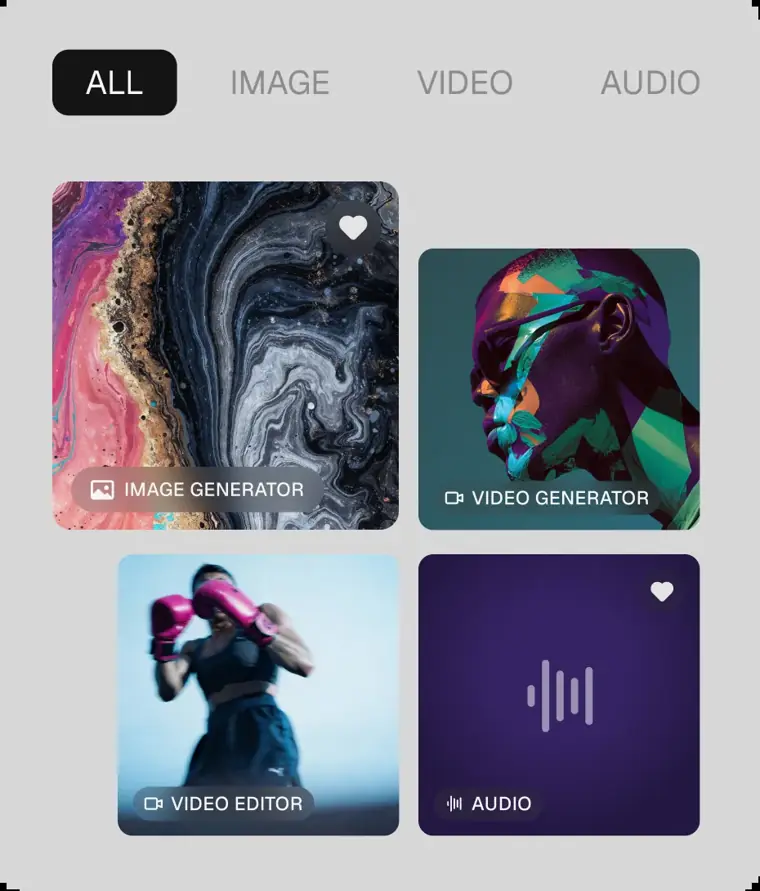
Multi model creative suite
Provides unified access to leading models for generating images, audio, 3D scenes, and cinematic video. Users create and refine content across diverse modalities within a single interface.
Use caseA marketing team produces campaign visual assets by generating shots and full scenes across different leading models.
From magnific.com · image from Freepik AI -
High resolution upscaling
Enhances images and video to 4K resolution using dedicated Magnific and Topaz algorithms. It restores details and increases visual clarity for production assets.
Use caseA designer upscales an image to 4K to elevate product and lifestyle photos for a major brand campaign.
From magnific.com/pricing -
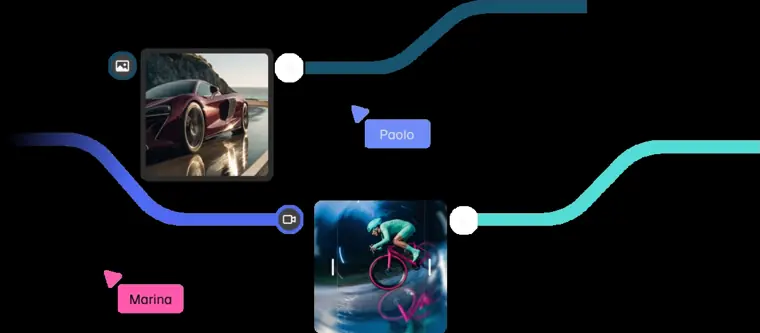
Spaces collaborative canvas
Serves as an infinite, node based canvas where team members construct, explore, and automate workflows in real time. It enables teams to wire nodes, share processes, and review assets together.
Use caseA video editor comments directly on a shared canvas creation to approve shots with teammates in real time.
From magnific.com · image from Freepik AI -
Licensed stock creative library
Supplies millions of photos, vectors, PSD files, icons, video clips, and templates cleared for commercial use. Users can download ready made resources or insert them directly into AI generation workflows.
Use caseA content creator selects licensed 4K stock video clips to use as references for an ad campaign.
From magnific.com -
Magnific agents and flows
Runs end to end briefs automatically by applying uploaded brand books, reference files, and saved workflows across the canvas. It automates repetitive creation tasks while remembering preferences across sessions.
Use caseAn agency lead feeds brand guidelines into an agent so it can automatically execute image and video steps across a client brief.
From magnific.com/enterprise -
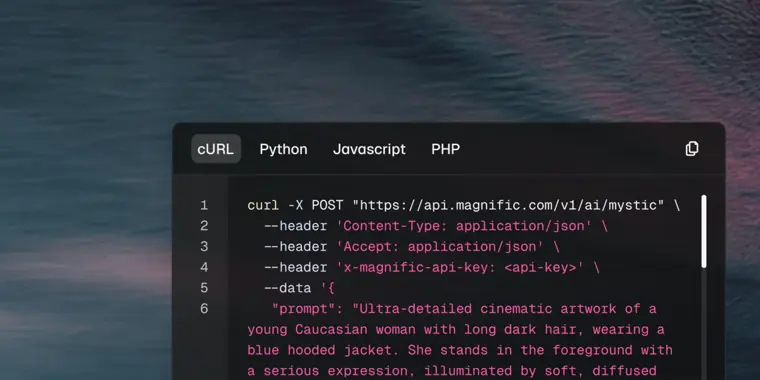
MCP API and plugin integrations
Connects platform capabilities into external tools such as Claude, ChatGPT, Cursor, and design editors using plugins, standard protocols, and APIs. It allows users to trigger generation and upscaling tasks without leaving their existing workspace.
Use caseA software engineer connects the suite via MCP to trigger image generation inside Claude or ChatGPT using their plan credits.
From magnific.com · image from Freepik AI
Written from Freepik AI's own website, checked . Each feature links to the page it comes from; images are Freepik AI's own.
Every plan
| Plan | Monthly | Billed yearly | Per | What it includes |
|---|---|---|---|---|
| Free | Free | Not listed | per account | limits not published on pricing page |
| Premium | $20 | $14.50 | per account | 240K credits/year, commercial AI license |
| Premium+ | $45 | $33.75 | per account | 600K credits/year, commercial AI license + music rights |
| Pro Starter | $110 | $82.50 | per account | 1.5M credits/year (or 4M with model options) |
From Freepik AI (Magnific)'s own pricing page, checked . Prices are in US dollars per month; "billed yearly" is the monthly price when you pay for a year up front. A few figures (often the yearly price) are derived rather than printed on the page.
Before you pay
- Refunds
- Subscriptions have a 30 day refund guarantee if no downloads or AI credits have been used in the current billing period, while unused extra credit packs are refundable within 14 days.
What Freepik AI says
Refunds are only available if you have not used the service : no downloads from Magnific.com or Flaticon.com, and no AI credits consumed.
Source page - Refund window
- 30 days
- How to cancel
- Subscribers cancel online by navigating to Plan & billing from their profile picture, clicking Danger zone -- Cancel a subscription, and following the confirmation steps.
What Freepik AI says
Click "Danger zone -- Cancel a subscription" and then "Cancel subscription". Follow the confirmation steps.
Source page - Cancel online yourself
- Yes
What Freepik AI says
Click "Danger zone -- Cancel a subscription" and then "Cancel subscription". Follow the confirmation steps.
Source page - Renews automatically
- Yes
What Freepik AI says
All paid Magnific subscriptions renew automatically at the end of each billing period (monthly or annual).
Source page - Unused credits roll over
- Partial
- Trains on your data
- No
- Export your data
- Yes
- SOC 2
- Yes
- GDPR
- Yes
- Support
- Help center, contact form, Slack channel
Only what Freepik AI's own pages state, with the quote behind each answer. Anything they don't publish is left out rather than guessed.
Getting started with Freepik AI
- Open the Photo Editor on the Home page or under Image tools.
- Add your image to the editor.
- Select an editing feature and save your work.
Written from Freepik AI's own help pages: magnific.com/ai/photo-editor
Freepik AI video tutorials
Independent creators on YouTube, not Freepik AI or us. The video loads from YouTube only when you press play.
What the free plan includes
Free plan referenced but limits not shown on pricing page.
Questions people ask about Freepik AI
How much does Freepik AI cost?
Paid plans start at $20 a month (Premium). 4 plans are listed above, from Freepik AI's own pricing page.
Is Freepik AI free?
Yes, there is a free plan: Free plan referenced but limits not shown on pricing page..
Can I get a refund from Freepik AI?
Subscriptions have a 30 day refund guarantee if no downloads or AI credits have been used in the current billing period, while unused extra credit packs are refundable within 14 days. The refund window stated is 30 days. Source
How do I cancel Freepik AI?
Subscribers cancel online by navigating to Plan & billing from their profile picture, clicking Danger zone -- Cancel a subscription, and following the confirmation steps. Source
Do unused Freepik AI credits roll over?
Partly: some unused credits carry over, with limits. Source
Does Freepik AI train its AI on my data?
No, the company says your data is not used for training. Source
Does Freepik AI have an API?
Yes.
How does Magnific API billing work?
The API uses the same credit based system as on our website. Every AI generation request you make through the API deducts credits from your wallet. Source
Are there any additional fees in the Magnific API's pricing model?
No, there are no hidden fees. Source
How do auto renewals work for paid subscriptions?
All paid Magnific subscriptions renew automatically at the end of each billing period (monthly or annual) using the payment method on file unless cancelled beforehand. Source
What happens if a subscription renewal payment fails?
The system retries three times (after 1 day, 7 days, and 21 days); if all fail, the subscription is cancelled. Source
Works with
- Integrations
- Claude, ChatGPT, Cursor, Topaz, ComfyUI, Photoshop
- AI models
- Nano Banana Pro, Nano Banana 2, Magnific Upscaler, Magnific Precision, GPT 6 Astra, Claude Opus, GPT Image 2, Grok Imagine, Happyhorse 1, Krea 2, Veo 3, Seedream 5, Seedance 2, Kling 3, Flux 2, ElevenLabs, Runway Gen 4.5, Wan, Minimax Hailuo, Gemini Omni
Where this came from
Plans, prices and limits were copied from Freepik AI (Magnific)'s own pages, then checked .
- magnific.com/pricing
- magnific.com/
- magnific.com/ai/docs/plans-and-pricing
- magnific.com/ai/docs/subscriptions-and-refunds
- magnific.com/pricing?view=business
- magnific.com/ai/photo-editor
- magnific.com/ai/support?form=true
- magnific.com/api
How we collect prices and rank tools · Is something wrong? Correct this listing
Others that do the same job
Midjourneymidjourney.com
Subscription text to image and image to video generator known for highly artistic, stylized results via web and Discord.
- Red flag: No free plan
Ideogramideogram.ai
AI image generator excelling at accurate typography and text inside images, logos, posters and graphics.
- Green flag: Free plan
- Green flag: Cancel online
- Green flag: Some credits roll over
 Kreakrea.ai
Creative AI suite with real time image generation, many third party image/video models, enhancer and LoRA training.
- Green flag: Free plan
- Green flag: No card for trial
 Recraftrecraft.ai
AI design generator producing raster and true vector (SVG) images, icons, logos and brand consistent styles.
- Green flag: Free plan
- Green flag: Cancel online
- Green flag: Refunds within 30 days
- Red flag: Credits reset monthly
 Adobe Fireflyadobe.com/products/firefly.html
Adobe's generative AI app for images, video and audio, with commercially safe models plus partner models.
- Green flag: Free plan
Leonardo AIleonardo.ai
Token based AI image and video platform with many models, real time canvas, custom model training and an API.
- Green flag: Free plan
- Green flag: Some credits roll over
- Red flag: Acquired