
Resume.io
Template driven resume and cover letter builder with paid trial access that converts to a recurring subscription.
Best for Quick polished resumes from proven templates
Used Resume.io and liked it? Upvote it. One upvote per person. Upvotes come from visitors, not from us, and never change "Our ranking".
What it does
Resume.io is an online career platform designed to help job seekers create application documents and find work. Users input their professional details to generate finished resumes and cover letters using guided tools. The platform is built for candidates aiming to pass applicant tracking systems and secure job interviews.
Read more: 3 features and how people use themShow less
-
Resume builder
Generates job application drafts quickly using automated writing assistance.
Use caseA candidate creates a full draft of their resume in twenty minutes using guided tools.
From resume.io -
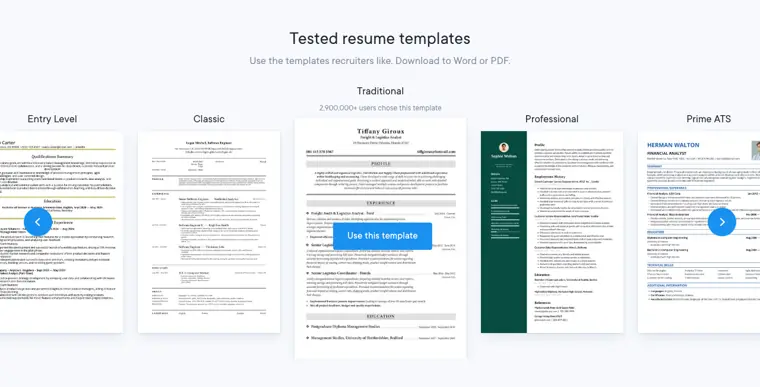
Tested resume templates
Provides preformatted document designs that follow employer standards and export to Word or PDF.
Use caseAn applicant selects an ATS compliant layout and downloads it to send directly to an employer.
From resume.io · image from Resume.io -
Interview prep
Presents practice interview questions modeled after major employers and delivers immediate results.
Use caseAn interviewee answers practice questions from top companies to evaluate their interview responses.
From resume.io
Written from Resume.io's own website, checked . Each feature links to the page it comes from; images are Resume.io's own.
Every plan
| Plan | Monthly | Billed yearly | Per | What it includes |
|---|---|---|---|---|
| Free | Free | Not listed | per account | TXT download only |
| 7 day trial | Not listed | Not listed | $2.95 one time, auto renews | Full access for 7 days, then auto subscribes to the 4 week plan |
| 4 week | $24.95 | Not listed | per account, billed every 4 weeks | Unlimited resumes, PDF/DOCX downloads |
| Quarterly | Not listed | Not listed | per account, $49.95 every 3 months | Same as 4 week |
From Resume.io's own pricing page, checked . Prices are in US dollars per month; "billed yearly" is the monthly price when you pay for a year up front. A few figures (often the yearly price) are derived rather than printed on the page.
Before you pay
- Refunds
- Offers a 7 day money back guarantee where customers can get a refund if they decide within 7 days that they did not get their money's worth.
What Resume.io says
We offer a good ol’ fashioned, no questions asked, 7‑day money back guarantee. If you purchase a plan and decide within 7 days that you didn’t get your money’s worth, we’ll give you a refund.
Source page - Refund window
- 7 days
What Resume.io says
If you purchase a plan and decide within 7 days that you didn’t get your money’s worth, we’ll give you a refund.
Source page - How to cancel
- Subscribers can cancel or downgrade from the app settings by navigating to Account Settings under their profile photo and downgrading in the My Plan box.
What Resume.io says
You can cancel your premium subscription at any time by logging into your resume.io account and clicking your profile photo in the top right hand corner. Click on “Account Settings” toward the bottom of the drop down menu.
Source page - Cancel online yourself
- Yes
What Resume.io says
Yes, you can upgrade, downgrade, or cancel your plan at anytime from the app.
Source page - Data retention
- Users can delete their account and all data it contains at the bottom of the settings page.
What Resume.io says
At the bottom of the settings page, you can also delete your account and all the data it contains.
Source page - Export your data
- Yes
What Resume.io says
Within the builder, you can download your resume as a PDF at any time using the blue “Download PDF” button found above your resume in the top right corner.
Source page
Only what Resume.io's own pages state, with the quote behind each answer. Anything they don't publish is left out rather than guessed.
Getting started with Resume.io
- Browse and view the library of sample resumes for inspiration.
- Use the resume builder to create your resume from scratch.
- Write a cover letter using professional tools, pre generated sentences, and tips.
- Download your resume and cover letter for free as a PDF file with the Vancouver template or choose Export to TXT from the drop down menu in the top right corner of the builder page.
- Search for job vacancies under Services in your resume.io dashboard using the free job search tool powered by Career.io.
Tips
- You can use several Resume.io tools 100% free of charge without entering any credit card information.
- If you download a TXT file, you can copy and paste the text into a word processor like Microsoft Word or Google Docs to adjust the format and style on your own.
- You can cancel a trial subscription at any time through the Account menu in the top right corner of the app before it automatically renews after 7 days.
Written from Resume.io's own help pages: help.resume.io/en/articles/3785088
Resume.io video tutorials
Independent creators on YouTube, not Resume.io or us. The video loads from YouTube only when you press play.
The free trial
Trial only: Free account can build but downloads are TXT only; PDF/
Questions people ask about Resume.io
How much does Resume.io cost?
Paid plans start at $24.95 a month (4 week). 4 plans are listed above, from Resume.io's own pricing page.
Is Resume.io free?
There is a free trial but no free plan: Free account can build but downloads are TXT only; PDF/DOCX need paid access.
Can I get a refund from Resume.io?
Offers a 7 day money back guarantee where customers can get a refund if they decide within 7 days that they did not get their money's worth. The refund window stated is 7 days. Source
How do I cancel Resume.io?
Subscribers can cancel or downgrade from the app settings by navigating to Account Settings under their profile photo and downgrading in the My Plan box. Source
Can I change my plan?
Yes, you can upgrade, downgrade, or cancel your plan at anytime from the app. You can also reach out for help changing your account. Source
Do you have a money back guarantee?
Yes, there is a no questions asked 7 day money back guarantee providing a refund if requested within 7 days. Source
Do I get full access with the trial?
Yes, the trial offers 100% access to all resume tools, templates, cover letters, and download formats. Source
How does the 7 day trial subscription period work?
Upgrading grants premium access for 7 days, after which you are automatically subscribed to the monthly membership if not cancelled. Source
Where this came from
Plans, prices and limits were copied from Resume.io's own pages and the other sources listed, then checked .
- resume.io/pricing
- resumeadapter.com/resumeadapter-vs-resume-io
- resume.io/
- help.resume.io/
- help.resume.io/en/articles/3784960
- help.resume.io/en/articles/3784704
- help.resume.io/en/articles/3785856
- resume.io/resume-templates/google-docs
- resume.io/cover-letter-templates/google-docs
- resume.io/resume-examples/legal
How we collect prices and rank tools · Is something wrong? Correct this listing
Others that do the same job
 Zetyzety.com
Guided resume and cover letter builder with prewritten content; low cost trial converts to 4 week billing.
 Rezirezi.ai
AI resume writer and editor with Rezi Score ATS analysis, cover letters and AI interview practice.
- Green flag: Free plan
- Green flag: No card for trial
- Green flag: Refunds within 30 days
 Kickresumekickresume.com
Designer resume and cover letter builder with AI writer, ATS checker and personal website templates.
- Green flag: Free plan
- Green flag: Refunds within 14 days
 Enhancvenhancv.com
Modern resume and cover letter builder with content suggestions and an ATS check against job postings.
- Green flag: Cancel online
- Green flag: No card for trial
- Red flag: No refunds
- Red flag: Free plan watermark
 Manatalmanatal.com
Affordable cloud ATS and recruitment CRM with AI candidate recommendations, scoring and job board posting.
- Green flag: Cancel online
- Red flag: Credits reset monthly
- Red flag: Failed runs cost credits
 Fetcherfetcher.ai
AI plus human vetted sourcing that delivers candidate batches and automates personalized outreach.
- Red flag: No free plan