
Dorik
No code AI website builder with CMS, blogging, white label client dashboard and lifetime plans.
Best for Freelancers and agencies building client sites
What it does
Dorik is a no code website builder and content management system that lets users design, publish, and host websites without writing software. Users provide text prompts or select predesigned templates and UI blocks to generate full page layouts, copy, and images. The platform is designed for beginners, makers, designers, and agencies building web presences for themselves or clients.
Read more: 4 features and how people use themShow less
-
AI website builder
Generates a complete multi page website including layouts, written copy, and images from a single descriptive prompt. Users can then customize every component using a visual drag and drop interface.
Use caseA business owner creates a complete multi page website for their coffee shop by submitting a brief text description.
From dorik.com/feature -
White label dashboard
Replaces all provider branding with an agency logo and color scheme, providing a dedicated client portal. It lets clients log in to update content while allowing agencies to bill them directly via Stripe.
Use caseAn agency owner sets up a portal with custom branding so a client can edit their own web pages without seeing third party provider software.
From dorik.com/for-agency -
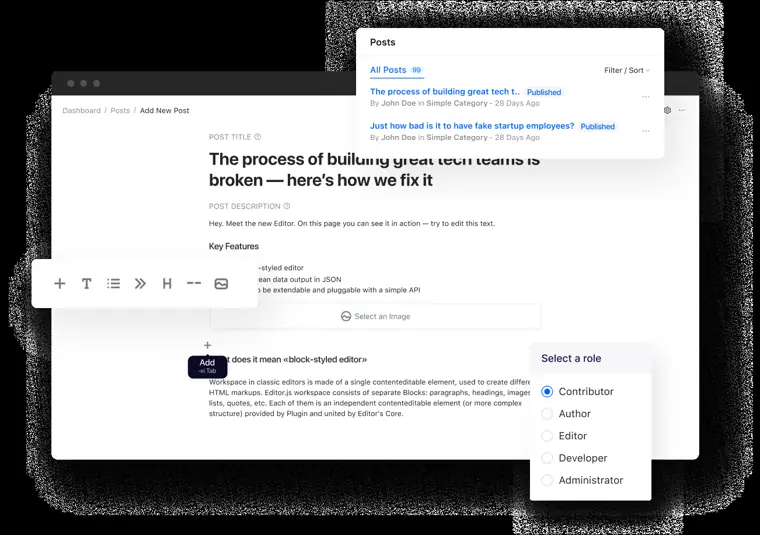
Built in blogging platform
Provides a distraction free rich text editor with post scheduling, multi author support, and import options from WordPress, Ghost, Medium, and Substack. It also includes individual SEO settings for every blog post.
Use caseA content team migrates articles from WordPress and schedules upcoming posts up to 30 days in advance.
From dorik.com/feature · image from Dorik -
Code export
Downloads the static website files including clean, unminified HTML, CSS, JavaScript, and accompanying media files. This allows users to retain their underlying code assets directly.
Use caseA web designer exports clean HTML and CSS files to keep a static archive of a client landing page.
From dorik.com
Written from Dorik's own website, checked . Each feature links to the page it comes from; images are Dorik's own.
Every plan
| Plan | Monthly | Billed yearly | Per | What it includes |
|---|---|---|---|---|
| Personal | $29 | $20.75 | per account | 1 custom domain, 25 pages, 200 CMS items; 2 yr $10.38/mo; lifetime $249 |
| Business | $59 | $41.50 | per account | 3 domains, unlimited pages, 10 collaborators; 2 yr $20.75/mo; lifetime $599 |
| Agency | $99 | $79 | per account | Unlimited domains, pages, collaborators; white label |
From Dorik's own pricing page, checked . Prices are in US dollars per month; "billed yearly" is the monthly price when you pay for a year up front.
Before you pay
- Data retention
- Personal Data associated with unverified accounts is retained for 14 days from registration before deletion from active systems.
What Dorik says
Personal Data associated with accounts that have not completed verification will be retained for 14 days from the date of registration. After this period, the account and its associated Personal Data will be deleted
Source page - Export your data
- Yes, HTML, CSS, JS, and media files
What Dorik says
Export your AI generated website's clean and un minified HTML/CSS/JS code with Media files.
Source page - Discounts
- Discounts are available using checkout codes PERSONAL37 on the 2 Year Personal plan and BUSINESS44 on the 2 Year Business plan.
- Support
- Live chat, email, online forum/community
Only what Dorik's own pages state, with the quote behind each answer. Anything they don't publish is left out rather than guessed.
Getting started with Dorik
- Choose a secure, AI powered website builder like Dorik and sign up for a free account.
- Define goals, page structure, and audience before starting to build.
- Use Dorik's AI website builder or pick from 110+ ready made templates to generate a layout.
- Drag and drop 250+ UI blocks, swap images, and adjust styles without code.
- Set meta tags, clean URLs, and auto generate a sitemap for SEO.
- Launch instantly on a free Dorik subdomain or connect a custom domain on paid plans.
- Share your website link, connect forms to email tools, and track visitors with built in analytics.
Written from Dorik's own help pages: dorik.com/
The free trial
Trial only: 7 day free trial with full access to chosen plan
Questions people ask about Dorik
How much does Dorik cost?
Paid plans start at $29 a month (Personal). 3 plans are listed above, from Dorik's own pricing page.
Is Dorik free?
There is a free trial but no free plan: 7 day free trial with full access to chosen plan.
Does Dorik have a student or other discount?
Discounts are available using checkout codes PERSONAL37 on the 2 Year Personal plan and BUSINESS44 on the 2 Year Business plan. Source
How many sites can I make in a free trial plan?
The number of sites you can create during your free trial depends on the plan you choose when starting the trial. The website limit of that selected plan will apply during the trial period. Source
Does Dorik provide free hosting?
Yes, Dorik provides unlimited hosting on all plans. Source
How much storage are you providing?
All plans have unlimited storage. Source
How long is the trial period?
The duration of the free trial period is 7 days. Explore everything for free with the free trial. Source
Works with
- Integrations
- Airtable, PayPal, Stripe, Gumroad, Zapier, MailChimp, Make
- Languages
- Any language
Where this came from
Plans, prices and limits were copied from Dorik's own pages, then checked .
- dorik.com/pricing
- dorik.com/
- help.dorik.com/en/article/how-to-connect-custom-domain-with-your-si...
- help.dorik.com/en/article/privacy-policy-9yv4ox/
- help.dorik.com/en/article/terms-of-service-1ct7bc/
- help.dorik.com/en/
- dorik.com/guest-blogging-guidelines
- app.dorik.com/login
- dorik.com/airtable-website-builder
How we collect prices and rank tools · Is something wrong? Correct this listing
Others that do the same job
 Squarespacesquarespace.com
Design led website builder with AI site generation, built in commerce, scheduling and AI visibility tracking.
- Green flag: No card for trial
- Red flag: Credits reset monthly
 Webflowwebflow.com
Professional visual web development platform with CMS, ecommerce and AI site, copy and SEO tools.
- Green flag: Free plan
 10Web10web.io
AI WordPress website builder with managed hosting, agentic site generation, cloning and Figma import.
- Green flag: Refunds within 30 days
 GoDaddy Airogodaddy.com/websites/website-builder
GoDaddy's AI website builder that creates a site, logo, content and marketing from a business description.
- Green flag: Free plan
- Green flag: No card for trial
- Red flag: Free plan watermark
 Durabledurable.com
AI business builder that generates a website in seconds plus CRM, SEO, blogs and lead capture agents.
- Green flag: Free plan
 Framerframer.com
Designer focused website builder with AI agents, CMS and animations that publishes production sites.
- Green flag: Free plan
- Green flag: Refunds within 14 days