
Gumloop
No code builder for AI agents and workflow automations using 35+ models and drag and drop nodes with app integrations.
Best for Non technical teams automating work with AI agents
Used Gumloop and liked it? Upvote it. One upvote per person. Upvotes come from visitors, not from us, and never change "Our ranking".
What it does
Gumloop is an agent infrastructure platform that lets teams build, deploy, and monitor AI agents for workplace automation. Users connect their logins, tools, or data prompts, and agents execute tasks across web browsers, messaging apps, and business systems. It is designed for companies and internal experts seeking to automate tasks across sales, marketing, support, and operations.
Read more: 5 features and how people use themShow less
-
Gumloop browser
Navigates websites directly to click, type, upload, clear CAPTCHAs, and pull data from applications with or without APIs. It logs in through secured credentials and can hand off the live browser to humans when approval is required.
Use caseA recruiter asks an agent to find B2B video producer leads in San Francisco, add candidate profiles to Ashby, and save personalized outreach emails directly into Gmail drafts.
From gumloop.com -

Workplace chat integration
Connects your deployed agents directly into communication tools such as Slack, Microsoft Teams, email, or text messaging. Team members interact with agents through conversational mentions or direct messages inside their existing channels.
Use caseA team member mentions an agent in a Slack data analysis channel to compare current month sales figures with the previous year without writing SQL queries.
From gumloop.com · image from Gumloop -
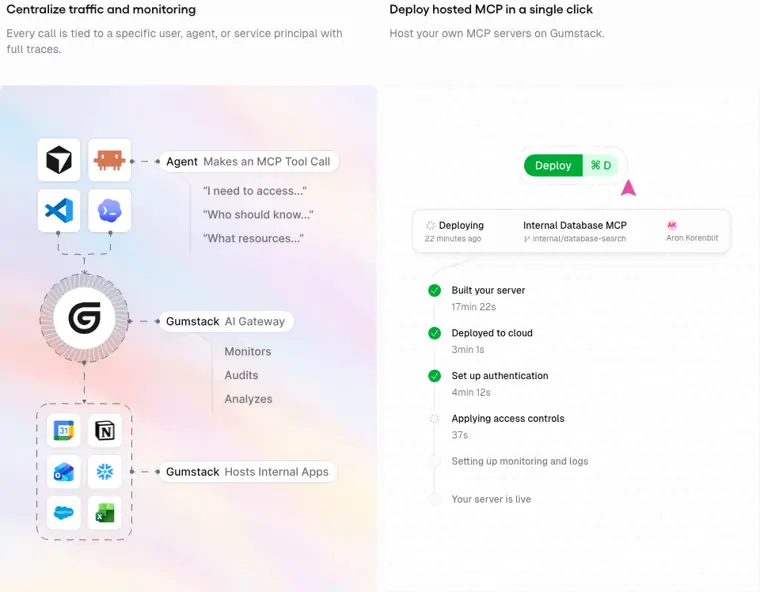
Hosted MCP servers
Deploys, hosts, and proxies Model Context Protocol servers in one click. It provides full trace visibility across tool calls and manages access policies for local or remote clients.
Use caseAn administrator hosts an MCP server on the platform and traces every tool call made to connected services like Linear, Asana, and Slack.
From gumloop.com/products/gumstack · image from Gumloop -
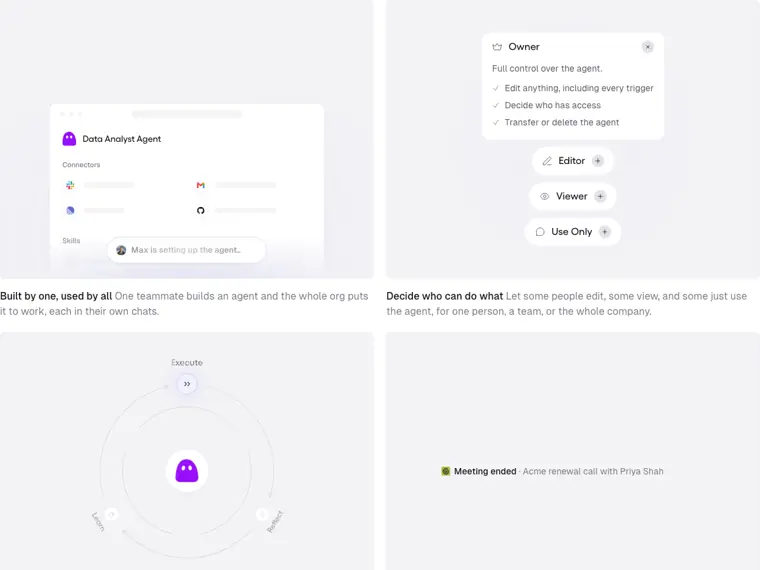
Role based access control
Manages permissions across agents, credentials, and tools by assigning specific tiers like owner, editor, viewer, or use only. It ensures team members only view or operate the automations assigned to them.
Use caseAn IT manager assigns viewer or use only access to company staff so they can trigger an internal agent from chat without modifying its configuration.
From gumloop.com · image from Gumloop -
Agent password vault
Secures third party account credentials and provides login access to agents without revealing plaintext passwords. It integrates with existing vaults and keeps human credentials masked in recorded audit sessions.
Use caseA team connects a 1Password login so an automation signs into LinkedIn to pull prospect data without exposing account passwords to users.
From gumloop.com
Written from Gumloop's own website, checked . Each feature links to the page it comes from; images are Gumloop's own.
Every plan
| Plan | Monthly | Billed yearly | Per | What it includes |
|---|---|---|---|---|
| Pro | $37 | $29.60 | credits (slider, unlimited seats) | from 20k credits/month at $37 up to 1M credits at $1,840/month; unlimited agents, seats and teams; 8% orchestration fee; 5 concurrent workflow runs; 25 concurrent agent chats; 1 MCP server |
| Enterprise | Not listed | Not listed | per account | contact sales; custom credits, optional VPC, RBAC, SCIM/SAML, audit logs, org wide connector policies |
From Gumloop's own pricing page, checked . Prices are in US dollars per month; "billed yearly" is the monthly price when you pay for a year up front. A few figures (often the yearly price) are derived rather than printed on the page.
Before you pay
- Support
- Email, Slack
Only what Gumloop's own pages state, with the quote behind each answer. Anything they don't publish is left out rather than guessed.
Getting started with Gumloop
- Open the Connectors section and add the integrations your agent requires.
- Start a real task to test the agent end to end and observe where adjustments are needed.
- Instruct the agent to write its own instructions and skills based on the completed task.
Written from Gumloop's own help pages: docs.gumloop.com/core-concepts/agents
Gumloop video tutorials
Independent creators on YouTube, not Gumloop or us. The video loads from YouTube only when you press play.
The free trial
Trial only: 14 day free trial of Pro on monthly billing only; permanent Free plan (5,000 credits/
Questions people ask about Gumloop
How much does Gumloop cost?
Paid plans start at $37 a month (Pro). 2 plans are listed above, from Gumloop's own pricing page.
Is Gumloop free?
There is a free trial but no free plan: 14 day free trial of Pro on monthly billing only; permanent Free plan (5,000 credits/month) removed around July 30, 2026.
Does Gumloop have an API?
Yes.
Works with
- Integrations
- 1Password, LinkedIn, Ashby, Gmail, Apple Store, Slack, Microsoft Teams, Salesforce, Notion
Where this came from
Plans, prices and limits were copied from Gumloop's own pages and the other sources listed, then checked .
- gumloop.com/pricing
- gumloop.com/solutions/support
- usagepricing.com/blueprint/activity/gumloop-2026-07-30-packaging
- gumloop.com/
- gumloop.com/blog/creators
- docs.gumloop.com/core-concepts/agents
How we collect prices and rank tools · Is something wrong? Correct this listing
Others that do the same job
 MindStudiomindstudio.ai
No code builder for AI agents and apps with 200+ models, deployable as web apps, extensions, email or API agents.
- Green flag: Free plan
 StackAIstackai.com
Enterprise no code platform for building AI agents and workflows over company data, deployable as chat, forms or Slack bots.
- Green flag: Free plan
- Green flag: Doesn't train on your data
- Red flag: Renamed
 Relevance AIrelevanceai.com
Platform for building and running AI agent workforces (e.g., BDR, research agents) with tools, triggers and 2,000+ integrations.
- Green flag: Cancel online
- Green flag: Some credits roll over
- Red flag: Changed focus
- Red flag: No free plan
 Braintrustbraintrust.dev
Evaluation first AI platform for experiments, scoring, prompt playgrounds and production tracing of LLM apps.
- Green flag: Free plan
- Green flag: No card for trial
- Red flag: Credits reset monthly
 Botpressbotpress.com
Platform for building LLM powered chat agents with visual flows, knowledge bases and multichannel deployment including WhatsApp.
- Green flag: Free plan
- Green flag: No card for trial
- Green flag: Some credits roll over
- Green flag: Doesn't train on your data
 Claude in Chrome (Anthropic)claude.com/chrome
Chrome extension that lets Claude navigate, click, fill forms and run scheduled tasks in your browser.
- Red flag: No free plan