
Higgsfield AI
Creator studio bundling Kling, Veo, Seedance and its own models with camera presets and ad tools.
Best for Social and ad creators wanting viral effects
Used Higgsfield AI and liked it? Upvote it. One upvote per person. Upvotes come from visitors, not from us, and never change "Our ranking".
What it does
Higgsfield AI is a creative platform that unifies multiple AI image and video models into a single workspace. Users provide text prompts, audio, images, or video clips to produce animated scenes, brand assets, and edited videos. It is designed for individual creators, brands, and teams producing multimedia content.
Read more: 5 features and how people use themShow less
-
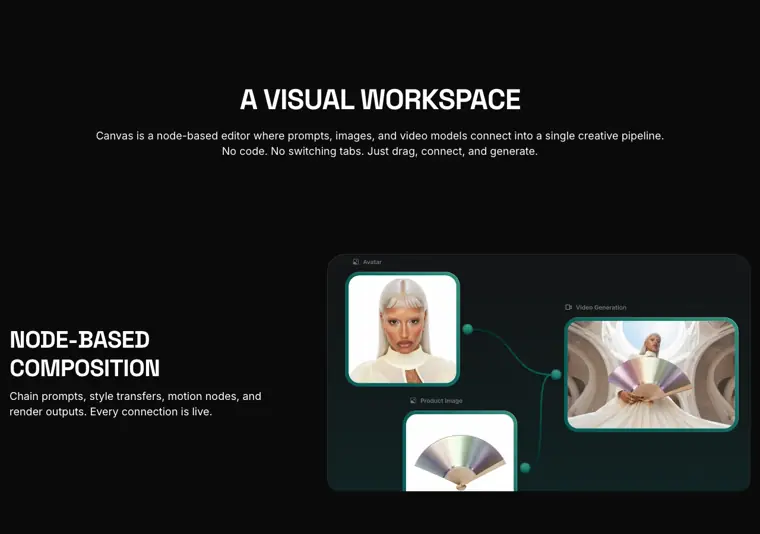
Node based Canvas
Lets you link prompts, reference files, and multiple AI models across an infinite board without writing code. You drag and connect nodes to create continuous production pipelines where one generation feeds the next.
Use caseA team collaborator drops a product image node and connects it to a campaign node to produce a video ad alongside coworkers live.
From higgsfield.ai/canvas-intro · image from Higgsfield AI -
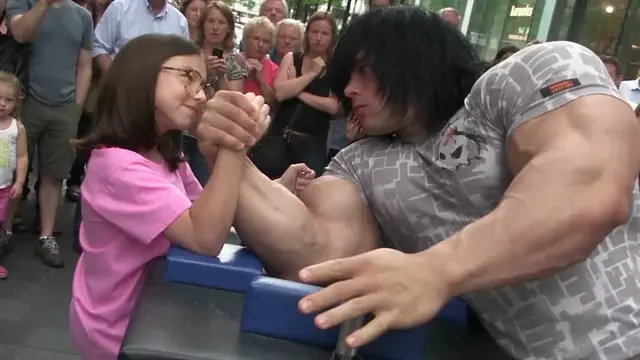
Higgsfield Genjutsu
Transfers movement from existing footage into completely new scenes and swaps specific visual components while leaving the remaining footage untouched. It recasts clips using your chosen characters, products, and environments.
Use caseA video creator uploads existing motion footage to recast it with new product elements and backgrounds.
From higgsfield.ai · image from Higgsfield AI -
Ads Studio Ad Multiplier
Recreates advertisements by applying your designated products and characters to an existing ad concept.
Use caseA brand marketer takes an existing ad setup and recreates it with their company catalog items and cast.
From higgsfield.ai -
Genjutsu API
Executes motion transfers and swaps objects programmatically via automated code requests.
Use caseA developer integrates video alteration workflows directly into an external application using a single code call.
From higgsfield.ai -
Higgsfield Katana
Edits uploaded video clips automatically in response to a single prompt.
Use caseA content creator turns raw recorded video cuts into finished edits using a single command prompt.
From higgsfield.ai
Written from Higgsfield AI's own website, checked . Each feature links to the page it comes from; images are Higgsfield AI's own.
Every plan
| Plan | Monthly | Billed yearly | Per | What it includes |
|---|---|---|---|---|
| Free | Free | $0 | per user | limited daily credits |
| Starter | $19 | $19 | per user | 270 credits/mo |
| Plus | $59 | $47 | per user | 1,200 credits/mo |
| Team | $79 | $65 | per user | 1,000 credits/mo per seat |
| Ultra | $129 | $99 | per user | 3,000 credits/mo (6,000 and 9,000 credit options) |
| Scale | $169.01 | $150.01 | per user | 2,500 credits/mo |
| Enterprise | Not listed | Not listed | per org | contact sales |
From Higgsfield AI's own pricing page, checked . Prices are in US dollars per month; "billed yearly" is the monthly price when you pay for a year up front. A few figures (often the yearly price) are derived rather than printed on the page.
Getting started with Higgsfield AI
- Drop a node using any prompt, image, or reference as your starting point.
- Chain your flow by connecting nodes, mixing models, and routing outputs between them.
- Share a link to create together and collaborate live on the same canvas simultaneously.
Tips
- Building the graph, connecting nodes, and editing prompts is free; credits are only deducted when a node generates an image or video.
- Save any canvas as a reusable template to duplicate it and swap inputs for future campaigns instead of rebuilding from scratch.
- Drop Soul ID characters, uploaded products, and brand references directly in as nodes to maintain consistent characters across your entire campaign.
Written from Higgsfield AI's own help pages: higgsfield.ai/canvas-intro
Higgsfield AI video tutorials
Independent creators on YouTube, not Higgsfield AI or us. The video loads from YouTube only when you press play.
What the free plan includes
Small model set, no credits
Questions people ask about Higgsfield AI
How much does Higgsfield AI cost?
Paid plans start at $19 a month (Starter). 7 plans are listed above, from Higgsfield AI's own pricing page.
Is Higgsfield AI free?
Yes, there is a free plan: Small model set, no credits.
Does Higgsfield AI have an API?
Yes.
Works with
- Integrations
- Claude, ChatGPT
Where this came from
Plans, prices and limits were copied from Higgsfield AI's own pages, then checked .
How we collect prices and rank tools · Is something wrong? Correct this listing
Others that do the same job
 Hailuo AI (MiniMax)hailuoai.video
MiniMax's Hailuo 2.3 / H3 models for realistic, physics heavy short clips.
- Green flag: Free plan
 PixVersepixverse.ai
Fast, cheap V6 video generator with effects templates, extend and up to 4K.
- Green flag: Free plan
 Runwayrunway.com
Creative suite that generates and edits video with its Gen 4.5 model plus Kling, Veo and Seedance.
- Green flag: Free plan
- Red flag: Credits reset monthly
 Kling AIkling.ai
Kuaishou's video model: up to 15s clips, native 4K, native audio and lip synced dialogue.
- Green flag: Free plan
- Red flag: Credits reset monthly
 LTX Studioltx.io/studio
Lightricks' script to storyboard to shots studio on its open LTX 2.5 model with synced audio.
- Green flag: Free plan
- Green flag: Cancel online
- Green flag: Refunds within 14 days
- Red flag: Free plan watermark
 Luma Dream Machinelumalabs.ai
Luma's Ray3.2 model with keyframes, reframe, video to video and HDR/EXR output.
- Red flag: No free plan