
LTX Studio
Lightricks' script to storyboard to shots studio on its open LTX 2.5 model with synced audio.
Best for Storytellers, ad teams, pre viz
Used LTX Studio and liked it? Upvote it. One upvote per person. Upvotes come from visitors, not from us, and never change "Our ranking".
What it does
LTX Studio is a web based generative AI video platform built for creative teams, filmmakers, and advertisers. You can input scripts, concepts, images, or audio tracks to generate, storyboard, and edit professional videos. The platform lets creators develop complete visual narratives and export them as finished video or project files.
Read more: 5 features and how people use themShow less
-
AI storyboard generator
Converts scripts or written concepts into visual frame blueprints divided into scenes and shots. Allows teams to review shot details, preview animated motions, and export animatics as MP4 files or pitch decks.
Use caseA creative team converts a client brief into an animated storyboard to align on scenes before generating finished video shots.
From ltx.io -
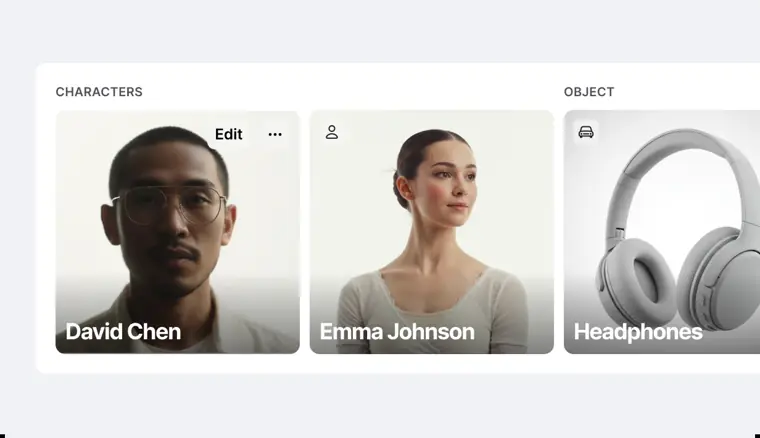
Element consistency tracking
Extracts characters, objects, and locations from an uploaded script as tagged assets. Keeps character identity, style, and object continuity uniform across every shot and scene.
Use caseA filmmaker builds a cast of characters and reuses their visual appearances across multiple scenes without identity drift.
From ltx.io · image from LTX Studio -
Audio to video generation
Transforms uploaded music files, speech recordings, and brand audio into synchronized visual sequences. Matches camera movements and animated action directly to the rhythm and beat of the track.
Use caseA record label uploads an artist music track to generate and edit a synchronized music video campaign without physical production costs.
From ltx.io -

Sound design layering
Adds audio depth to video projects by integrating character dialogue, voice narration, and custom sound effects. Blends foley and spoken audio directly across cut sequences.
Use caseA video editor layers spoken narration and sound effects onto an action teaser to complete the sound design.
From ltx.io · image from LTX Studio -
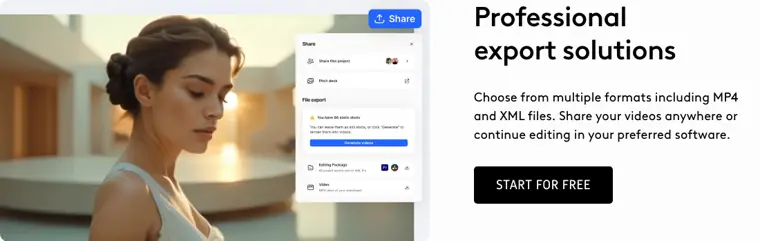
Multi format project export
Renders and exports completed scenes and edits as standard MP4 files or timeline XML files. Enables seamless transition from generative workspace drafts into external video editing applications.
Use caseA video editor exports generated project cuts as XML files to finish fine cutting inside their preferred editing application.
From ltx.io · image from LTX Studio
Written from LTX Studio's own website, checked . Each feature links to the page it comes from; images are LTX Studio's own.
Every plan
| Plan | Monthly | Billed yearly | Per | What it includes |
|---|---|---|---|---|
| Free | Free | $0 | 800 one time credits | personal use license only |
| Lite | $15 | $12 | 8,000 credits/month | personal use license, no watermark, upscales |
| Standard | $35 | $28 | 28,000 credits/month | commercial license, storyboards & pitch decks, extra credit purchase |
| Pro | $125 | $100 | 110,000 credits/month | commercial license, Veo 3.1, 3 collaborators/project, top ups |
| Enterprise | Contact sales | Not listed | custom | contact sales |
From LTX Studio's own pricing page, checked . Prices are in US dollars per month; "billed yearly" is the monthly price when you pay for a year up front. A few figures (often the yearly price) are derived rather than printed on the page.
Before you pay
- Refunds
- Refunds are typically granted for requests made within 14 days of payment if usage does not exceed 1,200 credits.
What LTX Studio says
Refunds are typically granted for requests made within 14 days of payment, provided that usage does not exceed 1200 credits.
Source page - Refund window
- 14 days
What LTX Studio says
Refunds are typically granted for requests made within 14 days of payment, provided that usage does not exceed 1200 credits.
Source page - How to cancel
- Users can cancel by clicking the 'Cancel Plan' button within the 'Your Plan' section under the 'Manage account' tab in Account Settings.
What LTX Studio says
You can cancel your subscription easily from the "Manage account" tab in your Account Settings. There, you will find a "Cancel Plan" button within the "Your Plan" section.
Source page - Cancel online yourself
- Yes
What LTX Studio says
You can cancel your subscription easily from the "Manage account" tab in your Account Settings. There, you will find a "Cancel Plan" button within the "Your Plan" section.
Source page - Watermark on the free plan
- Yes
What LTX Studio says
Everything in Free, plus... Image and video upscales Editing tools No watermarking
Source page - SOC 2
- Yes
What LTX Studio says
SOC 2 Type 2 Audited controls for security, availability, and confidentiality.
Source page - GDPR
- Yes
- Discounts
- Offers periodic discounts and promotional codes around feature or model releases, yearly plans (20% off), and Cyber Monday / Black Friday sales.
What LTX Studio says
We often offer discounts and promotion codes around new feature or model releases and at different times of the year on various pricing options, including yearly plans.
Source page
Only what LTX Studio's own pages state, with the quote behind each answer. Anything they don't publish is left out rather than guessed.
LTX Studio video tutorials
Independent creators on YouTube, not LTX Studio or us. The video loads from YouTube only when you press play.
What the free plan includes
800 one time credits, personal use
Questions people ask about LTX Studio
How much does LTX Studio cost?
Paid plans start at $15 a month (Lite). 5 plans are listed above, from LTX Studio's own pricing page.
Is LTX Studio free?
Yes, there is a free plan: 800 one time credits, personal use.
Can I get a refund from LTX Studio?
Refunds are typically granted for requests made within 14 days of payment if usage does not exceed 1,200 credits. The refund window stated is 14 days. Source
How do I cancel LTX Studio?
Users can cancel by clicking the 'Cancel Plan' button within the 'Your Plan' section under the 'Manage account' tab in Account Settings. Source
Does the LTX Studio free plan add a watermark?
Yes, free plan output carries a watermark or branding. Source
Does LTX Studio have a student or other discount?
Offers periodic discounts and promotional codes around feature or model releases, yearly plans (20% off), and Cyber Monday / Black Friday sales. Source
Does LTX Studio have an API?
Yes.
What is the LTX Platform?
The LTX Platform is an all in one generative AI platform designed for creative professionals that turns creative ideas into professional videos from scripting and storyboarding to editing and final delivery. Source
What is your refund policy?
Refund requests submitted within 14 days of payment are typically granted if credit usage does not exceed 1,200 credits. Source
Can I switch subscription plans?
Yes, switch anytime via the 'Pricing' tab or 'Change Plan' button in 'Manage account'. Upgrades take effect immediately with prorated pricing, while downgrades take effect at the end of the billing cycle. Source
Works with
- AI models
- LTX 2.5, LTX 2.3, Z image, Nano Banana 2, Nano Banana Pro, FLUX.2 Pro, Kling 2.6 Pro, Kling 3.0 Pro, Seedance 2.0, ChatGPT Images 2.0, Veo 3.1
Where this came from
Plans, prices and limits were copied from LTX Studio's own pages, then checked .
- ltx.io/studio/pricing
- ltx.io/studio
- ltx.io/blog-category/tutorials
- help.ltx.io//hc/en-us
- trust.ltx.io/
- ltx.io/studio/faq
- ltx.io/model/api
How we collect prices and rank tools · Is something wrong? Correct this listing
Others that do the same job
 Hailuo AI (MiniMax)hailuoai.video
MiniMax's Hailuo 2.3 / H3 models for realistic, physics heavy short clips.
- Green flag: Free plan
 PixVersepixverse.ai
Fast, cheap V6 video generator with effects templates, extend and up to 4K.
- Green flag: Free plan
 Runwayrunway.com
Creative suite that generates and edits video with its Gen 4.5 model plus Kling, Veo and Seedance.
- Green flag: Free plan
- Red flag: Credits reset monthly
 Higgsfield AIhiggsfield.ai
Creator studio bundling Kling, Veo, Seedance and its own models with camera presets and ad tools.
- Green flag: Free plan
 Kling AIkling.ai
Kuaishou's video model: up to 15s clips, native 4K, native audio and lip synced dialogue.
- Green flag: Free plan
- Red flag: Credits reset monthly
 Luma Dream Machinelumalabs.ai
Luma's Ray3.2 model with keyframes, reframe, video to video and HDR/EXR output.
- Red flag: No free plan