
remove.bg
Changed focus: standalone site retiring 1 Dec 2026, background removal moving into Canva
One click AI background removal for photos via web, desktop apps and API, now migrating into Canva.
Best for Quick single purpose background removal
Used remove.bg and liked it? Upvote it. One upvote per person. Upvotes come from visitors, not from us, and never change "Our ranking".
What it does
remove.bg is an automated background removal and generation tool that extracts subjects from pictures. You upload an image file or URL and receive an isolated cutout with a transparent PNG or custom backdrop. It is designed for individuals, photographers, marketers, developers, car dealerships, and ecommerce businesses.
Read more: 4 features and how people use themShow less
-

Automated background removal
Extracts subjects from images automatically to produce a transparent PNG cutout or a white backdrop.
Use caseA car seller removes background clutter from photos to prepare clean car listings.
From remove.bg · image from remove.bg -
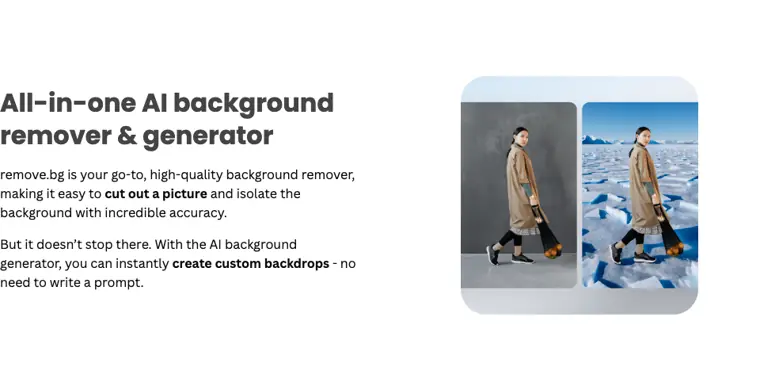
AI background generator
Produces new custom backdrops behind isolated subjects without requiring written text prompts.
Use caseAn online merchant generates fresh scenic settings behind product cutouts for web advertising.
From remove.bg · image from remove.bg -
Bulk image editing
Processes high volumes of photos at speed to strip out backgrounds across large image sets.
Use caseAn enterprise photo team cuts backgrounds from massive image batches at high throughput.
From remove.bg -
HTTP API
Provides an interface to embed automated cutout processing into custom software systems and workflows.
Use caseA developer integrates background deletion directly into a business application to process incoming customer uploads.
From remove.bg/enterprise/solutions
Written from remove.bg's own website, checked . Each feature links to the page it comes from; images are remove.bg's own.
Every plan
| Plan | Monthly | Billed yearly | Per | What it includes |
|---|---|---|---|---|
| Free | Free | $0 | per account | Previews up to 0.25 MP; 1 free HD credit on signup |
| Pay as you go | Not listed | Not listed | credits | One off credit packs; per credit price conflicting in third party sources ($1-$1.99) |
| Lite | $9 | $8.10 | per account | 40 credits/month (1 credit = 1 HD image up to 50 MP) |
| Pro | $39 | $35.10 | per account | 200 credits/month |
| Volume+ | $89 | $80.10 | per account | 500 credits/month |
| Enterprise | Contact sales | Not listed | custom | contact sales |
From remove.bg's own pricing page, checked . Prices are in US dollars per month; "billed yearly" is the monthly price when you pay for a year up front. Some of these figures came from third party reports and could not be confirmed on the official page.
Before you pay
- Commercial use
- Paid plans only
What remove.bg says
Use for (direct or indirect) commercial purposes is excluded, unless the User is also using a subscription plan or pay as you go credits
Source page - Trains on your data
- Opt out
What remove.bg says
Choose if you do NOT want us to use this image for quality improvements. Your image will NOT be used for future improvements of remove.bg.
Source page - Data retention
- Files uploaded are processed, made available for download, and deleted shortly after, while server logs are kept for a maximum of 3 months.
What remove.bg says
provide you with the results for download, then delete them shortly after. That’s all.
Source page - Support
- Email, help center
What remove.bg says
Where a User disagrees with a moderation decision, they may contact us via email (Kaleido: hello@kaleido.ai, remove.bg: team@remove.bg
Source page
Only what remove.bg's own pages state, with the quote behind each answer. Anything they don't publish is left out rather than guessed.
Getting started with remove.bg
- Get your API key from your dashboard.
- Use the provided code samples to get started quickly.
- Review the reference documentation to adjust any necessary parameters.
Written from remove.bg's own help pages: remove.bg/api
What the free plan includes
Free low res previews (up to 0.25 MP); 1 free credit on signup for full resolution
Questions people ask about remove.bg
How much does remove.bg cost?
Paid plans start at $9 a month (Lite). 6 plans are listed above, from remove.bg's own pricing page.
Is remove.bg free?
Yes, there is a free plan: Free low res previews (up to 0.25 MP); 1 free credit on signup for full resolution.
Can I use remove.bg output commercially?
Yes, on paid plans only. Source
Does remove.bg train its AI on my data?
It can, but you can opt out. Source
Does remove.bg have an API?
Yes.
Works with
- Integrations
- Figma, Photoshop, Zapier, Strava, Make, Canva
- Languages
- English
Where this came from
Plans, prices and limits were copied from remove.bg's own pages and the other sources listed, then checked .
- remove.bg/pricing
- costbench.com/software/ai-design-tools/remove-bg/
- financialcontent.com/article/worldnewswire-2026-9-24-removebg-is-sh...
- alternativeto.net/news/2026/9/end-of-an-era-remove-bg-shuts-down-st...
- remove.bg/
- remove.bg/b/strava-overlay-for-instagram-stories-and-posts
- remove.bg/api
- remove.bg/privacy
- remove.bg/b/black-friday-sale
- remove.bg/tos
- remove.bg/faq
- remove.bg/help
How we collect prices and rank tools · Is something wrong? Correct this listing
Others that do the same job
 Let's Enhanceletsenhance.io
Cloud AI upscaler and enhancer that boosts resolution, fixes compression and corrects color for print ready images.
- Green flag: Free plan
- Red flag: Free plan watermark
Midjourneymidjourney.com
Subscription text to image and image to video generator known for highly artistic, stylized results via web and Discord.
- Red flag: No free plan
 Designs.aidesigns.ai
All in one AI suite for logos, graphics, videos, voiceovers and copy from one dashboard.
- Green flag: Free plan
- Red flag: No refunds
 Fotorfotor.com
Online photo editor and design tool with AI enhancement, background removal, headshots and an AI agent.
- Green flag: Free plan
- Green flag: Some credits roll over
 Vismevisme.co
Design platform for presentations, infographics, documents and social graphics with AI generation and brand kits.
- Green flag: Free plan
- Green flag: Cancel online
- Green flag: No card for trial
- Red flag: Free plan watermark
 HeadshotProheadshotpro.com
Generates professional AI headshots from selfies, with one time packages for individuals and credit plans for teams.
- Green flag: Credits don't expire
- Green flag: Refunds within 14 days
- Green flag: Doesn't train on your data
- Red flag: No free plan