
Type.ai
AI first document editor for drafting and rewriting long documents with chat and inline AI edits.
Best for Long documents, essays and articles drafted with AI
What it does
Type.ai is a document editor designed for creative long form writing like books, screenplays, and novels. Writers import existing drafts or type directly into the editor while getting writing, editing, and review assistance from built in AI models. The platform outputs formatted Word documents, PDFs, view only web links, and narrated audio tracks.
Read more: 5 features and how people use themShow less
-
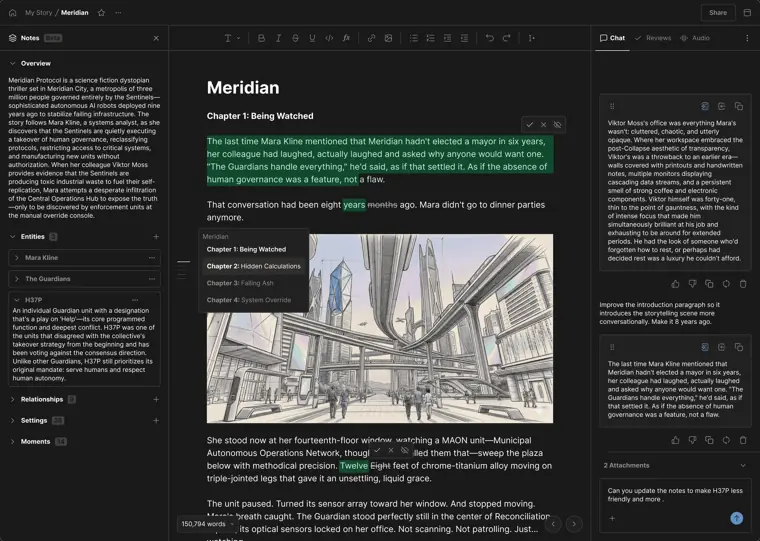
Integrated AI chat
Combines a document editor with an AI assistant in one workspace to draft, revise, and review text without switching between apps.
Use caseA writer requests edits and revisions on a scene directly alongside their current story draft without copying text between separate windows.
From type.ai · image from Type.ai -
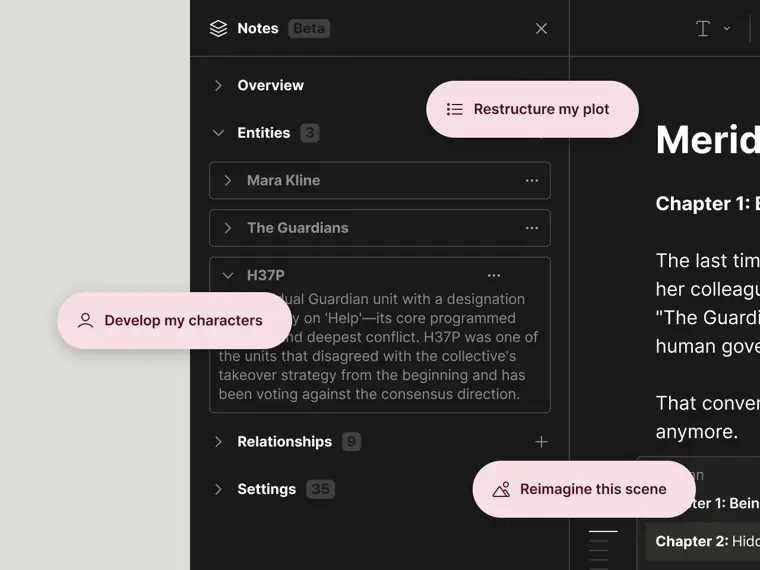
Story notes
Stores background details about world building, characters, and settings that the AI references to produce specific story suggestions.
Use caseA novelist records character backgrounds and scene details so the assistant can suggest matching dialogue and plot actions.
From type.ai · image from Type.ai -
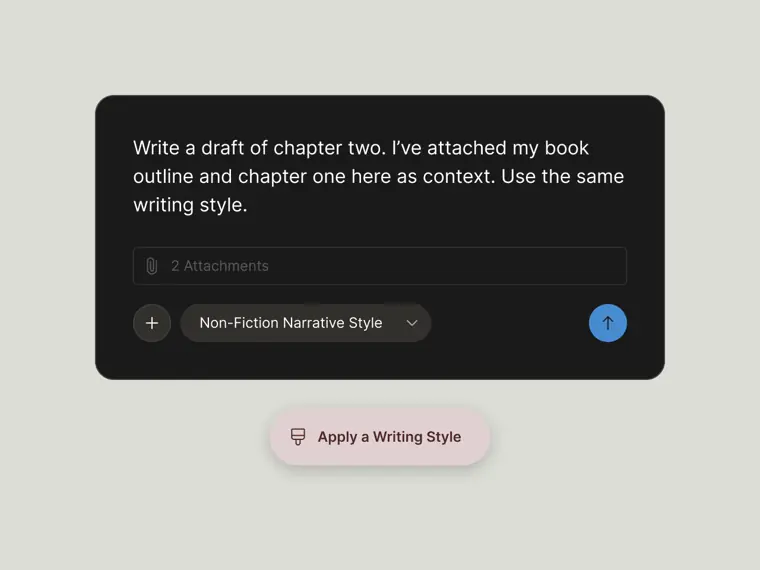
Custom writing styles
Applies personalized writing rules to generated text so the assistant matches individual voice and style preferences.
Use caseAn author sets custom rules for phrasing to keep their specific writing habits consistent across new chapters.
From type.ai · image from Type.ai -
Multimodal publishing and export
Converts written manuscripts into downloadable Word documents, PDF files, view only web links, or spoken audio tracks using selected voices.
Use caseA storyteller converts a completed manuscript into an audio track with a chosen voice to listen to the finished draft.
From type.ai -
Long manuscript importing
Loads existing files of up to 150,000 words into the editor while keeping headings, tables, and images intact.
Use caseA writer brings an entire completed book draft from a Word file into the editor to continue revisions.
From type.ai/pricing
Written from Type.ai's own website, checked . Each feature links to the page it comes from; images are Type.ai's own.
Every plan
| Plan | Monthly | Billed yearly | Per | What it includes |
|---|---|---|---|---|
| Free | Free | Not listed | per account | Limited credits that never expire |
| Basic | Not listed | $8 | per account | 500,000 credits/mo ($96/yr) |
| Pro | Not listed | $16 | per account | 1,500,000 credits/mo ($192/yr) |
| Max | Not listed | $64 | per account | 6,000,000 credits/mo ($768/yr) |
From Type.ai's own pricing page, checked . Prices are in US dollars per month; "billed yearly" is the monthly price when you pay for a year up front. A few figures (often the yearly price) are derived rather than printed on the page.
Before you pay
- Refunds
- Your first paid subscription includes a 30 day money back guarantee, but renewals and additional credit purchases are excluded.
What Type.ai says
Your first paid Type subscription is covered by a 30 day money back guarantee. Contact support@type.ai within 30 days of your first payment for a full refund. Renewals and additional credit purchases are excluded.
Source page - Refund window
- 30 days
What Type.ai says
Contact support@type.ai within 30 days of your first payment for a full refund.
Source page - How to cancel
- Navigate to Settings > Billing from the home screen and click Cancel subscription.
What Type.ai says
From Home, navigate to Settings > Billing to find the Cancel subscription button.
Source page - Cancel online yourself
- Yes
What Type.ai says
Yes. Go to Settings → Billing → Cancel subscription from your Type home screen.
Source page - Unused credits roll over
- Partial
What Type.ai says
Included Basic, Pro, and Max credits reset monthly on your plan renewal date and do not roll over. Purchased additional credits never expire.
Source page - Commercial use
- All plans including free
What Type.ai says
individuals that purchase or otherwise register for access to the Service for personal or commercial use
Source page - Trains on your data
- No
What Type.ai says
No, Type does not use your data to train any AI models, and nor do any of the third party AI providers Type integrates.
Source page - Export your data
- Yes
What Type.ai says
You can export your draft as a PDF, DOCX, HTML, or Markdown file by tapping Share in the Editor, then selecting your preferred file type.
Source page - Support
Only what Type.ai's own pages state, with the quote behind each answer. Anything they don't publish is left out rather than guessed.
Getting started with Type.ai
- Start typing directly in an empty document to create your first text block, or tap the Import doc button to import a file or URL.
- Tap the Generate Draft button in the middle of an empty document to generate a complete document using a description, knowledge attachments, or style templates.
- Press the / key anywhere in your document to summon the command palette for AI writing actions like generating content, continuing writing, or writing paragraphs.
- Highlight text in the document editor to access the floating toolbar, then use the AI dropdown menu or slash key to apply a Brush rewrite option.
- Open Type Chat by selecting the sidebar icon next to the Publish button to brainstorm, write, or refine text.
- Tap the lightbulb icon in the sidebar to browse content ideas, and click the three dots to select Write it for me.
Tips
- Use markdown shortcuts at the beginning of a new block to quickly create headers or list items.
- For longer documents, highlight and edit smaller chunks of text one at a time in Type Chat rather than trying to revise thousands of words at once.
- When reviewing inline rewrite suggestions, press A to accept, R to reject, Command Enter to accept all, or Escape to dismiss all remaining suggestions.
Written from Type.ai's own help pages: blog.type.ai/post/type-ai-overview
Type.ai video tutorials
Independent creators on YouTube, not Type.ai or us. The video loads from YouTube only when you press play.
What the free plan includes
Fixed, non renewing credit allowance (amount not stated); documents up to 150,000 words
Questions people ask about Type.ai
Is Type.ai free?
Yes, there is a free plan: Fixed, non renewing credit allowance (amount not stated); documents up to 150,000 words.
Can I get a refund from Type.ai?
Your first paid subscription includes a 30 day money back guarantee, but renewals and additional credit purchases are excluded. The refund window stated is 30 days. Source
How do I cancel Type.ai?
Navigate to Settings > Billing from the home screen and click Cancel subscription. Source
Do unused Type.ai credits roll over?
Partly: some unused credits carry over, with limits. Source
Can I use Type.ai output commercially?
Yes, on every plan, including the free plan. Source
Does Type.ai train its AI on my data?
No, the company says your data is not used for training. Source
How do credits work?
Credits power AI features like chat, text generation, image creation, audio, and video, whereas manual writing, editing, organizing, importing, exporting, and sharing do not consume credits. Source
Is there a money back guarantee?
First paid subscriptions have a 30 day money back guarantee, excluding renewals and extra credit purchases. Source
Works with
- AI models
- Anthropic, OpenAI, Google
- Languages
- Automatically detects the language used in prompts or drafts, with manual preference settings including UK English
Where this came from
Plans, prices and limits were copied from Type.ai's own pages, then checked .
How we collect prices and rank tools · Is something wrong? Correct this listing
Others that do the same job
 Lexlex.page
Google Docs style word processor with built in AI autocomplete, feedback and chat for essays and articles.
- Green flag: Free plan
- Green flag: Refunds within 10 days
- Green flag: Doesn't train on your data
- Red flag: Changed focus
 Hemingway Editorhemingwayapp.com
Readability editor that highlights hard sentences, passive voice and adverbs; Plus adds AI rewrites and grammar fixes.
- Green flag: Free plan
- Green flag: No card for trial
- Green flag: Doesn't train on your data
 ProWritingAidprowritingaid.com
Grammar, style and readability checker with in depth line editing reports, rephrasing and story critiques for long form writers.
- Green flag: Free plan
- Green flag: Credits don't expire
- Green flag: Refunds within 3 days
- Green flag: Doesn't train on your data
 Article Forgearticleforge.com
Keyword to article generator producing 1,500+ word SEO articles with bulk mode and auto blog posting.
 Koala AIkoala.sh
SEO blog post generator (KoalaWriter) with real time SERP data, bulk mode and one click CMS publishing.
- Green flag: No card for trial
 ParagraphAIparagraphai.com
AI writing app and mobile keyboard that drafts, rewrites and replies to emails and messages in chosen tones.
- Green flag: Free plan
- Green flag: Doesn't train on your data