
Hemingway Editor
Readability editor that highlights hard sentences, passive voice and adverbs; Plus adds AI rewrites and grammar fixes.
Best for Making prose clear, short and readable
Used Hemingway Editor and liked it? Upvote it. One upvote per person. Upvotes come from visitors, not from us, and never change "Our ranking".
What it does
Hemingway Editor is an editing tool that makes writing concise and correct. You paste in or write your draft text and receive color highlights pointing out complex sentences, weakening phrases, and errors. It is built for writers who want to fix hard to read passages and check grammar.
Read more: 5 features and how people use themShow less
-
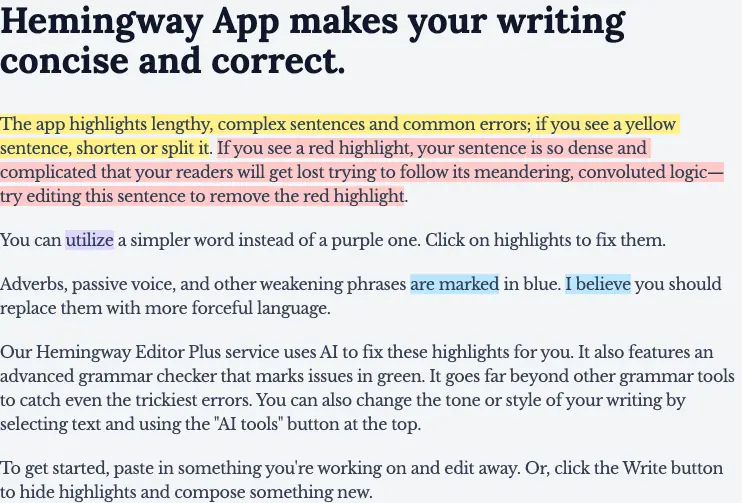
Sentence complexity highlighting
Highlights lengthy or complex sentences in yellow or red so you know when to split or shorten them. Shows where readers might struggle to follow dense and convoluted logic.
Use caseA writer shortens a red highlighted sentence to prevent readers from getting lost in complicated phrasing.
From hemingwayapp.com · image from Hemingway Editor -
Weakening phrase detection
Marks adverbs, passive voice, and other weakening phrases in blue. Suggests replacing them with more forceful language.
Use caseA writer replaces blue marked passive phrasing with active, forceful wording across a draft.
From hemingwayapp.com -
Simpler word suggestions
Flags words that can be swapped for simpler alternatives in purple. Lets you click directly on the highlight to apply a fix.
Use caseA writer clicks a purple highlight to swap out an overly complex term for a simpler word.
From hemingwayapp.com -
Hemingway Editor Plus AI rewrites
Uses AI to resolve highlighted issues and adjust the tone or style of selected text. Fixes problems automatically through an AI tools menu.
Use caseA writer selects text and clicks AI tools to adjust tone and fix highlighted issues automatically.
From hemingwayapp.com -
Advanced grammar checker
Marks grammar issues in green to help identify and fix difficult errors. Catches tricky mistakes directly inside your text.
Use caseA writer reviews green highlights across an article to catch and correct tricky grammar mistakes.
From hemingwayapp.com
Written from Hemingway Editor's own website, checked . Each feature links to the page it comes from; images are Hemingway Editor's own.
Every plan
| Plan | Monthly | Billed yearly | Per | What it includes |
|---|---|---|---|---|
| Free (web editor) | Free | $0 | per account | Readability highlights only, no AI |
| Editor Plus Individual 5K | $10 | $8.33 | per user | 5,000 AI sentences/mo; $100/yr; 2 week trial |
| Editor Plus Individual 10K | Not listed | $12.50 | per user | 10,000 AI sentences/mo; $150/yr; monthly billed price not shown |
| Editor Plus Team 10K | Not listed | $12.50 | per user (up to 50 users) | 10,000 AI sentences/user/mo; $150/user/yr; single bill |
| Enterprise | Not listed | Not listed | per organization | contact sales |
| Hemingway Editor desktop (Mac/Windows) | Not listed | Not listed | one time | $19.99; offline, WordPress publish, export; no AI features |
From Hemingway Editor's own pricing page, checked . Prices are in US dollars per month; "billed yearly" is the monthly price when you pay for a year up front.
Before you pay
- Card needed for the trial
- No
- Trains on your data
- No
What Hemingway Editor says
Neither Hemingway nor our AI providers use your writing to train AI models.
Source page - Data retention
- Document content is processed in memory and discarded without being stored on servers, though LLM providers may retain it temporarily for up to 30 days for security audits, and user account data can be deleted upon request.
What Hemingway Editor says
We do not store document content after processing. Content is processed in memory and discarded. LLM providers may retain content temporarily, usually for 30 days, for security audits before discarding it.
Source page - Export your data
- Yes
- SOC 2
- No
What Hemingway Editor says
Hemingway Editor Plus does not yet have SOC 2 or ISO certification.
Source page
Only what Hemingway Editor's own pages state, with the quote behind each answer. Anything they don't publish is left out rather than guessed.
Hemingway Editor video tutorials
Independent creators on YouTube, not Hemingway Editor or us. The video loads from YouTube only when you press play.
What the free plan includes
Free web editor with readability highlights; Editor Plus 2 week trial, no card needed
Questions people ask about Hemingway Editor
How much does Hemingway Editor cost?
Paid plans start at $10 a month (Editor Plus Individual 5K). 6 plans are listed above, from Hemingway Editor's own pricing page.
Is Hemingway Editor free?
Yes, there is a free plan: Free web editor with readability highlights; Editor Plus 2 week trial, no card needed.
Does Hemingway Editor train its AI on my data?
No, the company says your data is not used for training. Source
Do I need a credit card to try Hemingway Editor?
No, you can start without a credit card. Source
Do you use customer writing to train AI models?
Neither Hemingway nor its AI providers use writing, prompts, instructions, or AI output to train AI models. Source
Are documents stored on Hemingway servers?
No, documents are not stored on Hemingway servers and stay in your browser or local device. Source
Who owns the writing and AI generated edits?
You retain ownership of your writing and the AI generated edits. Source
Is a credit card required to start the free trial?
No credit card is required to begin the 2 week trial, and it cancels automatically. Source
Works with
- AI models
- OpenAI, Google, Anthropic
Where this came from
Plans, prices and limits were copied from Hemingway Editor's own pages and the other sources listed, then checked .
- hemingwayapp.com/
- hemingwayapp.com/premium
- hemingwayapp.com/help/support-articles/billing-faqs
- hemingwayapp.com/desktop
- hemingwayapp.com/hemingway-editor-plus
- hemingwayapp.com/security
How we collect prices and rank tools · Is something wrong? Correct this listing
Others that do the same job
 ProWritingAidprowritingaid.com
Grammar, style and readability checker with in depth line editing reports, rephrasing and story critiques for long form writers.
- Green flag: Free plan
- Green flag: Credits don't expire
- Green flag: Refunds within 3 days
- Green flag: Doesn't train on your data
 LanguageToollanguagetool.org
Multilingual grammar, spelling and style checker with AI paraphrasing, browser add ons and team style guides.
- Green flag: Free plan
- Green flag: Cancel online
 Outwriteoutwrite.com
Grammar checker and AI rewriter with paraphrasing, style suggestions and a plagiarism checker on paid plans.
- Green flag: Free plan
- Green flag: Cancel online
- Red flag: No refunds
Trinkatrinka.ai
Grammar checker built for academic and technical writing, with journal style checks, paraphraser and plagiarism scans.
- Green flag: Free plan
 Ginger Softwaregingersoftware.com
Grammar and spelling checker with sentence rephraser, translator and keyboard apps for 40+ languages.
- Green flag: Free plan
 Article Forgearticleforge.com
Keyword to article generator producing 1,500+ word SEO articles with bulk mode and auto blog posting.