
Adobe Podcast
Changed focus: standalone Premium plan discontinued for new buyers Aug 30, 2026; now sold via Firefly Pro
Browser based speech enhancement, mic check and podcast recording studio from Adobe.
Best for One click cleanup of noisy voice recordings
Used Adobe Podcast and liked it? Upvote it. One upvote per person. Upvotes come from visitors, not from us, and never change "Our ranking".
What it does
Adobe Podcast is a browser based audio creation tool for recording, editing, and improving spoken voice tracks. Users upload or capture spoken audio and video recordings to get clear studio quality sound, transcripts, and edited episodes. It is designed for creators making projects such as podcasts, voiceovers, class lectures, and audio newsletters.
Read more: 5 features and how people use themShow less
-
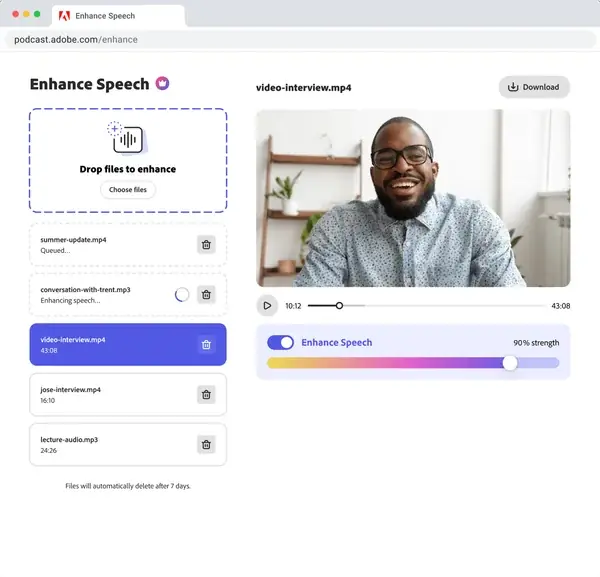
Enhance speech
Removes background noise and room echo from audio and video recordings so voice tracks sound clean and clear.
Use caseA creator fixes poor microphone audio after recording to make it sound like it was captured in a studio.
From podcast.adobe.com/en/plans · image from Adobe Podcast -
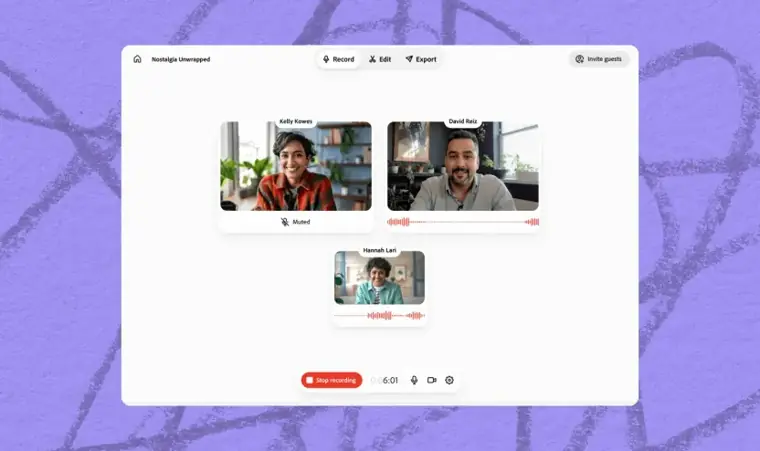
Studio recording
Captures high quality voice recordings individually for each participant as separate audio tracks directly in the web browser.
Use caseA host records an interview with remote guests even when participant internet connections are unstable.
From podcast.adobe.com · image from Adobe Podcast -
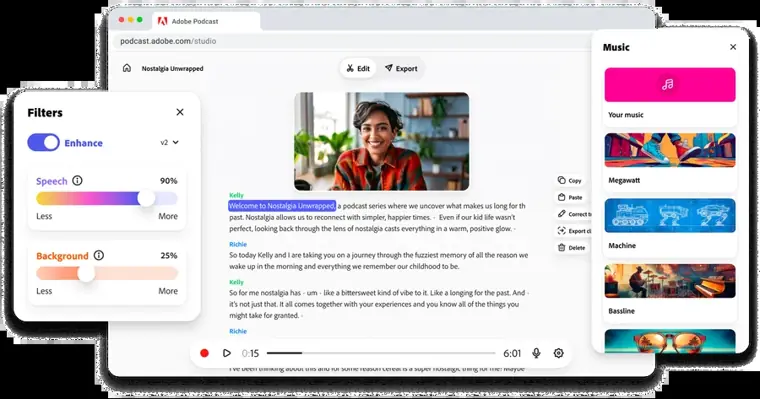
Text document editing
Transcribes spoken words automatically and lets you edit the recorded audio by cutting, copying, and pasting text.
Use caseA producer cuts out unwanted spoken sentences from a class lecture project by deleting words in the transcript.
From podcast.adobe.com · image from Adobe Podcast -
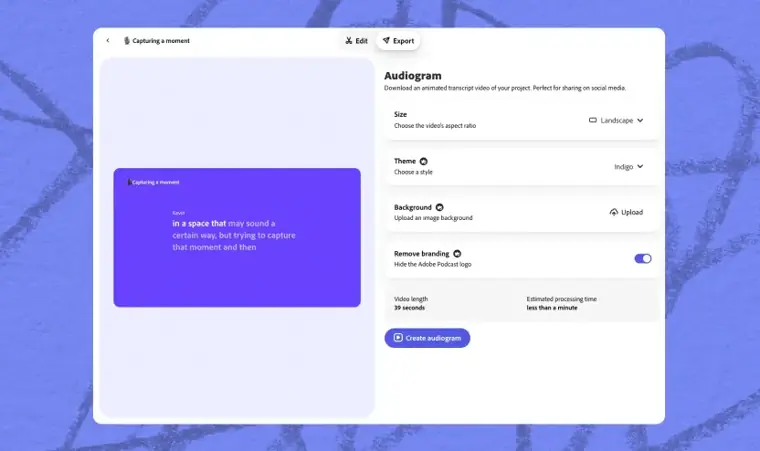
Audiograms
Generates shareable social clips with captions, background art, and themes from your studio projects.
Use caseA podcaster creates captioned promotional clips with custom backgrounds to share episode highlights on social media.
From podcast.adobe.com/en/plans · image from Adobe Podcast -
Pre edited royalty free music
Provides ready to use sound collections containing intro tracks, outro tracks, transition sounds, and background music.
Use caseA creator adds background tracks and transition sounds to an audio newsletter without searching for separate music licenses.
From podcast.adobe.com
Written from Adobe Podcast's own website, checked . Each feature links to the page it comes from; images are Adobe Podcast's own.
Every plan
| Plan | Monthly | Billed yearly | Per | What it includes |
|---|---|---|---|---|
| Free | Free | $0 | per account | Enhance Speech ~1 hr/day, limited Studio downloads |
| Firefly Pro (includes Podcast Premium) | $19.99 | Not listed | per account | Enhance Speech up to 4 hrs/day, 1 GB files, bulk + video uploads, unlimited Studio downloads, 4,000 Firefly credits/mo |
From Adobe Podcast's own pricing page, checked . Prices are in US dollars per month; "billed yearly" is the monthly price when you pay for a year up front. A few figures (often the yearly price) are derived rather than printed on the page.
Before you pay
- Export your data
- Yes
- Support
- Community, help center
What Adobe Podcast says
Contact Adobe Support for subscription questions. You can also find answers in the Adobe Help Center.
Source page
Only what Adobe Podcast's own pages state, with the quote behind each answer. Anything they don't publish is left out rather than guessed.
Adobe Podcast video tutorials
Independent creators on YouTube, not Adobe Podcast or us. The video loads from YouTube only when you press play.
What the free plan includes
Enhance Speech about 1 hr/
Questions people ask about Adobe Podcast
How much does Adobe Podcast cost?
Paid plans start at $19.99 a month (Firefly Pro (includes Podcast Premium)). 2 plans are listed above, from Adobe Podcast's own pricing page.
Is Adobe Podcast free?
Yes, there is a free plan: Enhance Speech about 1 hr/day; free Adobe ID required (third party figure).
What is happening to Adobe Podcast Premium?
Starting August 30, 2026, Adobe will no longer sell Adobe Podcast Premium as a standalone plan to new members. Existing subscribers receive Firefly Standard added at no extra cost with 2,000 monthly generative credits, and existing projects and content remain accessible. Source
Can new customers still sign up for Adobe Podcast Premium?
New customers can sign up through August 29, 2026; starting August 30, 2026, visitors checking out will be prompted to sign up for the Firefly Pro plan instead. Source
Will subscription pricing change for existing Adobe Podcast Premium users?
Subscription pricing will not change; users remain at their current pricing with Firefly Standard added at no extra cost. Source
Works with
- Languages
- 11 interface languages (Bengali, English, Filipino, French, German, Hindi, Indonesia, Italian, Portuguese, Spanish, Turkish) and 7 transcription languages (English, French, German, Hindi, Italian, Portuguese, Spanish)
Where this came from
Plans, prices and limits were copied from Adobe Podcast's own pages and the other sources listed, then checked .
- podcast.adobe.com/en/plans
- helpx.adobe.com/podcast/adobe-podcast-premium-plan-change-faq.html
- aitoolsatlas.ai/tools/adobe-podcast/pricing
- saascrmreview.com/adobe-firefly-pricing/
- podcast.adobe.com/en
- adobe.com/learn
- adobe.com/products/firefly/plans.html
- helpx.adobe.com/podcast/technical-requirements.html
- helpx.adobe.com/podcast/adobe-podcast-faq.html
How we collect prices and rank tools · Is something wrong? Correct this listing
Others that do the same job
 Cleanvoice AIcleanvoice.ai
Removes filler words, mouth sounds, stutters, silences and background noise from podcast audio automatically.
- Green flag: No card for trial
- Green flag: Some credits roll over
 Happy Scribehappyscribe.com
AI and human transcription, subtitles and translation in 150+ languages with meeting recorder.
- Green flag: Free plan
- Green flag: Cancel online
- Green flag: No card for trial
- Red flag: Credits reset monthly
 Sonixsonix.ai
Automated transcription, translation and subtitling in 54+ languages with an in browser editor and API.
- Green flag: No card for trial
- Green flag: Doesn't train on your data
 Wispr Flowwisprflow.ai
System wide AI voice dictation that turns speech into polished text in any app.
- Green flag: Free plan
- Green flag: No card for trial
 Hume AIhume.ai
Emotionally expressive Octave TTS and EVI empathic voice interface for building conversational voice AI.
- Green flag: Free plan
 Sunosuno.com
Generates full songs with vocals and lyrics from text prompts, plus editing, personas and a DAW style Studio.
- Green flag: Free plan
- Green flag: No card for trial
- Red flag: Credits reset monthly
- Red flag: Trains on your data