
Wispr Flow
System wide AI voice dictation that turns speech into polished text in any app.
Best for Fast voice typing across every app
Used Wispr Flow and liked it? Upvote it. One upvote per person. Upvotes come from visitors, not from us, and never change "Our ranking".
What it does
Wispr Flow is an AI voice to text tool for Mac, Windows, iPhone, and Android. Users speak naturally into their device microphone and receive clear, formatted writing across any app where a cursor types. It is designed for professionals and teams who want to create, write, message, and take notes faster than using a keyboard.
Read more: 3 features and how people use themShow less
-
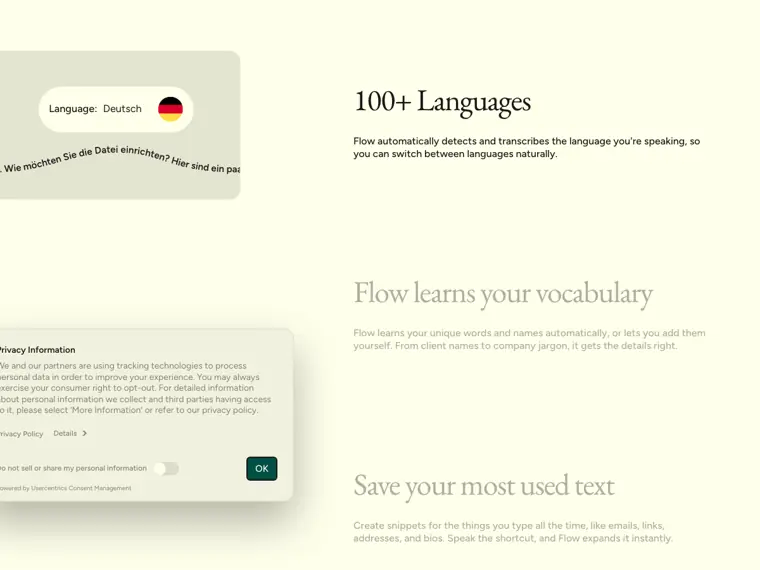
Multilingual transcription
Transcribes speech across more than a hundred languages and lets users select or switch languages directly from the interface.
Use caseA bilingual worker alternates between speaking English and French throughout the workday using the language selector.
From wisprflow.ai · image from Wispr Flow -
Wispr Notetaker
Records audio from virtual or in person meetings on desktop computers without a bot, generating organized summaries, speaker identification, and action items.
Use caseA team member captures a meeting on Zoom or Microsoft Teams to produce a topic organized summary and speaker identified transcript.
From wisprflow.ai -
Vocabulary and snippet expansion
Stores custom jargon, names, and text shortcuts that expand into full phrases when a spoken trigger word is detected.
Use caseA team member speaks a short shortcut keyword to instantly paste a standard biography, link, or company address into a document.
From wisprflow.ai
Written from Wispr Flow's own website, checked . Each feature links to the page it comes from; images are Wispr Flow's own.
Every plan
| Plan | Monthly | Billed yearly | Per | What it includes |
|---|---|---|---|---|
| Free | Free | $0 | per user | 2,000 words/week desktop |
| Pro | $15 | $12 | per user | Unlimited words |
| Growth | $23 | $18 | per user | Unlimited; team features (page also lists $33/$26) |
| Enterprise | Not listed | Not listed | per user | contact sales; annual only |
From Wispr Flow's own pricing page, checked . Prices are in US dollars per month; "billed yearly" is the monthly price when you pay for a year up front.
Before you pay
- Refunds
- An empty disbanded organization's live subscriptions end immediately without refunds.
What Wispr Flow says
An empty organization is disbanded: its configuration is kept for possible reactivation, but live subscriptions end immediately without refunds, domains are released, and pending invitations and requests are deleted.
Source page - Card needed for the trial
- No
What Wispr Flow says
creating or joining a team can grant 14 days of Pro without a credit card.
Source page - Trains on your data
- Opt out
What Wispr Flow says
Opt out of model training at any time. Choose what stays on your device, and delete it whenever you want.
Source page - Data retention
- Users can keep local dictation history, auto delete it after 24 hours, or never save it, while audio is deleted immediately after transcription unless cloud storage is enabled.
What Wispr Flow says
Saves your dictation history on your computer, so you can revisit what you said. Keep it, auto delete it after 24 hours, or never save it.
Source page - HIPAA
- Yes
What Wispr Flow says
Sign a Business Associate Agreement to enable HIPAA support for dictation, on any plan. Enterprise admins can enforce it org wide.
Source page - SOC 2
- Yes
What Wispr Flow says
We are SOC 2 Type II certified, which means our security, availability, and privacy practices have been independently audited to meet rigorous industry standards.
Source page - Discounts
- Students and educators with an education email receive 50% off Flow Pro, and non profits receive a discounted rate; annual billing also offers a 20% discount.
What Wispr Flow says
If you want Flow Pro, students and educators with an education email get 50% off, and non profits get a discounted rate.
Source page - Support
- Help center, support portal, in app support chat/ticket, email
What Wispr Flow says
In the desktop app, open ? (Help) → Talk to support. Include your platform, device, selected languages, steps tried, and an example of what you said versus what Flow transcribed.
Source page
Only what Wispr Flow's own pages state, with the quote behind each answer. Anything they don't publish is left out rather than guessed.
Wispr Flow video tutorials
Independent creators on YouTube, not Wispr Flow or us. The video loads from YouTube only when you press play.
What the free plan includes
2,000 words/
Questions people ask about Wispr Flow
How much does Wispr Flow cost?
Paid plans start at $15 a month (Pro). 4 plans are listed above, from Wispr Flow's own pricing page.
Is Wispr Flow free?
Yes, there is a free plan: 2,000 words/week desktop; 1,000 words/week mobile.
Can I get a refund from Wispr Flow?
An empty disbanded organization's live subscriptions end immediately without refunds. Source
Does Wispr Flow train its AI on my data?
It can, but you can opt out. Source
Is Wispr Flow HIPAA compliant?
Yes. Source
Do I need a credit card to try Wispr Flow?
No, you can start without a credit card. Source
Does Wispr Flow have a student or other discount?
Students and educators with an education email receive 50% off Flow Pro, and non profits receive a discounted rate; annual billing also offers a 20% discount. Source
Will Flow work in my messages, notes, email, or AI tools?
Yes. Flow works in every app on your computer where your cursor is without any setup or integrations, including Gmail, Slack, iMessage, Notion, terminals, code editors, and AI tools like ChatGPT and Claude. Source
Can I change or cancel my subscription at any time?
Yes. Subscriptions can be managed under Plan & Billing in the Flow Desktop App, or via the Support Portal. Source
Is Flow free for students and non profits?
Flow is free for everyone, while Flow Pro is available at a 50% discount for students and educators with an education email, and at a discounted rate for non profits. Source
Works with
- Integrations
- Gmail, Slack, iMessage, Notion, ChatGPT, Claude, Cursor, Zoom, Google Meet, Microsoft Teams
- Languages
- 100+ languages
Where this came from
Plans, prices and limits were copied from Wispr Flow's own pages, then checked .
- wisprflow.ai/pricing
- wisprflow.ai/
- docs.wisprflow.ai/articles/2458545840-faqs-for-flow-pro-team-and-fl...
- docs.wisprflow.ai/articles/3191899797-use-flow-with-multiple-languages
- wisprflow.ai/microphones
- wisprflow.ai/get-started?plan=FLOW_PRO_MONTHLY
- wisprflow.ai/get-started?plan=FLOW_PRO_YEARLY
- wisprflow.ai/privacy
How we collect prices and rank tools · Is something wrong? Correct this listing
Others that do the same job
 Happy Scribehappyscribe.com
AI and human transcription, subtitles and translation in 150+ languages with meeting recorder.
- Green flag: Free plan
- Green flag: Cancel online
- Green flag: No card for trial
- Red flag: Credits reset monthly
 Sonixsonix.ai
Automated transcription, translation and subtitling in 54+ languages with an in browser editor and API.
- Green flag: No card for trial
- Green flag: Doesn't train on your data
 Hume AIhume.ai
Emotionally expressive Octave TTS and EVI empathic voice interface for building conversational voice AI.
- Green flag: Free plan
 Sunosuno.com
Generates full songs with vocals and lyrics from text prompts, plus editing, personas and a DAW style Studio.
- Green flag: Free plan
- Green flag: No card for trial
- Red flag: Credits reset monthly
- Red flag: Trains on your data
 Listnrlistnr.ai
Budget AI text to speech and podcast voice generator with 1,000+ voices across 140+ languages.
- Green flag: Free plan
- Green flag: Cancel online
- Green flag: No card for trial
- Red flag: Credits reset monthly
 Mubertmubert.com
Generates royalty free instrumental tracks for videos, apps and streams, with a music API for developers.
- Green flag: Free plan
- Red flag: No refunds