
Happy Scribe
AI and human transcription, subtitles and translation in 150+ languages with meeting recorder.
Best for Subtitles and multilingual transcripts with human option
Used Happy Scribe and liked it? Upvote it. One upvote per person. Upvotes come from visitors, not from us, and never change "Our ranking".
What it does
Happy Scribe is an audio and video transcription, subtitling, and meeting recording platform. Users provide recorded meetings, online calls, or uploaded media files and receive structured transcripts, summaries, action items, and subtitles. The software serves professionals such as researchers, sales representatives, legal teams, educators, and journalists.
Read more: 5 features and how people use themShow less
-
Multilingual transcription and subtitling
Transcribes and creates subtitles from spoken audio across more than 150 languages and dialects with automatic language detection and speaker identification.
Use caseAn educator captions economics lectures and exports subtitles in four languages for international students.
From happyscribe.com -
Meeting recorder
Joins scheduled video calls from your calendar or records directly from a mobile device or browser to capture conversations and provide live transcripts.
Use caseA sales representative connects Outlook Calendar so the bot joins discovery calls on Teams to record audio and capture action items.
From happyscribe.com -
Human proofreading
Provides human review of transcripts to deliver 99 percent accuracy within 24 hours.
Use caseA legal team orders a verified transcript of a bilingual witness hearing for a case file.
From happyscribe.com -
Glossaries and style guides
Applies custom vocabulary, product names, acronyms, and formatting rules across every generated transcript and summary.
Use caseA reporter enters municipal names and technical jargon so that newsroom interview transcripts spell local references properly on deadline.
From happyscribe.com -
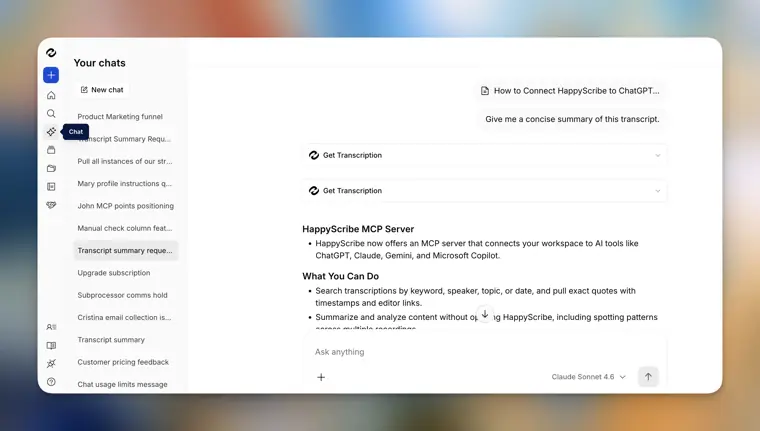
AI Chat
Answers natural language questions across stored transcripts and pins every response to the exact minute in the recording.
Use caseA qualitative researcher searches across hundreds of expert interviews to identify recurring market themes without re reading each file.
From happyscribe.com · image from Happy Scribe
Written from Happy Scribe's own website, checked . Each feature links to the page it comes from; images are Happy Scribe's own.
Every plan
| Plan | Monthly | Billed yearly | Per | What it includes |
|---|---|---|---|---|
| Free | Free | $0 | per account | 10 min AI trial, 1 seat |
| Basic | $17 | $8.50 | per account | 120 min/month, 1 seat |
| Pro | $29 | $19 | per account | 600 min/month, 3 seats |
| Business | $89 | $59 | per account | 6,000 min/month, 5 seats |
| Human made | $2 | Not listed | per audio minute | 99% accuracy proofreading |
From Happy Scribe's own pricing page, checked . Prices are in US dollars per month; "billed yearly" is the monthly price when you pay for a year up front.
Before you pay
- Refunds
- Refunds are subject to HappyScribe's refund policy, with no specific terms detailed on the provided pages.
What Happy Scribe says
Note that refunds are subject to our policy. Find out more about it here.
Source page - How to cancel
- Subscribers can cancel under Settings & members > Billing by scrolling down and pressing the Cancel subscription button.
What Happy Scribe says
You can do so by going to Settings & members > Billing, scrolling down, and pressing the button Cancel subscription.
Source page - Cancel online yourself
- Yes
What Happy Scribe says
You can do so by going to Settings & members > Billing, scrolling down, and pressing the button Cancel subscription.
Source page - Renews automatically
- Yes
What Happy Scribe says
You can sign up, use your included minutes for your project, and cancel anytime to avoid being charged for the next billing cycle.
Source page - Card needed for the trial
- No
- Unused credits roll over
- No
What Happy Scribe says
Credits refresh every billing period and don’t carry over if unused.
Source page - Watermark on the free plan
- Yes
- Trains on your data
- Opt out
What Happy Scribe says
Training is opt in, and no workspace is opted in by default. The same rules apply on every plan.
Source page - Data retention
- Users can decide retention controls for how long recordings and notes are kept.
What Happy Scribe says
Retention controls You decide how long recordings and notes are kept.
Source page - Export your data
- Yes
- SOC 2
- Yes
What Happy Scribe says
We are SOC 2 Type 2 certified. SOC 2 is a widely recognized security compliance certification that demonstrates our commitment to security and privacy.
Source page - GDPR
- Yes
- Support
- Email, live chat
Only what Happy Scribe's own pages state, with the quote behind each answer. Anything they don't publish is left out rather than guessed.
Getting started with Happy Scribe
- Click Create and then select Subtitles to begin uploading your file or URL.
- Select the audio language and the service you require, then click Create to submit your file.
- Click the file name on your dashboard after it finishes processing to open the Subtitle Editor.
- Review and correct errors or adjust styling and synchronization options in the Subtitle Editor.
- Click Export in the top right corner of the Editor and select your desired format.
Tips
- Pay close attention during proofreading to words highlighted in red, which the AI marks when it is not completely confident in the result.
- Use the Find feature to quickly correct multiple repeating mistakes in one go.
- Choose the Subtitles file format instead of Video with subtitles if you want viewers to be able to toggle captions on and off on platforms like YouTube or Vimeo.
Written from Happy Scribe's own help pages: help.happyscribe.com/en/articles/8541414-tuto...
Happy Scribe video tutorials
Independent creators on YouTube, not Happy Scribe or us. The video loads from YouTube only when you press play.
What the free plan includes
10 minute AI trial; 45 min per meeting recording; watermarked MP4
Questions people ask about Happy Scribe
How much does Happy Scribe cost?
Paid plans start at $2 a month (Human made). 5 plans are listed above, from Happy Scribe's own pricing page.
Is Happy Scribe free?
Yes, there is a free plan: 10 minute AI trial; 45 min per meeting recording; watermarked MP4.
Can I get a refund from Happy Scribe?
Refunds are subject to HappyScribe's refund policy, with no specific terms detailed on the provided pages. Source
How do I cancel Happy Scribe?
Subscribers can cancel under Settings & members > Billing by scrolling down and pressing the Cancel subscription button. Source
Do unused Happy Scribe credits roll over?
No, unused credits do not carry over to the next month. Source
Does the Happy Scribe free plan add a watermark?
Yes, free plan output carries a watermark or branding. Source
Does Happy Scribe train its AI on my data?
It can, but you can opt out. Source
Do I need a credit card to try Happy Scribe?
No, you can start without a credit card. Source
Does Happy Scribe have an API?
Yes.
Can I use HappyScribe for a one off project?
Yes. You can subscribe to any paid plan to use the included AI minutes and cancel anytime to avoid being charged for the next billing cycle, or you can purchase human made services per minute without a subscription. Source
Do unused credits carry over to the next month?
No, credits refresh every billing period and do not carry over if unused. Source
Is workspace data used to train AI models?
Data is not used for model training unless the workspace explicitly opts in. Source
Where does HappyScribe store user data?
Data is stored on EU infrastructure in European Union data centers under European data protection law. Source
Works with
- Integrations
- Zoom, Google Meet, Microsoft Teams, Google Calendar, Outlook Calendar, Google Drive, Dropbox, Box, YouTube, Vimeo
- AI models
- ChatGPT, Claude, Mistral, GLM
- Languages
- 150+ languages
Where this came from
Plans, prices and limits were copied from Happy Scribe's own pages, then checked .
- happyscribe.com/pricing
- happyscribe.com/
- help.happyscribe.com/en/articles/6906232-plans-and-pricing
- help.happyscribe.com/en/articles/11364876-data-usage-how-ai-model-t...
- happyscribe.com/security
- happyscribe.com/pricing-professional-services
- happyscribe.com/solutions/legal
- happyscribe.com/integrations/claude
- happyscribe.com/integrations/chatgpt
How we collect prices and rank tools · Is something wrong? Correct this listing
Others that do the same job
 Revrev.com
AI and human transcription, captions and subtitles with 99%+ human accuracy and legal workflows.
- Green flag: Free plan
- Red flag: Credits reset monthly
 Sonixsonix.ai
Automated transcription, translation and subtitling in 54+ languages with an in browser editor and API.
- Green flag: No card for trial
- Green flag: Doesn't train on your data
 Wispr Flowwisprflow.ai
System wide AI voice dictation that turns speech into polished text in any app.
- Green flag: Free plan
- Green flag: No card for trial
 Hume AIhume.ai
Emotionally expressive Octave TTS and EVI empathic voice interface for building conversational voice AI.
- Green flag: Free plan
 Sunosuno.com
Generates full songs with vocals and lyrics from text prompts, plus editing, personas and a DAW style Studio.
- Green flag: Free plan
- Green flag: No card for trial
- Red flag: Credits reset monthly
- Red flag: Trains on your data
 Listnrlistnr.ai
Budget AI text to speech and podcast voice generator with 1,000+ voices across 140+ languages.
- Green flag: Free plan
- Green flag: Cancel online
- Green flag: No card for trial
- Red flag: Credits reset monthly