
CodeRabbit
AI reviewer that comments on pull requests line by line, plus IDE and CLI pre commit reviews.
Best for Teams wanting automated AI pull request reviews
What it does
CodeRabbit is an automated code review and change management platform designed for engineering teams handling code from human developers and coding agents. You connect your repositories across Git platforms, IDEs, or CLI tools, and CodeRabbit delivers automated pull request reviews, queue triage, diff explanations, and security monitoring. It is designed for software teams that need to validate, prioritize, and secure high volumes of code changes before merging.
Read more: 4 features and how people use themShow less
-
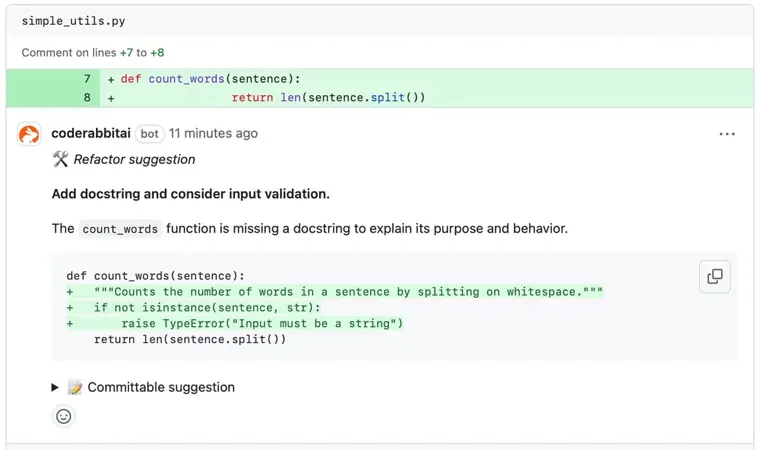
Automated code reviews
Analyzes pull requests, IDE edits, and CLI commits with context from your codebase to deliver feedback and single click fixes.
Use caseA software engineer submits a pull request and inspects automated walkthroughs and one click fixes before requesting human approval.
From coderabbit.ai/pricing · image from CodeRabbit -
Pre merge checks
Enforces quality gates and custom organization standards on code before pull requests are allowed to merge.
Use caseA development team blocks pull requests from merging until required repository standards and verification checks pass.
From coderabbit.ai/pricing -
CodeRabbit triage
Scores, ranks, and categorizes open pull requests across repositories based on business value, effort, and risk.
Use caseAn engineering manager views a prioritized queue of pull requests to assign the correct reviewer and fast track low risk changes.
From coderabbit.ai/pricing -
Continuous security monitoring
Inspects repositories and pull requests for vulnerabilities, exposed secrets, and dependency threats while assessing exploitability.
Use caseA security engineer tracks attack surface exposure across repositories and uses automated deep scans to verify fixes.
From coderabbit.ai/pricing
Written from CodeRabbit's own website, checked . Each feature links to the page it comes from; images are CodeRabbit's own.
Every plan
| Plan | Monthly | Billed yearly | Per | What it includes |
|---|---|---|---|---|
| Essentials | Not listed | $24 | per user | 1 linked repo, 5 PR reviews/dev/hr, 5 MCP connections |
| Team | Not listed | $48 | per user | 5 linked repos, 8 PR reviews/dev/hr, 10 MCP connections, 10 custom pre merge checks |
| Advanced | Not listed | $72 | per user | 10 linked repos, 10 PR reviews/dev/hr, 15 MCP connections, 20 custom checks |
| Enterprise | Contact sales | Not listed | custom | contact sales; self hosting option, 20 linked repos |
From CodeRabbit's own pricing page, checked . Prices are in US dollars per month; "billed yearly" is the monthly price when you pay for a year up front. A few figures (often the yearly price) are derived rather than printed on the page.
Before you pay
- Card needed for the trial
- No
- Support
- Support SLA, dedicated customer success
Only what CodeRabbit's own pages state, with the quote behind each answer. Anything they don't publish is left out rather than guessed.
Getting started with CodeRabbit
- Sign up with your Git platform using an existing GitHub, GitLab, Azure DevOps, Bitbucket Cloud, or Bitbucket Data Center account.
- Add the repositories that CodeRabbit should review.
- Open a pull request to receive automated AI feedback within minutes.
Written from CodeRabbit's own help pages: docs.coderabbit.ai/getting-started/quickstart
The free trial
Trial only: 14 day trial on paid plans; separate free plan for open source projects (FAQ references it)
Questions people ask about CodeRabbit
Is CodeRabbit free?
There is a free trial but no free plan: 14 day trial on paid plans; separate free plan for open source projects (FAQ references it).
Do I need a credit card to try CodeRabbit?
No, you can start without a credit card. Source
What happens when the 14 day trial expires?
When the trial expires, USD billed organizations can choose Essentials, Team, or Advanced, while INR billed organizations can choose Essentials or Team. Organizations that do not subscribe revert to Free with lower rate limits. Source
Do rate limited pushes draw down included reviews?
No, a push that was rate limited uses 0 included reviews. Source
Works with
- Integrations
- GitHub, GitLab, Azure DevOps, Bitbucket, Jira, Linear, Slack, Discord, VS Code, Cursor
Where this came from
Plans, prices and limits were copied from CodeRabbit's own pages and the other sources listed, then checked .
- coderabbit.ai/pricing
- docs.coderabbit.ai/
- coderabbit.ai/trust-center/soc
- coderabbit.ai/
- docs.coderabbit.ai/management/plans
- docs.coderabbit.ai/guides/code-review-overview
- docs.coderabbit.ai/getting-started/quickstart
- docs.coderabbit.ai/guide
- docs.coderabbit.ai/management/rate-limits
- docs.coderabbit.ai/security/blast-radius
How we collect prices and rank tools · Is something wrong? Correct this listing
Others that do the same job
 Greptilegreptile.com
AI pull request reviewer that indexes your whole codebase to catch bugs with full context.
- Green flag: Free plan
- Green flag: Cancel online
 Graphitegraphite.com
Stacked pull request workflow with AI reviews, chat and merge queue for GitHub teams.
- Green flag: Free plan
- Green flag: No card for trial
- Red flag: Acquired
 Qodo (formerly CodiumAI)qodo.ai
AI code review and quality platform for PRs and IDEs, billed on a pooled team credit balance.
- Green flag: No card for trial
- Green flag: Doesn't train on your data
- Red flag: Renamed
- Red flag: Credits reset monthly
 Shopifyshopify.com
Leading ecommerce platform with Sidekick AI that designs stores, writes product copy and edits photos.
 Squarespacesquarespace.com
Design led website builder with AI site generation, built in commerce, scheduling and AI visibility tracking.
- Green flag: No card for trial
- Red flag: Credits reset monthly
 Dorikdorik.com
No code AI website builder with CMS, blogging, white label client dashboard and lifetime plans.