
Colossyan
Turns docs and slides into interactive avatar led training with quizzes and SCORM export.
Best for L&D teams building interactive training
Used Colossyan and liked it? Upvote it. One upvote per person. Upvotes come from visitors, not from us, and never change "Our ranking".
What it does
Colossyan is an AI video and course creation platform that converts documents, slide decks, or text prompts into structured training content with AI presenters. You get out standalone videos or multi lesson courses featuring synthetic avatars, voiceovers, quizzes, and learning management system packages. It is designed for workplace teams building training materials for employees, partners, and customers.
Read more: 5 features and how people use themShow less
-
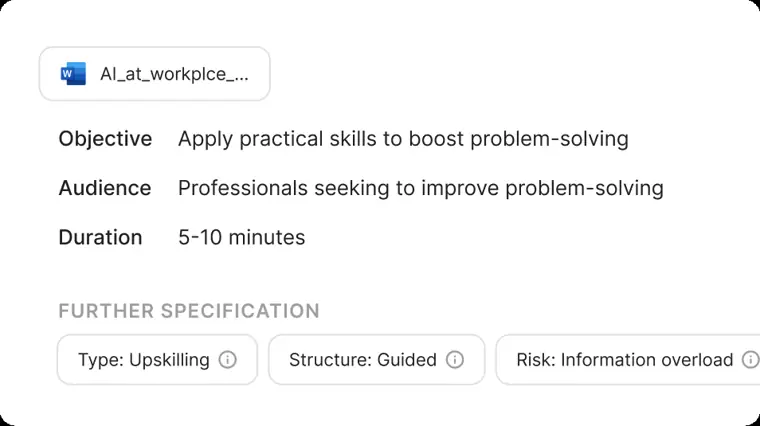
Course creator
Generates complete multi lesson courses from uploaded documents or prompts, combining AI video narration, supporting text, and assessments into a single workflow. Enables updating single lessons individually without rebuilding the entire course structure.
Use caseAn enablement team turns product briefs and battlecards into structured video led lessons with quizzes for sales reps.
From colossyan.com/features/course-creator · image from Colossyan -
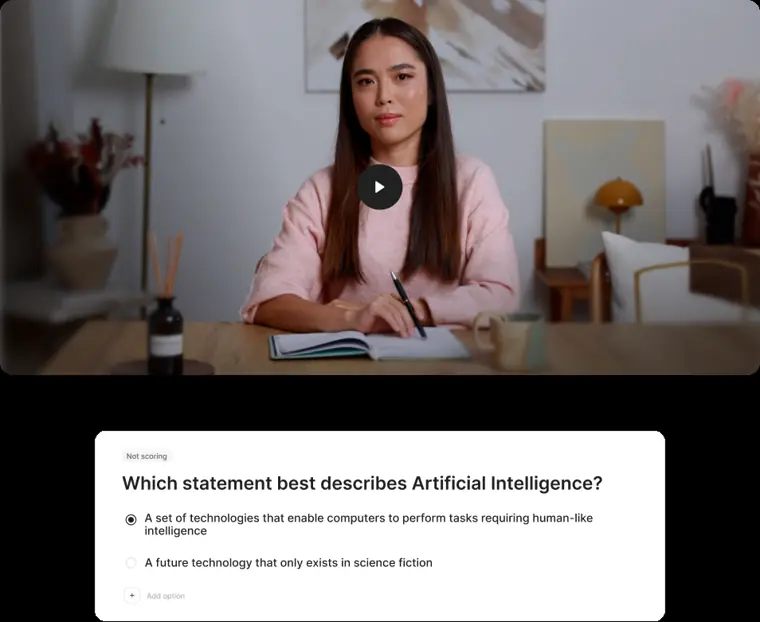
Interactive videos
Adds interactive elements directly into video lessons, including branch paths, clickable action buttons, and scored knowledge checks. Tracks learner progress and prevents skipping ahead when used for formal certification.
Use caseA compliance manager delivers regulatory training that stops employees from scrubbing forward and requires passing multiple choice questions.
From colossyan.com · image from Colossyan -
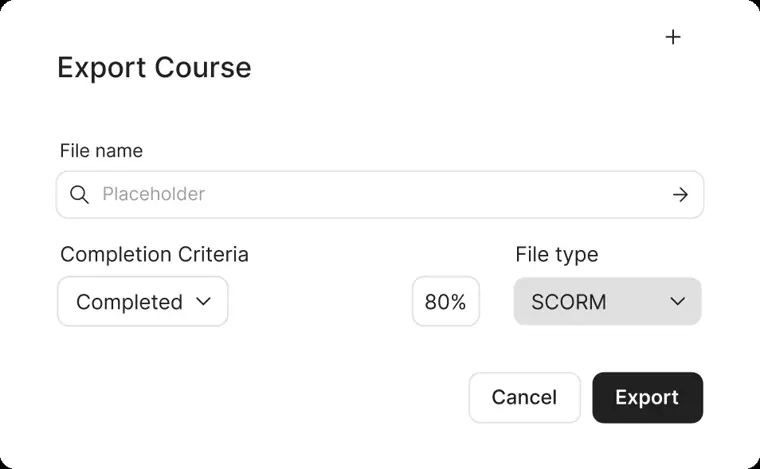
SCORM export
Packages video content and full courses into SCORM compliant zip files ready for upload into learning management systems. Sends completion signals, pass percentages, and resume states directly to the tracking platform.
Use caseA curriculum manager exports a finished micro course as a SCORM package and uploads it to an enterprise LMS like Cornerstone or Moodle.
From colossyan.com/features/course-creator · image from Colossyan -
AI video translation
Translates spoken audio, scripts, on screen text, and closed caption subtitles into dozens of languages from a single source. Keeps updates synchronized across every language variant whenever the primary video is edited.
Use caseA human resources project manager localizes workplace policy modules into several languages for international new hires.
From colossyan.com/features/video-translator -
Voice cloning and custom avatars
Creates a digital avatar from short video footage or photos and clones a human speaking voice from an audio sample. Allows users to generate synthetic text to speech narration in dozens of languages using their own likeness and vocal profile.
Use caseA course creator records a short audio sample to narrate training modules across multiple languages without recording new voiceovers each time.
From colossyan.com/features/video-translator
Written from Colossyan's own website, checked . Each feature links to the page it comes from; images are Colossyan's own.
Every plan
| Plan | Monthly | Billed yearly | Per | What it includes |
|---|---|---|---|---|
| Starter (Free) | Free | Not listed | 1 editor seat | 20 min/mo NEO video; 0.5 min/mo NEO2; 10 interactive videos/mo; 15 auto translations/mo |
| Professional | Not listed | $59 | per team (1 editor incl., +$30/mo per extra editor, max 3) | 30 min/mo NEO; 10 min/mo NEO2; 20 custom avatars + 5 voices; 5 SCORM exports/mo |
| Enterprise | Contact sales | Not listed | custom seats | contact sales; billed annually; unlimited minutes |
From Colossyan's own pricing page, checked . Prices are in US dollars per month; "billed yearly" is the monthly price when you pay for a year up front. A few figures (often the yearly price) are derived rather than printed on the page.
Before you pay
- Trains on your data
- No
What Colossyan says
Your documents, scripts, and videos are never used to train our AI models
Source page - Data retention
- Upon contract termination, users can export their content and request full deletion of their data.
What Colossyan says
Upon contract termination, you can export your content and request full deletion of your data.
Source page - Export your data
- Yes (MP4, SCORM)
- SOC 2
- Yes
What Colossyan says
Colossyan holds SOC 2 Type II certification, independently audited by a third party firm.
Source page - Support
- Email, priority support 24/7 (Enterprise plan)
What Colossyan says
Priority support 24/7Receive rapid response support around the clock.
Source page
Only what Colossyan's own pages state, with the quote behind each answer. Anything they don't publish is left out rather than guessed.
Getting started with Colossyan
- Upload your PDF, PPT, DOC, or TXT file directly into Colossyan to create a video draft.
- Select a professionally designed template based on your use case.
- Personalize the draft with your own script, visuals, and company brand kit.
- Enhance your video by adding AI avatars, screen recordings, branching scenarios, or multiple choice quizzes.
- Translate your video into over 100 languages in seconds.
- Export your interactive video as a SCORM package for your LMS.
Tips
- Use the prompt to video feature by simply entering a video idea, target audience, and desired tone of voice to let AI generate a draft.
- When company policies change, edit the script in the Colossyan editor and re generate to update the video and all translated versions automatically.
- Package an existing presentation or web page as a SCORM 1.2 ZIP in minutes using Colossyan's PowerPoint to SCORM or HTML to SCORM converters without needing a full authoring suite.
Written from Colossyan's own help pages: colossyan.com/use-cases/employee-onboarding/ · colossyan.com/posts/how-to-create-scorm-conte...
Colossyan video tutorials
Independent creators on YouTube, not Colossyan or us. The video loads from YouTube only when you press play.
What the free plan includes
20 min/
Questions people ask about Colossyan
Is Colossyan free?
Yes, there is a free plan: 20 min/mo (NEO), no SCORM.
Does Colossyan train its AI on my data?
No, the company says your data is not used for training. Source
Does Colossyan have an API?
Yes.
Does Colossyan use my content to train AI models?
No, Colossyan does not use customer uploaded documents, scripts, or generated training videos to train or fine tune AI models, and contractually requires the same from all integrated AI vendors. Source
Is Colossyan SOC 2 certified?
Yes, Colossyan holds SOC 2 Type II certification covering security, availability, and confidentiality. Source
Does Colossyan support SSO?
Yes, Colossyan supports OIDC and SAML based single sign on for enterprise customers. Source
Who owns the content I create in Colossyan?
All documents, scripts, generated videos, and course content belong to the customer's organization. Source
Works with
- Integrations
- DALL E, PowerPoint, PDF, Word, Articulate, EasyGenerator, Elucidat, 360Learning, Cornerstone, Docebo
- AI models
- NEO, NEO 2, DALL E
- Languages
- 120+ supported languages
Where this came from
Plans, prices and limits were copied from Colossyan's own pages, then checked .
- colossyan.com/pricing
- colossyan.com/
- colossyan.com/pricing/
- colossyan.com/book-a-demo/
- colossyan.com/use-cases/employee-onboarding/
- colossyan.com/enterprise/
- colossyan.com/privacy/
- colossyan.com/security/
- colossyan.com/features/scorm/
How we collect prices and rank tools · Is something wrong? Correct this listing
Others that do the same job
 HeyGenheygen.com
AI avatar videos from a script, plus video translation with voice cloning and lip sync.
- Green flag: Free plan
Hour Onehourone.ai
Presenter led videos with virtual human avatars and layout based scenes.
 Elai.ioelai.io
Turns text, URLs or slides into avatar videos with voice cloning and 1 click translation.
- Green flag: Free plan
 Synthesiasynthesia.io
Enterprise grade script to presenter video with stock or personal avatars and dubbing.
- Green flag: Free plan
- Red flag: Free plan watermark
 Vidnozvidnoz.com
Budget avatar maker with a huge avatar library, talking photos and lip sync translation.
- Green flag: Free plan
- Green flag: No card for trial
 AI Studios (DeepBrain AI)aistudios.com
Realistic avatar presenter videos from text, with dubbing, custom and interactive avatars.
- Green flag: Free plan
- Green flag: No card for trial