
Synthesia
Enterprise grade script to presenter video with stock or personal avatars and dubbing.
Best for Corporate training, L&D, internal comms
Used Synthesia and liked it? Upvote it. One upvote per person. Upvotes come from visitors, not from us, and never change "Our ranking".
What it does
Synthesia is an AI video platform built for business workflows. Users input text prompts, scripts, documents, links, or files, and the software generates presenter led videos with avatars and voiceovers. It is designed for organizational teams such as learning and development, sales enablement, marketing, and internal communications.
Read more: 4 features and how people use themShow less
-
Personal avatars
Creates a digital twin presenter from an uploaded photo or short recording alongside an optional cloned voice. Produces ongoing video narration in multiple languages without putting the user in front of a camera each time.
Use caseA business leader shares routine company updates across regional offices without filming a fresh message every week.
From synthesia.io/features/avatars -
AI dubbing
Translates existing video assets into dozens of languages while preserving the original speaker voice and accent. Adjusts mouth movements on screen using automated lip sync technology.
Use caseA video creator uploads an English product recording to generate German and Spanish editions with matched mouth movements.
From synthesia.io -
One click translation
Translates full video scripts, captions, and voiceovers across more than 140 supported languages simultaneously. Applies customizable glossary controls to maintain consistent product names and phrasing.
Use caseA corporate trainer localizes a complete employee onboarding video series into regional languages for international workers.
From synthesia.io/pricing -
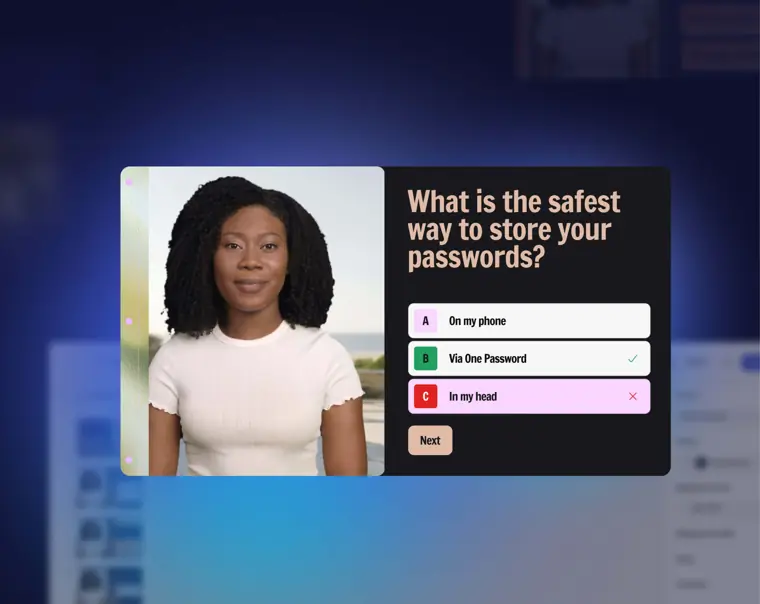
Interactive video experiences
Adds clickable buttons, knowledge check quizzes, and branching paths directly inside videos. Tracks completion metrics and allows exports via SCORM packages for learning management platforms.
Use caseAn instructional designer creates a customer service scenario where retail staff choose different responses during a customer exchange.
From synthesia.io/features/interactivity · image from Synthesia
Written from Synthesia's own website, checked . Each feature links to the page it comes from; images are Synthesia's own.
Every plan
| Plan | Monthly | Billed yearly | Per | What it includes |
|---|---|---|---|---|
| Basic (Free) | Free | $0 | 1 editor, 500 credits/mo | 10 min video/mo; 9 stock avatars; watermark; no MP4 download |
| Starter | $29 | $18 | 1 editor + 3 guests, 1,250 credits/mo | ~12 min video/mo; 125+ avatars; downloads |
| Pro | $89 | $64 | 1 editor + 5 guests, 6,000 credits/mo | ~60 min video/mo; 180+ avatars; 5 personal avatars; interactive video. Higher credit tiers: 12k $176, 24k $347, 36k $514, 48k $676 /mo |
| Enterprise | Contact sales | Not listed | custom | contact sales |
From Synthesia's own pricing page, checked . Prices are in US dollars per month; "billed yearly" is the monthly price when you pay for a year up front. A few figures (often the yearly price) are derived rather than printed on the page.
Before you pay
- Watermark on the free plan
- Yes
- Export your data
- Yes
- SOC 2
- Yes
- GDPR
- Yes
- Support
- Chat, email
Only what Synthesia's own pages state, with the quote behind each answer. Anything they don't publish is left out rather than guessed.
Getting started with Synthesia
- Select Developers in the sidebar, then choose the API keys tab.
- Select New API key, enter a name, choose the Legacy (v2) scope, set an expiration, and select Create API key to copy your key immediately.
- Enter your copied API key in the Authorization header of the Create a video endpoint section.
- Fill in the endpoint parameters such as test, title, scriptText, avatar, and background, leaving all others to default.
- Click on Try it! and store the returned video ID.
- Poll the Retrieve a video endpoint until the video status changes to complete.
- Use the time limited download link provided in the download attribute to download the video file.
Tips
- Video API requests require a Legacy (v2)-scoped key, not an Interactive Avatars scoped key.
- API keys and any associated webhook subscriptions belong to your individual account rather than the entire workspace.
- You are limited to a rate limit of 30 test videos per day.
Written from Synthesia's own help pages: docs.synthesia.io/reference/synthesia-api-quickstart · docs.synthesia.io/reference/video-api-introduction
Synthesia video tutorials
Independent creators on YouTube, not Synthesia or us. The video loads from YouTube only when you press play.
What the free plan includes
10 free minutes/
Questions people ask about Synthesia
How much does Synthesia cost?
Paid plans start at $29 a month (Starter). 4 plans are listed above, from Synthesia's own pricing page.
Is Synthesia free?
Yes, there is a free plan: 10 free minutes/mo (video or dubbing).
Does the Synthesia free plan add a watermark?
Yes, free plan output carries a watermark or branding. Source
Does Synthesia have an API?
Yes.
Which APIs does one key cover?
Interactive Avatars for real time sessions, and the Video API for scripted video, dubbing, translation and templates. Upload and Billing complete the set. Interactive Avatar access is enabled per key. Source
Do I need to bring my own LLM?
For Interactive Avatars, yes. You provide the LLM and speech to text; we render the avatar and can supply the voice. The Video API needs neither. Source
Is there a drop in embed for interactive avatars?
No. Sessions run over LiveKit and WebRTC, and you build the interface around them. Our Python plugin handles token minting and session management. Source
What are the rate limits?
Write limits run 120, 80 or 60 requests per minute depending on your plan, with hourly and daily caps alongside. Going over returns 429 with reset headers. Source
Works with
- Languages
- 140+ languages
Where this came from
Plans, prices and limits were copied from Synthesia's own pages, then checked .
- synthesia.io/pricing
- synthesia.io/
- docs.synthesia.io/reference/introduction
- docs.synthesia.io/docs/synthesia-integrations
- synthesia.io/legal/privacy-policy
- synthesia.io/legal/customer-terms-of-service
- academy.synthesia.io/
- synthesia.io/api
How we collect prices and rank tools · Is something wrong? Correct this listing
Others that do the same job
 HeyGenheygen.com
AI avatar videos from a script, plus video translation with voice cloning and lip sync.
- Green flag: Free plan
Hour Onehourone.ai
Presenter led videos with virtual human avatars and layout based scenes.
 Elai.ioelai.io
Turns text, URLs or slides into avatar videos with voice cloning and 1 click translation.
- Green flag: Free plan
 Vidnozvidnoz.com
Budget avatar maker with a huge avatar library, talking photos and lip sync translation.
- Green flag: Free plan
- Green flag: No card for trial
 AI Studios (DeepBrain AI)aistudios.com
Realistic avatar presenter videos from text, with dubbing, custom and interactive avatars.
- Green flag: Free plan
- Green flag: No card for trial
 Colossyancolossyan.com
Turns docs and slides into interactive avatar led training with quizzes and SCORM export.
- Green flag: Free plan
- Green flag: Doesn't train on your data