
AI Studios (DeepBrain AI)
Realistic avatar presenter videos from text, with dubbing, custom and interactive avatars.
Best for News style and training presenter videos
Used AI Studios and liked it? Upvote it. One upvote per person. Upvotes come from visitors, not from us, and never change "Our ranking".
What it does
AI Studios by DeepBrain AI is an online video generation and editing platform that produces full videos from text scripts, images, documents, or video clips. It delivers finished content complete with realistic AI avatar presenters, professional voiceovers, visual assets, and multilingual translations. The platform is designed for solo creators, educators, marketers, and businesses producing training, social, and promotional videos.
Read more: 6 features and how people use themShow less
-
Ready to use AI avatars
Presents your video script using lifelike digital presenters selected from a large built in catalog. Allows you to choose different personas and framing options to deliver on camera narration without filming yourself.
Use caseAn educator selects a ready to use avatar to present lecture style introduction modules for an online course without recording on camera.
From aistudios.com -
Dubbing AI
Translates existing video speech into over 150 languages while preserving original tone and meaning. Clones the original speaker voices and automatically aligns lip movements to the translated audio.
Use caseAn interviewer translates a multi person discussion into several languages while keeping distinct cloned voices and synchronized lip movements.
From aistudios.com -
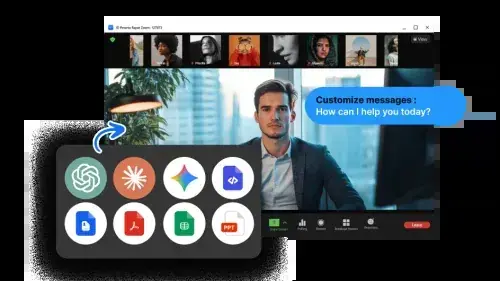
Interactive avatars and conversational AI
Deploys responsive avatars that hold two way conversations in real time across websites, apps, and kiosks. Connects to company documents and custom language models to answer visitor inquiries continuously.
Use caseA business embeds an avatar on its website to answer product questions and guide customer purchases around the clock.
From aistudios.com · image from AI Studios -
Interactive course builder and SCORM export
Assembles structured training videos with embedded checkpoints such as quizzes and decision points. Exports completed lessons in standard SCORM formats compatible with external learning management systems.
Use caseA corporate trainer embeds quizzes into avatar presented modules and exports the files to an LMS like Moodle or Canvas.
From aistudios.com -
Docs to video conversion
Transforms uploaded documents such as PowerPoint, PDF, or Word files directly into video scenes. Extracts primary talking points from the slides and matches them with visuals and spoken avatar narration.
Use caseAn online course creator uploads a slide deck to generate narrated lesson slides without manual retyping.
From aistudios.com -
Seedance multimodal generation
Generates cinematic multi shot scenes up to 30 seconds long from text, image, audio, and video prompts. Produces synchronized dual channel stereo sound and visuals in a single operation.
Use caseA marketer creates short promotional ad clips by providing reference images and text prompts to generate matching video and sound.
From aistudios.com/features/seedance
Written from AI Studios's own website, checked . Each feature links to the page it comes from; images are AI Studios's own.
Every plan
| Plan | Monthly | Billed yearly | Per | What it includes |
|---|---|---|---|---|
| Free | Free | $0 | per account | 16 one time generative credits; 3 videos/mo up to 1 min; 1 custom avatar; 720p; 3 AI dubbing uses |
| Personal | $24 | Not listed | per user | 60 generative credits/mo; unlimited videos up to 30 min; 3 custom avatars; 1080p; 120 dubbing min/mo |
| Team | $55 | Not listed | per seat | 150 generative credits/seat/mo (shared); videos up to 60 min; 5 custom avatars; 4K; 240 dubbing min/mo |
| Interactive Avatar Standard | $99 | Not listed | per account | 100 credits (1 credit = 5 min); 20 min sessions; 20 concurrent users; API access |
| Enterprise | Not listed | Not listed | organization | contact sales |
From AI Studios (DeepBrain AI)'s own pricing page, checked . Prices are in US dollars per month; "billed yearly" is the monthly price when you pay for a year up front. A few figures (often the yearly price) are derived rather than printed on the page.
Before you pay
- Card needed for the trial
- No
- Commercial use
- Use AI generated avatars and voices for commercial projects with no attribution required.
What AI Studios says
Use AI generated avatars and voices for commercial projects with no attribution required.
Source page - Export your data
- Yes (720p, 1080p, 4K video, SRT subtitle files, SCORM format)
- SOC 2
- Yes
- Discounts
- Save 20% with annual billing.
- Support
- 24/7 priority technical support, dedicated account manager (Enterprise)
What AI Studios says
Dedicated account manager * 24/7 priority technical support * Customized onboarding and training
Source page
Only what AI Studios's own pages state, with the quote behind each answer. Anything they don't publish is left out rather than guessed.
Getting started with AI Studios
- Start with a script, built in script assistant, or by uploading a link, document, or slide deck.
- Select an avatar to present your video, or choose to leave it faceless.
- Choose an AI voice and language, or upload a custom voice clone.
- Customize visuals by adding stock footage, your own images, or letting AI Studios auto fill scenes.
- Click Generate to process your video so it is ready to publish.
Written from AI Studios's own help pages: aistudios.com/how-to-guides/how-to-create-fac...
AI Studios video tutorials
Independent creators on YouTube, not AI Studios or us. The video loads from YouTube only when you press play.
What the free plan includes
3 videos/
Questions people ask about AI Studios
How much does AI Studios cost?
Paid plans start at $24 a month (Personal). 5 plans are listed above, from AI Studios's own pricing page.
Is AI Studios free?
Yes, there is a free plan: 3 videos/mo up to 1 min, 720p.
Can I use AI Studios output commercially?
Use AI generated avatars and voices for commercial projects with no attribution required. Source
Do I need a credit card to try AI Studios?
No, you can start without a credit card. Source
Does AI Studios have a student or other discount?
Save 20% with annual billing. Source
Does AI Studios have an API?
Yes.
What is the Videos per Month limit on plans?
It represents the number of videos you can create each month, which resets on your billing date. Source
What makes Nano Banana Pro different from other AI image models?
It is designed for real world usability, solving production issues like garbled text, broken infographic structures, and inconsistent multi reference blending without heavy manual cleanup. Source
How do you use Nano Banana Pro inside AI Studios?
Select Nano Banana Pro from the model picker to generate images from text prompts or edit existing images with professional controls, then drop results directly into video scenes. Source
Works with
- AI models
- OpenAI, Claude, Gemini, Seedance 2.0, Veo 3.1, Sora, Nano Banana Pro (Gemini 3 Pro Image), ChatGPT
- Languages
- 150+ languages
Where this came from
Plans, prices and limits were copied from AI Studios (DeepBrain AI)'s own pages, then checked .
- aistudios.com/pricing
- aistudios.com/
- aistudios.com/how-to-guides/how-to-create-faceless-videos-for-socia...
- app.aistudios.com/auth/signin?redirect=https%3A%2F%2Fapp.aistudios....
- aistudios.com/how-to-guides/how-to-choose-a-youtube-topic-that-gets...
- aistudios.com/how-to-guides/how-to-get-daily-youtube-video-ideas-us...
- aistudios.com/how-to-guides/absolute-beginners-guide-to-making-ai-c...
- aistudios.com/how-to-guides/how-to-make-stunning-images-with-nano-b...
- aistudios.com/how-to-guides/how-to-try-prompts-in-ai-studios-with-n...
How we collect prices and rank tools · Is something wrong? Correct this listing
Others that do the same job
 HeyGenheygen.com
AI avatar videos from a script, plus video translation with voice cloning and lip sync.
- Green flag: Free plan
Hour Onehourone.ai
Presenter led videos with virtual human avatars and layout based scenes.
 Elai.ioelai.io
Turns text, URLs or slides into avatar videos with voice cloning and 1 click translation.
- Green flag: Free plan
 Synthesiasynthesia.io
Enterprise grade script to presenter video with stock or personal avatars and dubbing.
- Green flag: Free plan
- Red flag: Free plan watermark
 Vidnozvidnoz.com
Budget avatar maker with a huge avatar library, talking photos and lip sync translation.
- Green flag: Free plan
- Green flag: No card for trial
 Colossyancolossyan.com
Turns docs and slides into interactive avatar led training with quizzes and SCORM export.
- Green flag: Free plan
- Green flag: Doesn't train on your data