
Interior AI
Upload a room photo and AI redesigns it in dozens of styles, plus virtual staging.
Best for Realtors virtual staging and homeowners exploring styles
Used Interior AI and liked it? Upvote it. One upvote per person. Upvotes come from visitors, not from us, and never change "Our ranking".
What it does
Interior AI is a room redesign software that transforms interior photos into newly styled spaces. Users upload a picture or design screenshot of a space, select room parameters, and receive generated concepts in seconds. It is designed for anyone wanting to reimagine an interior without needing design skills.
Read more: 3 features and how people use themShow less
-
Room redesign
Takes a photo of an interior space and generates redesigned concepts based on selected room types and styles.
Use caseA homeowner takes a photo of an existing room and generates alternative layouts and looks in seconds.
From interiorai.com -
Virtual staging
Fills unfurnished or empty rooms with digital furniture and decor elements.
Use caseA real estate agent uploads an image of an empty listing to furnish the space virtually for potential buyers.
From interiorai.com -
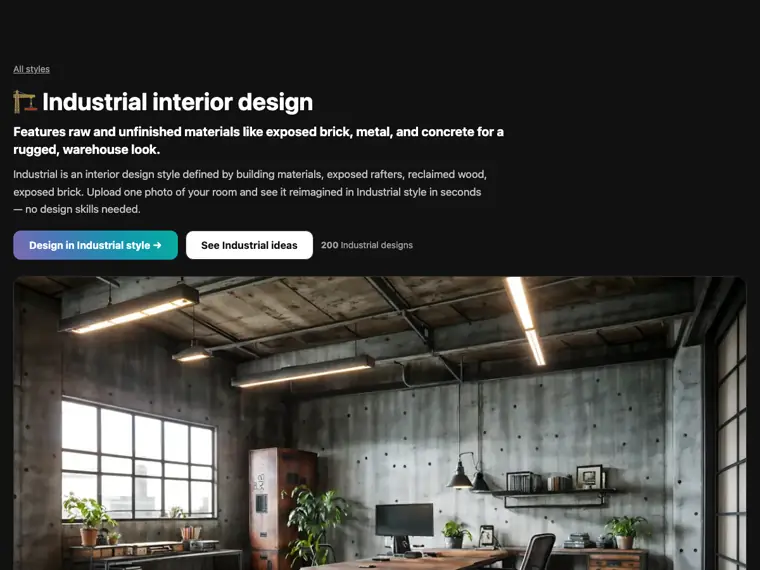
Style library
Applies specific visual aesthetic presets, such as Industrial or Modern, to any uploaded space.
Use caseA user selects the Industrial style preset to add exposed brick and concrete details to a dining room photo.
From interiorai.com/styles/industrial · image from Interior AI
Written from Interior AI's own website, checked . Each feature links to the page it comes from; images are Interior AI's own.
Every plan
| Plan | Monthly | Billed yearly | Per | What it includes |
|---|---|---|---|---|
| Pro | $39 | $32.50 | per account | 1,000 interiors/month, virtual staging, all styles; $390/yr annual |
| Premium | $99 | Not listed | per account | 5,000 interiors/month, priority access, faster renders (official site: '$60 more a month' than base) |
From Interior AI's own pricing page, checked . Prices are in US dollars per month; "billed yearly" is the monthly price when you pay for a year up front. Some of these figures came from third party reports and could not be confirmed on the official page.
Before you pay
- Refunds
- No refunds are offered due to the high costs incurred for generating AI images and upstream GPU processing time.
What Interior AI says
Unfortunately, we cannot offer refunds as costs incurred for generating AI images are extremely high.
Source page - How to cancel
- Subscribers can cancel at any time by clicking Billing at the top of the site while logged in to access the billing portal.
What Interior AI says
Go to the top of Interior AI when you are logged in and click Billing, you will be redirected to the billing portal where you can download invoices, switch plans and cancel your subscription.
Source page - Cancel online yourself
- Yes
What Interior AI says
Go to the top of Interior AI when you are logged in and click Billing, you will be redirected to the billing portal where you can download invoices, switch plans and cancel your subscription.
Source page - Renews automatically
- Yes
What Interior AI says
Yes, after payment you get a receipt and invoice sent by Stripe. And on every renewal you also get one.
Source page - Trains on your data
- No
What Interior AI says
We only use your photos to create AI interior design renders. We do not train on them like other companies, and your photos and renders are only accessible by you.
Source page
Only what Interior AI's own pages state, with the quote behind each answer. Anything they don't publish is left out rather than guessed.
Getting started with Interior AI
- Take a photo of your interior and upload it.
- Select the room type and design style.
- Tap Create design to generate your redesign.
Written from Interior AI's own help pages: interiorai.com/
Interior AI video tutorials
Independent creators on YouTube, not Interior AI or us. The video loads from YouTube only when you press play.
The free trial
Trial only: Third parties conflict: free trial only vs. a few watermarked low res renders
Questions people ask about Interior AI
How much does Interior AI cost?
Paid plans start at $39 a month (Pro). 2 plans are listed above, from Interior AI's own pricing page.
Is Interior AI free?
There is a free trial but no free plan: Third parties conflict: free trial only vs. a few watermarked low res renders.
Can I get a refund from Interior AI?
No refunds are offered due to the high costs incurred for generating AI images and upstream GPU processing time. Source
How do I cancel Interior AI?
Subscribers can cancel at any time by clicking Billing at the top of the site while logged in to access the billing portal. Source
Does Interior AI train its AI on my data?
No, the company says your data is not used for training. Source
What will you do with my interior photos?
Photos are only used to create renders, are not used to train models, and remain accessible only to you. Source
What payment methods do you accept?
Payment is accepted via credit/debit cards (MasterCard, VISA, American Express), iDeal, SOFORT, Bancontact, Przelewy24, Giropay, EPS, GrabPay, AliPay, and others, but not PayPal or cryptocurrency. Source
Where this came from
Plans, prices and limits were copied from Interior AI's own pages and the other sources listed, then checked .
How we collect prices and rank tools · Is something wrong? Correct this listing
Others that do the same job
 Spacely AIspacely.ai
AI rendering tool for architects and interior designers: room redesign, sketch to render and virtual staging.
- Green flag: Free plan
- Green flag: No card for trial
- Green flag: Credits roll over
 RoomGPTroomgpt.io
Restyles a photo of any room into a chosen theme in seconds using AI.
- Green flag: Free plan
 Let's Enhanceletsenhance.io
Cloud AI upscaler and enhancer that boosts resolution, fixes compression and corrects color for print ready images.
- Green flag: Free plan
- Red flag: Free plan watermark
Midjourneymidjourney.com
Subscription text to image and image to video generator known for highly artistic, stylized results via web and Discord.
- Red flag: No free plan
 Designs.aidesigns.ai
All in one AI suite for logos, graphics, videos, voiceovers and copy from one dashboard.
- Green flag: Free plan
- Red flag: No refunds
 Fotorfotor.com
Online photo editor and design tool with AI enhancement, background removal, headshots and an AI agent.
- Green flag: Free plan
- Green flag: Some credits roll over