
Spacely AI
AI rendering tool for architects and interior designers: room redesign, sketch to render and virtual staging.
Best for Architects and interior designers producing client renders
Used Spacely AI and liked it? Upvote it. One upvote per person. Upvotes come from visitors, not from us, and never change "Our ranking".
What it does
Spacely AI is an architectural and interior design rendering platform. Users upload sketches, 3D models, or property photos and generate photorealistic visuals in under a minute while keeping underlying geometries intact. It is designed for interior designers, architects, and real estate professionals seeking quick client ready presentations.
Read more: 4 features and how people use themShow less
-
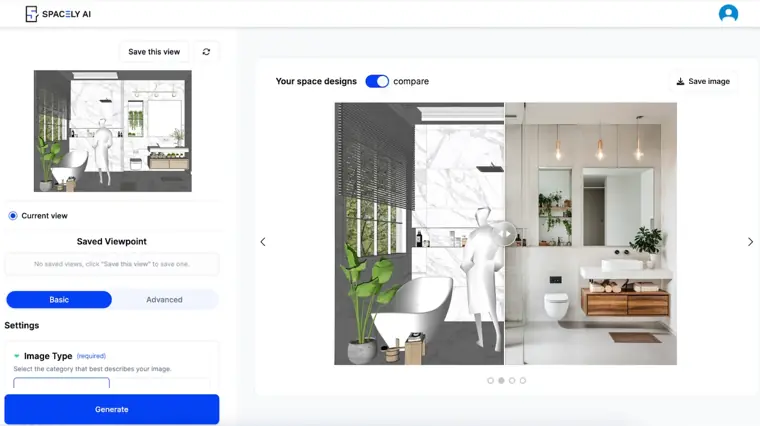
Realistic render
Converts an uploaded sketch, 3D model, or photograph into a photorealistic visual in under 60 seconds. Preserves your existing materials and original geometry throughout the conversion.
Use caseAn architect turns an early concept sketch into a photorealistic visual study to review scale and layout during schematic client discussions.
From spacely.ai · image from Spacely AI -
Team canvas
Provides a shared design workspace where multiple teammates view real time cursor positions, edits, and rendered updates simultaneously. Keeps the entire team aligned on one active design version without requiring manual file exports.
Use caseAn interior design team reviews client revisions together in one workspace and adjusts room elements live before presenting final files.
From spacely.ai -
SketchUp extension
Integrates directly into your local modeling workspace through an extension warehouse download. Generates photorealistic renders from selected 3D geometry without leaving the application interface.
Use caseA 3D designer selects an existing SketchUp room model and immediately produces realistic render styles to present to a client.
From spacely.ai -
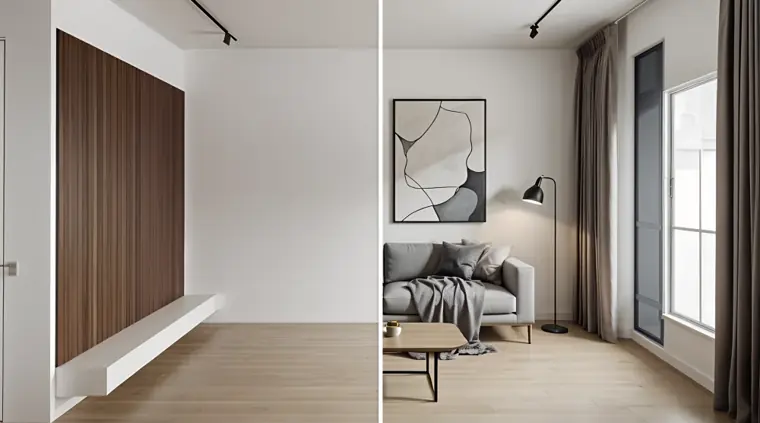
Virtual staging
Populates empty or sparsely furnished interior photography with realistic furniture and finishes in under a minute. Avoids structural modifications while presenting potential interior arrangements.
Use caseA real estate agent stages vacant home photography with realistic furniture before publishing a property listing.
From spacely.ai · image from Spacely AI
Written from Spacely AI's own website, checked . Each feature links to the page it comes from; images are Spacely AI's own.
Every plan
| Plan | Monthly | Billed yearly | Per | What it includes |
|---|---|---|---|---|
| Free | Free | Not listed | credits | 40 trial credits |
| Personal | $25 | Not listed | per account | 500 credits/mo, standard queue (~5 min) |
| Studio | $50 | Not listed | up to 2 seats | 1,500 credits/mo, Pro features, priority queue |
| Agency | $100 | Not listed | up to 5 seats | 3,500 credits/mo, Pro+ features, private API key, real time collaboration |
| Education | $30 | Not listed | per account | Studio features, 1,500 credits/mo, academic email required |
| Enterprise | Not listed | Not listed | 20+ seats | contact sales |
From Spacely AI's own pricing page, checked . Prices are in US dollars per month; "billed yearly" is the monthly price when you pay for a year up front. A few figures (often the yearly price) are derived rather than printed on the page.
Before you pay
- Card needed for the trial
- No
- Unused credits roll over
- Yes
What Spacely AI says
unused credits carry over and stack for as long as you stay subscribed.
Source page - Watermark on the free plan
- No
What Spacely AI says
With Free, get: Access to all features High resolution download Private mode Commercial license Watermark free
Source page - Commercial use
- All plans including free
What Spacely AI says
With Free, get: Access to all features High resolution download Private mode Commercial license Watermark free
Source page - Export your data
- Yes
- Discounts
- Education Plan at $30/month including everything in Studio Plan for up to two seats when signing up with an academic email.
What Spacely AI says
If you’re using an academic email, your EDU pricing will be applied automatically. Didn’t receive the discount? Reach out to us at hello@spacely.ai and we’ll take care of it.
Source page - Support
- Email, community
What Spacely AI says
Community forum available on Discord Email support reply within 48 hours Email support reply within 24 hours
Source page
Only what Spacely AI's own pages state, with the quote behind each answer. Anything they don't publish is left out rather than guessed.
Getting started with Spacely AI
- Sign up and create an account without needing a credit card.
- Pick a style or upload your own sketch design, 3D design, or room image.
- Generate photorealistic renders in under 60 seconds and share the visuals.
Written from Spacely AI's own help pages: spacely.ai/
Spacely AI video tutorials
Independent creators on YouTube, not Spacely AI or us. The video loads from YouTube only when you press play.
What the free plan includes
40 trial credits, commercial license, no watermark
Questions people ask about Spacely AI
How much does Spacely AI cost?
Paid plans start at $25 a month (Personal). 6 plans are listed above, from Spacely AI's own pricing page.
Is Spacely AI free?
Yes, there is a free plan: 40 trial credits, commercial license, no watermark.
Do unused Spacely AI credits roll over?
Yes, unused credits carry over. Source
Does the Spacely AI free plan add a watermark?
No, free plan output has no watermark. Source
Can I use Spacely AI output commercially?
Yes, on every plan, including the free plan. Source
Do I need a credit card to try Spacely AI?
No, you can start without a credit card. Source
Does Spacely AI have a student or other discount?
Education Plan at $30/month including everything in Studio Plan for up to two seats when signing up with an academic email. Source
Does Spacely AI have an API?
Yes.
Can I invite an existing Spacely AI user to the team?
Yes, existing users can be invited to join your team, with all credits drawn from the shared team credit pool. Source
Can an existing Spacely AI subscriber also be part of a team?
Yes, you can join a team and select whether to use personal credits or shared team credits for each generation. Source
Once invited, can team members access their personal generation history?
Yes, previous renders remain accessible because each member's generation history is tied to their account email. Source
Who will be the Owner of a team plan?
The first person to register for the plan becomes the Owner. Source
Works with
- Integrations
- SketchUp, Revit, AutoCAD, Rhino
Where this came from
Plans, prices and limits were copied from Spacely AI's own pages and the other sources listed, then checked .
- spacely.ai/pricing
- spacely.ai/blog/spacely-ai-subscription-plans-2026-new-pricing-explained
- spacely.ai/
- spacely.ai/blog/spacely-ai-subscription-plans-2026-new-pricing-explained
- spacely.ai/faq
How we collect prices and rank tools · Is something wrong? Correct this listing
Others that do the same job
 Interior AIinteriorai.com
Upload a room photo and AI redesigns it in dozens of styles, plus virtual staging.
- Green flag: Cancel online
- Green flag: Doesn't train on your data
- Red flag: No refunds
 RoomGPTroomgpt.io
Restyles a photo of any room into a chosen theme in seconds using AI.
- Green flag: Free plan
 Let's Enhanceletsenhance.io
Cloud AI upscaler and enhancer that boosts resolution, fixes compression and corrects color for print ready images.
- Green flag: Free plan
- Red flag: Free plan watermark
Midjourneymidjourney.com
Subscription text to image and image to video generator known for highly artistic, stylized results via web and Discord.
- Red flag: No free plan
 Designs.aidesigns.ai
All in one AI suite for logos, graphics, videos, voiceovers and copy from one dashboard.
- Green flag: Free plan
- Red flag: No refunds
 Fotorfotor.com
Online photo editor and design tool with AI enhancement, background removal, headshots and an AI agent.
- Green flag: Free plan
- Green flag: Some credits roll over