
Langfuse
Acquired: by ClickHouse
Open source LLM engineering platform for tracing, evals, prompt management and cost tracking, cloud or self hosted.
Best for Teams wanting open source, self hostable LLM tracing
Used Langfuse and liked it? Upvote it. One upvote per person. Upvotes come from visitors, not from us, and never change "Our ranking".
What it does
Langfuse is an open source engineering platform designed to trace, evaluate, and monitor AI applications and agents. You send production execution signals such as model calls, tool uses, and prompts, and you receive observability traces, latency and cost metrics, and evaluation results. It is built for engineers and teams developing generative AI features from initial prototype to production scale.
Read more: 6 features and how people use themShow less
-
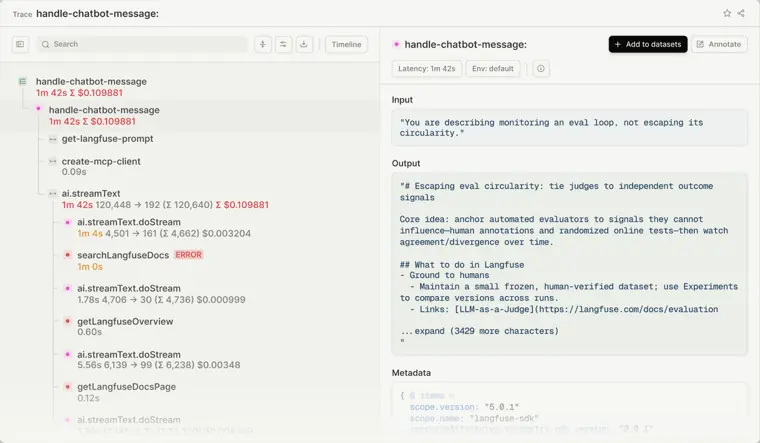
Observability and tracing
Records complete execution trees of AI applications, tracking each model call, tool invocation, and retrieval action. Lets you filter and inspect executions by specific users, sessions, metadata tags, latency, and cost.
Use caseAn AI team traces and debugs generative design features in production.
From langfuse.com · image from Langfuse -
Evaluation
Assesses model outputs using automated judge models, custom heuristic functions, or manual reviews. Runs these checks directly on production logs or during testing experiments to evaluate quality.
Use caseAn engineer queries row level observations from production to run evaluation pipelines.
From langfuse.com -
Prompt management
Stores and controls prompts separately from application code so teams can iterate without redeploying software. Enables one click rollbacks and direct updates to production templates.
Use caseAn engineer updates a production prompt and saves it directly to prompt management without changing code.
From langfuse.com -
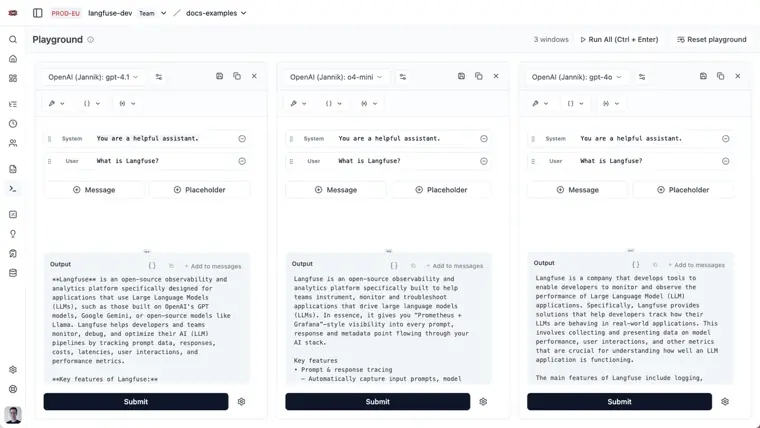
Prompt playground
Provides an interactive environment to test prompts, mock tool responses, and adjust parameters across multiple models. Displays side by side comparisons of multiple prompt variations and configurations at the same time.
Use caseA developer opens a generation directly from observability into the playground to tweak parameters and compare how different models respond.
From langfuse.com · image from Langfuse -
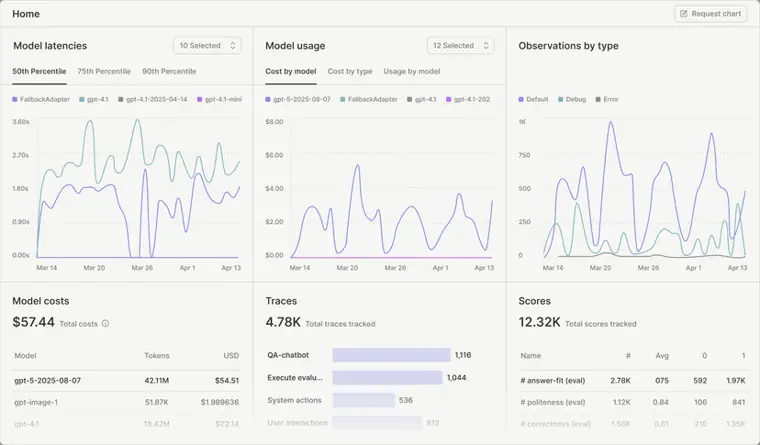
Cost and latency monitoring
Tracks token usage, monetary expenses, and latency across all model executions. Presents operational metrics through dashboards and dispatches automated alerts when unexpected spikes happen.
Use caseA developer sets up dashboards and automated alerts to monitor system costs and latency.
From langfuse.com · image from Langfuse -
Human annotation
Routes traces and generations into review queues so teams can inspect outputs and provide manual feedback. Turns human evaluated traces into curated golden datasets for future testing.
Use caseA team reviews production traces collaboratively to build golden datasets.
From langfuse.com
Written from Langfuse's own website, checked . Each feature links to the page it comes from; images are Langfuse's own.
Every plan
| Plan | Monthly | Billed yearly | Per | What it includes |
|---|---|---|---|---|
| Free (Hobby) | Free | Not listed | per account | 50k units/mo, 2 seats, 30 day data access, community support |
| Core | $29 | Not listed | per account | 100k units/mo then $8 per 100k, unlimited seats, 90 day data access |
| Pro | $199 | Not listed | per account | 100k units/mo then $8 per 100k, 3 year data access, SOC2/ISO27001 reports, HIPAA region; Teams add on $300/mo for SSO/RBAC |
| Enterprise | $2,499 | Not listed | per account | audit logs, SCIM, SLAs, named support engineer; yearly commitment pricing via sales |
| Self hosted Open Source | Free | Not listed | per account | MIT license, all core features, community support |
| Self hosted Enterprise | Not listed | Not listed | per account | contact sales |
From Langfuse's own pricing page, checked . Prices are in US dollars per month; "billed yearly" is the monthly price when you pay for a year up front.
Getting started with Langfuse
- Create a Langfuse account or self host Langfuse.
- Create new API credentials in the project settings.
- Install the Langfuse SDK using pip install langfuse or npm i @langfuse/client.
- Add your Langfuse credentials including LANGFUSE_SECRET_KEY, LANGFUSE_PUBLIC_KEY, and LANGFUSE_BASE_URL as environment variables.
- Create a new text or chat prompt using the Langfuse UI, SDK, or Public API.
Tips
- Select your prompt type carefully when creating a prompt, as you cannot change it afterwards.
- If you create a prompt with an existing name, it will automatically be added as a new version.
- Langfuse SDKs queue trace events locally and flush them asynchronously in batches, ensuring no latency is added to your application's response time.
Written from Langfuse's own help pages: langfuse.com/docs/prompt-management/get-started · langfuse.com/docs/observability/overview
Langfuse video tutorials
Independent creators on YouTube, not Langfuse or us. The video loads from YouTube only when you press play.
What the free plan includes
Hobby cloud: 50k units/
Questions people ask about Langfuse
How much does Langfuse cost?
Paid plans start at $29 a month (Core). 6 plans are listed above, from Langfuse's own pricing page.
Is Langfuse free?
Yes, there is a free plan: Hobby cloud: 50k units/month, 2 seats, 30 day data access; self hosted OSS free with all core features.
Does Langfuse have an API?
Yes.
Works with
- Integrations
- OTel
Where this came from
Plans, prices and limits were copied from Langfuse's own pages and the other sources listed, then checked .
How we collect prices and rank tools · Is something wrong? Correct this listing
Others that do the same job
 Braintrustbraintrust.dev
Evaluation first AI platform for experiments, scoring, prompt playgrounds and production tracing of LLM apps.
- Green flag: Free plan
- Green flag: No card for trial
- Red flag: Credits reset monthly
 Arize AI (Phoenix / AX)arize.com
AI observability and evaluation: open source Phoenix for local tracing/evals plus hosted Arize AX for production.
- Green flag: Free plan
- Green flag: No card for trial
 LangSmithlangchain.com/langsmith
LangChain's platform for tracing, evaluating, and deploying LLM apps and agents, framework agnostic.
- Green flag: Free plan
- Green flag: Doesn't train on your data
 Heliconehelicone.ai
Open source LLM observability and gateway: proxy based request logging, cost tracking, caching and prompt management.
- Green flag: Free plan
- Green flag: No card for trial
- Red flag: Acquired
Weights & Biases Weavewandb.ai/site/weave
W&B toolkit for tracing, evaluating and iterating on LLM apps and agents, now under CoreWeave Forge.
- Green flag: Free plan
- Red flag: Acquired
 Datadog LLM Observability (Agent Observability)datadoghq.com/product/llm-observability
Datadog module tracing LLM apps and agents end to end with quality, safety and cost monitoring.
- Green flag: Free plan
- Red flag: Renamed
Free plan · Flat monthly
Visit site Datadog LLM Observability (Agent Observability) (opens the tool's site)