
Lusha
Self serve B2B contact finder delivering verified emails and direct dials via web app and browser extension.
Best for SMB reps needing quick direct dials
Used Lusha and liked it? Upvote it. One upvote per person. Upvotes come from visitors, not from us, and never change "Our ranking".
What it does
Lusha provides business contact details and company intelligence for go to market teams and AI agents. Users search for prospect names, accounts, or buying signals to retrieve verified email addresses, phone numbers, and firmographic records. The software helps sales and revenue professionals connect with decision makers and keep their customer relationship management data accurate.
Read more: 5 features and how people use themShow less
-
Lusha search
Searches a database of hundreds of millions of business records to uncover prospect profiles containing email confidence scores, phone numbers, and company event signals.
Use caseA sales development representative searches for prospect records to find verified direct dials before starting outbound cold calls.
From lusha.com -
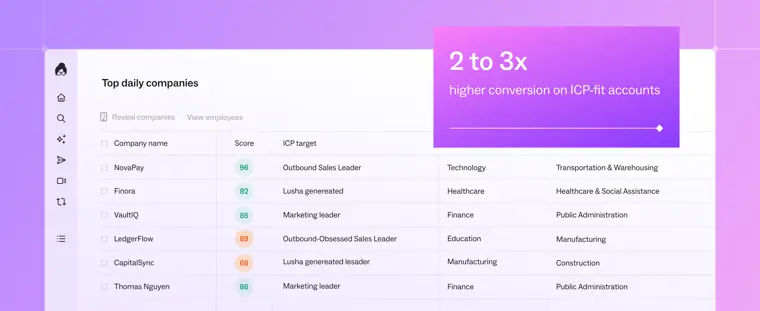
Deep intelligence
Evaluates accounts against your ideal customer profile and intent signals, generating rankings and identifying the specific members of a buying committee.
Use caseAn account executive researches target accounts to map who decides, who champions, and who uses the product before booking meetings.
From lusha.com · image from Lusha -
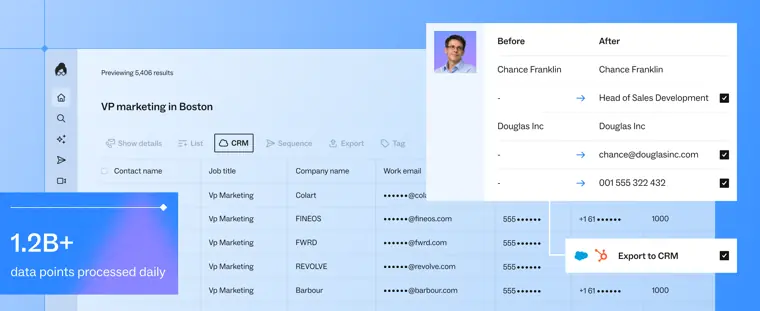
Salesforce direct export and enrichment
Sends prospect information from Lusha straight into customer management software as new records and refreshes outdated data across existing entries via automated field mapping.
Use caseA sales operations lead bulk enriches Salesforce leads older than 90 days with verified direct dials without downloading spreadsheets.
From lusha.com/integrations/salesforce · image from Lusha -
HubSpot CRM integration
Exports contacts and companies into your pipeline while screening against existing entries to avoid creating duplicates or burning credits.
Use caseA marketer automatically enriches HubSpot demo form submissions with firmographic information before routing enterprise prospects to a senior account executive.
From lusha.com/integrations/hubspot -
Rolling over monthly credits
Transfers unused contact reveal allowances at the end of each billing cycle into the following month up to a set limit.
Use caseA business development consultant on a monthly subscription rolls over unspent reveal credits to prospect heavier in the following month.
From lusha.com/pricing
Written from Lusha's own website, checked . Each feature links to the page it comes from; images are Lusha's own.
Every plan
| Plan | Monthly | Billed yearly | Per | What it includes |
|---|---|---|---|---|
| Free | Free | $0 | per user | 40 credits/mo |
| Starter | $49.90 | $37.45 | per user | 400 credits/mo (4,800/yr) |
| Pro | $69.90 | $52.45 | per user | 600 credits/mo (7,200/yr) |
| Premium | $399.90 | $299.95 | per user | 3,400 credits/mo (40,800/yr) |
| Scale | Not listed | Not listed | per account | contact sales; per user credit limits, teams 5+ |
From Lusha's own pricing page, checked . Prices are in US dollars per month; "billed yearly" is the monthly price when you pay for a year up front. A few figures (often the yearly price) are derived rather than printed on the page.
Before you pay
- Renews automatically
- Yes
What Lusha says
Yes, your plan renews automatically and all your monthly or annual credits are issued automatically.
Source page - Card needed for the trial
- No
- Unused credits roll over
- Partial
What Lusha says
On monthly plans, as long as you’re subscribed, your unused credits will roll over and accumulate up to twice the credit limit according to your plan.
Source page - Failed generations cost credits
- No
What Lusha says
a lookup that finds no match costs nothing, and every search shows which fields exist before you spend a credit, so an empty record costs nothing
Source page - Trains on your data
- No
What Lusha says
Data obtained through the API can’t be used to train or develop AI or ML systems, except where the Terms and Conditions specifically say otherwise.
Source page - Export your data
- Yes
What Lusha says
Export enriched data to CSV, integrate with your CRM, and keep your records up to date.
Source page - GDPR
- Yes
Only what Lusha's own pages state, with the quote behind each answer. Anything they don't publish is left out rather than guessed.
Getting started with Lusha
- Create your free account to access Workspace and your monthly credit allowance.
- Start a table in Workspace using AI chat, the filter panel, or a CRM import.
- Click Save first X contacts to save your results as a permanent table.
- Add data columns by clicking the Add enrichment toolbar button to add Lusha Data, AI Data, Signals, or CRM fields.
- Select contacts and export your table to CSV, sync directly to your CRM, or push contacts to an Engage sequence.
Tips
- Combine AI chat and structured filters to add extra precision to your audience search.
- Use the Get API request popover or the Table / JSON view toggle in the search control bar to turn your UI search into ready to run API code.
- Click Add contacts and select Add similar contacts inside any saved table to get 5 daily AI suggested lookalike prospects.
Written from Lusha's own help pages: docs.lusha.com/user-guide/getting-started/int... · docs.lusha.com/user-guide/introduction-and-ge...
Lusha video tutorials
Independent creators on YouTube, not Lusha or us. The video loads from YouTube only when you press play.
What the free plan includes
40 credits/
Questions people ask about Lusha
How much does Lusha cost?
Paid plans start at $49.90 a month (Starter). 5 plans are listed above, from Lusha's own pricing page.
Is Lusha free?
Yes, there is a free plan: 40 credits/mo (1 credit per email, 5 per phone), extension and CRM integrations included.
Do unused Lusha credits roll over?
Partly: some unused credits carry over, with limits. Source
Does Lusha charge credits for failed generations?
No, failed generations are not charged. Source
Does Lusha train its AI on my data?
No, the company says your data is not used for training. Source
Do I need a credit card to try Lusha?
No, you can start without a credit card. Source
Does Lusha have an API?
Yes.
What are Lusha credits?
Credits are used to access contact data: revealing a verified email address costs 1 credit, and revealing a phone number costs 5 credits. Source
What is included in my Free plan?
The Free plan provides up to 40 credits per month along with basic prospecting features, browser extension, and CRM integrations. Source
Can I cancel my plan?
Yes, you can cancel at any time from your Account Settings. Credits remain available until the end of the billing period. Source
Will my plan renew automatically?
Yes, plans renew automatically and credits are issued automatically. Source
Where this came from
Plans, prices and limits were copied from Lusha's own pages and the other sources listed, then checked .
- lusha.com/pricing/
- databar.ai/blog/article/lusha-pricing-2026
- lusha.com/
- docs.lusha.com/tutorials/clay-data
- docs.lusha.com/user-guide
- lusha.com/trust-center/
- lusha.com/data-accuracy-faq/
- lusha.com/lusha-api/
- lusha.com/integrations/salesforce/
- lusha.com/integrations/hubspot/
How we collect prices and rank tools · Is something wrong? Correct this listing
Others that do the same job
 Seamless.AIseamless.ai
AI search engine that finds and verifies B2B emails and phone numbers in real time.
- Green flag: Free plan
 Apollo.ioapollo.io
All in one B2B contact database with prospecting search, email sequencing, dialer and CRM enrichment.
- Green flag: Free plan
- Green flag: No card for trial
 RocketReachrocketreach.co
Contact lookup database returning emails, phone numbers and social profiles for professionals and companies.
- Green flag: Free plan
- Green flag: Cancel online
- Green flag: No card for trial
 LeadIQleadiq.com
Prospecting tool that captures verified contacts from LinkedIn, tracks job changes and writes AI outreach.
- Green flag: Free plan
 Kasprkaspr.io
LinkedIn Chrome extension that reveals verified phone numbers and emails from profiles, groups and events.
- Green flag: Free plan
- Green flag: No card for trial
- Red flag: No refunds
 ZoomInfozoominfo.com
Enterprise go to market intelligence platform with contact and company data, intent signals and AI Copilot.