
Microsoft Power Automate
Microsoft's cloud and desktop RPA automation platform with Copilot and agents across Microsoft 365.
Best for Microsoft 365 organizations needing cloud flows plus RPA
Used Microsoft Power Automate and liked it? Upvote it. One upvote per person. Upvotes come from visitors, not from us, and never change "Our ranking".
What it does
Microsoft Power Automate is an enterprise automation solution that optimizes business processes across organizations. Users provide natural language instructions, legacy desktop actions, or cloud services, and the platform delivers automated cloud workflows, robotic desktop actions, and process insights. It is designed for businesses and teams looking to boost productivity by automating repetitive tasks and core enterprise operations.
Read more: 5 features and how people use themShow less
-
Robotic process automation
Executes user interface actions to bridge cloud workflows with legacy systems. It runs in attended mode with human interaction or autonomously in the background without intervention.
Use caseA team member automates repetitive data entry into legacy software using prebuilt or custom interface actions.
From microsoft.com -
AI authoring with Copilot
Generates and refines automated workflows from natural language prompts. It assists users in setting up cloud flows and building desktop bots quickly.
Use caseA business maker describes a routine invoicing workflow in natural language to create and edit the automation without writing code.
From microsoft.com -
Digital process automation
Connects apps, data, and online services to automate tasks across cloud and on premises environments. It lets builders start from prebuilt templates, design from scratch, or use agents.
Use caseA business analyst configures a cloud flow to automate cross system data updates between on premises services and cloud apps.
From microsoft.com -
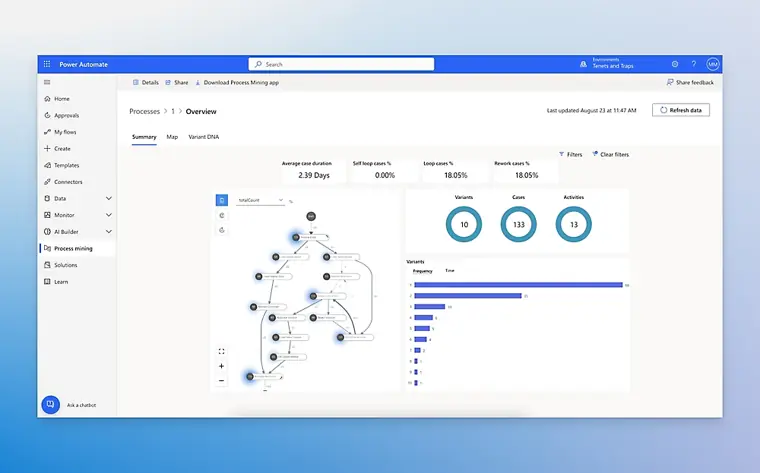
Task and process mining
Analyzes business workflows and measures operational challenges to discover automation opportunities. It produces reports and provides AI guidance to optimize operational efficiency.
Use caseA Center of Excellence team evaluates an existing invoice approval process to find bottlenecks and prioritize steps to automate.
From microsoft.com · image from Microsoft Power Automate -
Native Microsoft 365 experiences
Integrates automation directly into everyday productivity software like Teams, Excel, and SharePoint. It runs automations inside native applications without interrupting work.
Use caseAn employee triggers approval workflows directly within Excel or Teams without switching to another window.
From microsoft.com
Written from Microsoft Power Automate's own website, checked . Each feature links to the page it comes from; images are Microsoft Power Automate's own.
Every plan
| Plan | Monthly | Billed yearly | Per | What it includes |
|---|---|---|---|---|
| Free trial | Free | Not listed | per user | 30 days, cloud flows, standard connectors only, no desktop flows |
| Premium | Not listed | $15 | per user | Cloud flows, attended desktop RPA, premium/custom connectors, 50 MB process mining, Dataverse |
| Process | Not listed | $150 | per bot | Unattended desktop flows, cloud flows |
| Hosted Process | Not listed | $215 | per bot | Process plus Microsoft hosted Azure VM |
| Process Mining add on | Not listed | $5,000 | per tenant | 100 GB process mining data; requires Premium |
| Copilot Studio (agents) | Not listed | Not listed | credits (prepaid commit units / PAYG) | contact sales / Azure pricing |
From Microsoft Power Automate's own pricing page, checked . Prices are in US dollars per month; "billed yearly" is the monthly price when you pay for a year up front. A few figures (often the yearly price) are derived rather than printed on the page.
Before you pay
- Support
- Live chat, phone, community, support request
Only what Microsoft Power Automate's own pages state, with the quote behind each answer. Anything they don't publish is left out rather than guessed.
Microsoft Power Automate video tutorials
Independent creators on YouTube, not Microsoft Power Automate or us. The video loads from YouTube only when you press play.
The free trial
Trial only: 30 day trial; standard connector cloud flows included with most Microsoft 365 business plans
Questions people ask about Microsoft Power Automate
Is Microsoft Power Automate free?
There is a free trial but no free plan: 30 day trial; standard connector cloud flows included with most Microsoft 365 business plans.
Does Microsoft Power Automate have an API?
Yes.
My flow failed. How do I fix it?
Check the notifications icon or Activity tab in the mobile app to view flow error details and edit the flow to fix it. Source
How do I use advance conditions or formulas?
Select Add condition from inside an existing condition. Source
How does licensing work with Microsoft 365?
Microsoft 365 users receive full access to Power Automate. Source
Works with
- AI models
- GPT, Claude
Where this came from
Plans, prices and limits were copied from Microsoft Power Automate's own pages and the other sources listed, then checked .
- microsoft.com/en-us/power-platform/products/power-automate/pricing
- superblocks.com/blog/power-automate-free-paid
- microsoft.com/en-us/power-platform/products/power-automate
- microsoft.com/en-us/power-platform/products/power-automate/support/
- microsoft.com/en-us/power-platform/products/power-automate/guided-tour
- learn.microsoft.com/en-us/training/browse/?WT.mc_id=webupdates_GEP_...
- signup.microsoft.com/get-started/signup?isAdminSignup=true&products...
- learn.microsoft.com/en-us/microsoft-365/admin/add-users/about-admin...
- learn.microsoft.com/en-us/power-automate/
How we collect prices and rank tools · Is something wrong? Correct this listing
Others that do the same job
 Makemake.com
Visual scenario builder for complex multi branch automations across thousands of apps, with AI agents.
- Green flag: Free plan
- Green flag: No card for trial
- Red flag: Credits reset monthly
 Zapierzapier.com
No code automation platform connecting 9,000+ apps with multi step Zaps, tables, forms and AI agents.
- Green flag: Free plan
 Activepiecesactivepieces.com
Open source Zapier alternative with flows, AI agents, tables and MCPs, self hostable on every plan.
- Green flag: Free plan
- Green flag: No card for trial
 Integratelyintegrately.com
Budget no code automation with millions of ready made one click automations across 1,500+ apps.
- Green flag: Free plan
 IFTTTifttt.com
Consumer friendly applet automation linking 1,000+ apps, smart home devices and services.
- Green flag: Free plan
 n8nn8n.io
Fair code workflow automation with AI agent nodes, code steps, and free self hosted Community Edition.
- Green flag: Free plan
- Green flag: No card for trial
- Red flag: Credits reset monthly