
Zapier
No code automation platform connecting 9,000+ apps with multi step Zaps, tables, forms and AI agents.
Best for Non technical teams automating across many SaaS apps
Used Zapier and liked it? Upvote it. One upvote per person. Upvotes come from visitors, not from us, and never change "Our ranking".
What it does
Zapier is a no code automation and AI orchestration platform. Users connect their software applications and AI tools to create automated workflows that trigger actions, store structured data, and route tasks without manual intervention. It is designed for businesses of all sizes, from first time founders to enterprise organizations.
Read more: 3 features and how people use themShow less
-
Zapier MCP
Connects AI clients to external business applications so AI models can access context and run actions as tool calls without requiring prebuilt Zaps, passwords, or API keys.
Use caseA team member starts building a workflow inside Claude or ChatGPT and uses tool calls to take action across business apps without leaving the conversation.
From zapier.com -
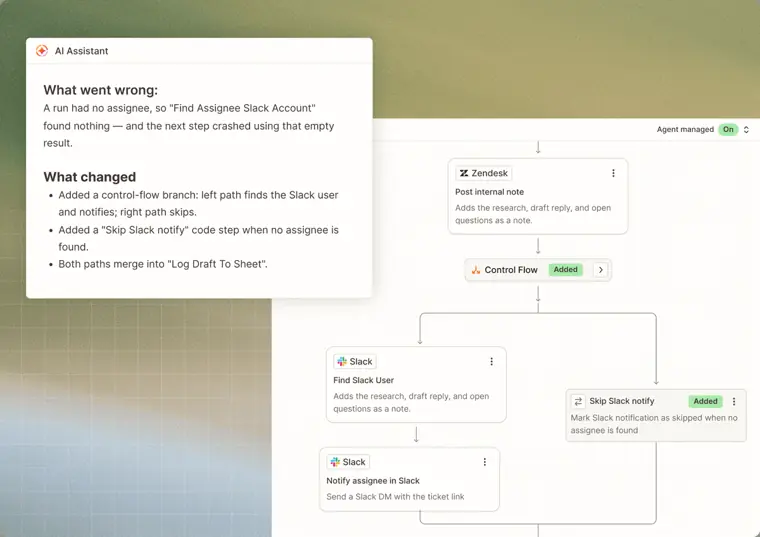
Next Gen Zaps
Executes automated multi step workflows across apps based on set triggers, using deterministic steps and embedded AI manager agents that identify and correct workflow issues.
Use caseA customer support team member sets an intake workflow where every incoming ticket automatically receives a reply and routes to a representative every single time.
From zapier.com · image from Zapier -
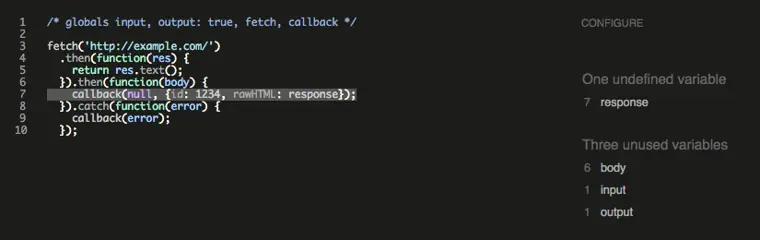
Code by Zapier
Executes custom JavaScript or Python logic inside an automated workflow to calculate values, transform data, or interact with APIs when standard steps do not fit.
Use caseAn operations manager runs custom business logic to calculate discounts and reformat order data before generating an invoice when an e commerce order is placed.
From zapier.com/pricing/rates · image from Zapier
Written from Zapier's own website, checked . Each feature links to the page it comes from; images are Zapier's own.
Every plan
| Plan | Monthly | Billed yearly | Per | What it includes |
|---|---|---|---|---|
| Free | Free | Not listed | per account | 100 tasks/month, unlimited two step Zaps, 10 form pages, 2,500 table records, no premium apps |
| Professional | $29.99 | $19.99 | per account (1 seat), task tiers | From 750 tasks/month (tiers up to 2M); multi step Zaps, premium apps, webhooks, AI fields |
| Team | $103.50 | $69 | per account (up to 25 users), task tiers | Shared Zaps/folders/connections, SAML SSO, priority support; base task tier reported as 2,000/month |
| Enterprise | Contact sales | Not listed | custom | contact sales |
| Agents Pro | Not listed | $33.33 | per account (add on) | 1,500 agent activities/month, $400 billed annually |
From Zapier's own pricing page, checked . Prices are in US dollars per month; "billed yearly" is the monthly price when you pay for a year up front. A few figures (often the yearly price) are derived rather than printed on the page.
Before you pay
- Trains on your data
- Opt out
- Data retention
- Zapier offers custom data retention as an admin control on its Enterprise plan.
- Export your data
- Yes
- SOC 2
- Yes
- GDPR
- Yes
- Support
- Email, live chat, priority support, screen sharing, community
Only what Zapier's own pages state, with the quote behind each answer. Anything they don't publish is left out rather than guessed.
Getting started with Zapier
- Create a new Zapier account to automatically enroll in a 14 day free trial.
- Create your Zap and configure your webhook URL but do not enable your Zap quite yet.
- Provide the generated Catch Hook URL to your triggering app and perform an action to trigger a webhook.
- Return to Zapier and click "Load Samples" or "Reload Samples" in step 4 to view incoming payloads.
- Finish editing your Zap and enable it.
Tips
- Make sure to add something to the payload when sending a webhook, as completely empty webhook requests sent to your Zap will be ignored.
- Treat your Catch Hook URL as a password or secret, because anyone who finds it can spam it and trigger your Zap.
- Add /silent to the end of the webhook URL if your triggering app requires an empty response body.
Written from Zapier's own help pages: help.zapier.com/hc/en-us/articles/84961971924... · help.zapier.com/hc/en-us/articles/84960833556...
Zapier video tutorials
Independent creators on YouTube, not Zapier or us. The video loads from YouTube only when you press play.
What the free plan includes
100 tasks/
Questions people ask about Zapier
How much does Zapier cost?
Paid plans start at $29.99 a month (Professional). 5 plans are listed above, from Zapier's own pricing page.
Is Zapier free?
Yes, there is a free plan: 100 tasks/month, two step Zaps only, no premium apps, 1 seat; Agents Free 400 activities/month.
Does Zapier train its AI on my data?
It can, but you can opt out. Source
Does Zapier have an API?
Yes.
What counts toward task usage?
A task is any successful action that runs in Zapier; only successful actions count toward your task usage. Source
Do Zap triggers use tasks?
No, Zap triggers and polling checks never consume tasks. Source
Is a payment method required for the free trial?
No payment method is required when creating a new account for the 14 day free trial. Source
What happens when you exceed your plan's task limit?
Paid plans automatically switch to pay per task billing to keep workflows running, or hold runs if pay per task billing is disabled. Source
Works with
- Integrations
- Claude, ChatGPT, Cursor, PayPal, Facebook Lead Ads, Gmail, Dropbox, Slack
Where this came from
Plans, prices and limits were copied from Zapier's own pages and the other sources listed, then checked .
- zapier.com/pricing
- eesel.ai/blog/zapier-subscription
- trust.zapier.com/
- zapier.com
- help.zapier.com/hc/en-us/articles/8496260621197-Zapier-s-refund-policy
- help.zapier.com/hc/en-us/articles/8496196837261-How-is-task-usage-m...
- help.zapier.com/hc/en-us/articles/15279018245901
- zapier.com/pricing/rates
- help.zapier.com/hc/en-us/articles/8496197192461
- help.zapier.com/hc/en-us/articles/8495958304909
- help.zapier.com/hc/en-us
How we collect prices and rank tools · Is something wrong? Correct this listing
Others that do the same job
 Makemake.com
Visual scenario builder for complex multi branch automations across thousands of apps, with AI agents.
- Green flag: Free plan
- Green flag: No card for trial
- Red flag: Credits reset monthly
 Activepiecesactivepieces.com
Open source Zapier alternative with flows, AI agents, tables and MCPs, self hostable on every plan.
- Green flag: Free plan
- Green flag: No card for trial
 Integratelyintegrately.com
Budget no code automation with millions of ready made one click automations across 1,500+ apps.
- Green flag: Free plan
 Microsoft Power Automatemicrosoft.com/en-us/power-platform/products/power-automate
Microsoft's cloud and desktop RPA automation platform with Copilot and agents across Microsoft 365.
 IFTTTifttt.com
Consumer friendly applet automation linking 1,000+ apps, smart home devices and services.
- Green flag: Free plan
 n8nn8n.io
Fair code workflow automation with AI agent nodes, code steps, and free self hosted Community Edition.
- Green flag: Free plan
- Green flag: No card for trial
- Red flag: Credits reset monthly