
Pixelcut
AI photo editor for sellers: background removal, upscaling and product shot generation with batch exports.
Best for Small online sellers on a budget
What it does
Pixelcut is an AI image and video platform designed for brands, sellers, and creators. You upload product images or enter text prompts, and the system produces studio quality product photography, edited visuals, and videos. It is built for businesses looking to generate commercial marketing assets and catalog listings without photo shoots.
Read more: 6 features and how people use themShow less
-
AI Product Photography
Generates complete sets of studio or lifestyle photos from a single product upload while keeping logos, colors, and item shapes intact. Produces multiple scene variations based on selected styles or custom text prompts.
Use caseA jewelry brand uploads an image of a ring to generate lifestyle shots on marble countertops and on model images for an online storefront.
From pixelcut.ai/ai-product-photography -
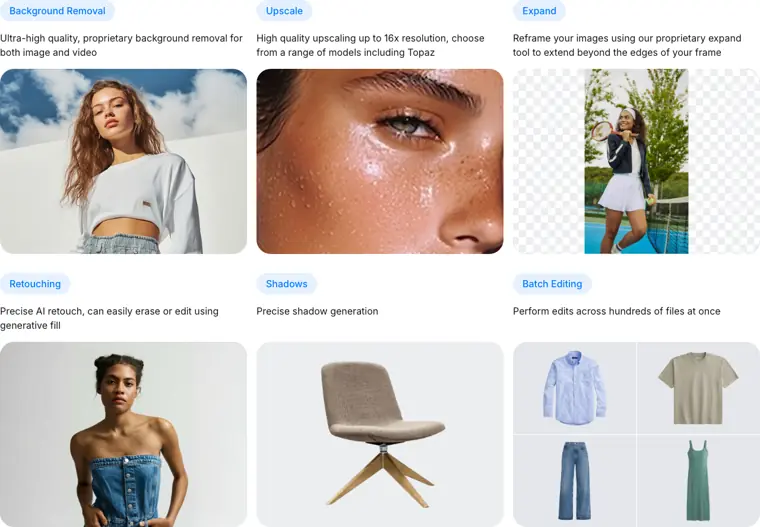
Background Removal
Extracts the subject and isolates it from the background across images and video files. Uses proprietary models to cleanly cut out items for commercial listings.
Use caseAn ecommerce seller removes busy background settings from clothing snapshots before uploading clean packshots to marketplace listings.
From pixelcut.ai · image from Pixelcut -
Image Upscaling
Increases image resolution up to 16x using selectable models. Enhances file sharpness so visuals stay clear in print and high definition digital formats.
Use caseA store owner enlarges low resolution supplier product shots up to 4K resolution before publishing them to a website catalog.
From pixelcut.ai -
Batch Editing
Applies repetitive edits such as background cutouts and image resizing across entire folders of assets at the same time. Accelerates large catalog updates by processing hundreds of files simultaneously.
Use caseA retailer processes hundreds of new inventory photos at once to cut out backgrounds and resize files for a seasonal launch.
From pixelcut.ai -
Image Expansion
Extends the visible area of an image beyond its existing borders using AI generative fill. Reframes compositions without cropping away the core subject.
Use caseA digital marketer uncrops a tight vertical product snapshot to create wider banner assets for web ads.
From pixelcut.ai -
Pixelcut API
Connects automated image generation and editing capabilities directly into external applications and internal tools. Enables automated visual transformations within existing product pipelines.
Use caseA software engineer connects catalog ingestion workflows to automatically trigger background removal and image creation inside an online store.
From pixelcut.ai/ai-product-photography
Written from Pixelcut's own website, checked . Each feature links to the page it comes from; images are Pixelcut's own.
Every plan
| Plan | Monthly | Billed yearly | Per | What it includes |
|---|---|---|---|---|
| Free | Free | $0 | per account | Limited background removal and upscale |
| Pro | $10 | $8 | per account (3 person team) | 600 AI credits/month, 1,000 batch exports/month, unlimited BG removal and upscale, commercial license |
| Business | $30 | $24 | per account (10 person team) | 3,600 AI credits/month, 2,000 batch exports/month |
From Pixelcut's own pricing page, checked . Prices are in US dollars per month; "billed yearly" is the monthly price when you pay for a year up front. A few figures (often the yearly price) are derived rather than printed on the page.
Before you pay
- Watermark on the free plan
- No
- Commercial use
- Paid plans only
What Pixelcut says
Paid Pixelcut plans include a commercial license, so you can use your generated product photos on Shopify, Amazon, Etsy, ads, and other channels
Source page
Only what Pixelcut's own pages state, with the quote behind each answer. Anything they don't publish is left out rather than guessed.
Getting started with Pixelcut
- Open Pixelcut's Product Studio and upload a product photo in JPG, PNG, or HEIC format.
- Pick a Studio or Lifestyle scene format for how your product should be shot.
- Set the angle and background, and add custom prompt instructions to fine tune the scene.
- Generate a set of variations and download the preferred shots.
Written from Pixelcut's own help pages: pixelcut.ai/ai-product-photography
Pixelcut video tutorials
Independent creators on YouTube, not Pixelcut or us. The video loads from YouTube only when you press play.
What the free plan includes
Limited background removal and upscales; exports without watermark
Questions people ask about Pixelcut
How much does Pixelcut cost?
Paid plans start at $10 a month (Pro). 3 plans are listed above, from Pixelcut's own pricing page.
Is Pixelcut free?
Yes, there is a free plan: Limited background removal and upscales; exports without watermark.
Does the Pixelcut free plan add a watermark?
No, free plan output has no watermark. Source
Can I use Pixelcut output commercially?
Yes, on paid plans only. Source
Does Pixelcut have an API?
Yes.
Can you cancel your subscription at any time?
Yes, subscribers can cancel their subscription at any time. Source
How do credits work?
Credits are used when creating or editing images with certain advanced AI models, particularly those provided by third party partners. Source
Do paid Pixelcut plans include commercial use?
Yes, paid plans include a commercial license to use generated product photos on Shopify, Amazon, Etsy, ads, and other channels. Source
Where this came from
Plans, prices and limits were copied from Pixelcut's own pages, then checked .
How we collect prices and rank tools · Is something wrong? Correct this listing
Others that do the same job
 Photoroomphotoroom.com
AI photo editor for removing backgrounds and generating product shots for ecommerce listings and social posts.
- Green flag: Free plan
- Green flag: Cancel online
- Green flag: Refunds within 7 days
 Let's Enhanceletsenhance.io
Cloud AI upscaler and enhancer that boosts resolution, fixes compression and corrects color for print ready images.
- Green flag: Free plan
- Red flag: Free plan watermark
Midjourneymidjourney.com
Subscription text to image and image to video generator known for highly artistic, stylized results via web and Discord.
- Red flag: No free plan
 Designs.aidesigns.ai
All in one AI suite for logos, graphics, videos, voiceovers and copy from one dashboard.
- Green flag: Free plan
- Red flag: No refunds
 Fotorfotor.com
Online photo editor and design tool with AI enhancement, background removal, headshots and an AI agent.
- Green flag: Free plan
- Green flag: Some credits roll over
 Vismevisme.co
Design platform for presentations, infographics, documents and social graphics with AI generation and brand kits.
- Green flag: Free plan
- Green flag: Cancel online
- Green flag: No card for trial
- Red flag: Free plan watermark