
Beautiful.ai
Presentation software with smart templates that auto format slides and AI that drafts decks from prompts.
Best for Teams needing on brand, auto formatted slides
Used Beautiful.ai and liked it? Upvote it. One upvote per person. Upvotes come from visitors, not from us, and never change "Our ranking".
What it does
Beautiful.ai is presentation software that helps teams and individuals build polished slide decks quickly. Users provide prompts, outlines, or source material and receive complete, formatted presentations with automated design adjustments. It is designed for sales, strategy, and corporate teams looking to maintain brand consistency without manual formatting.
Read more: 6 features and how people use themShow less
-
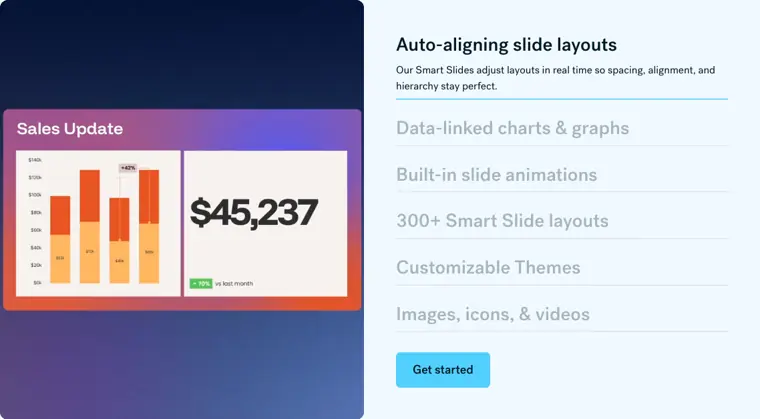
Smart Slides
Adjusts slide layouts, sizes, and spacing automatically as you add and edit your presentation content.
Use caseA presenter changes text and figures on a layout while the slide automatically preserves alignment and spacing.
From beautiful.ai · image from Beautiful.ai -
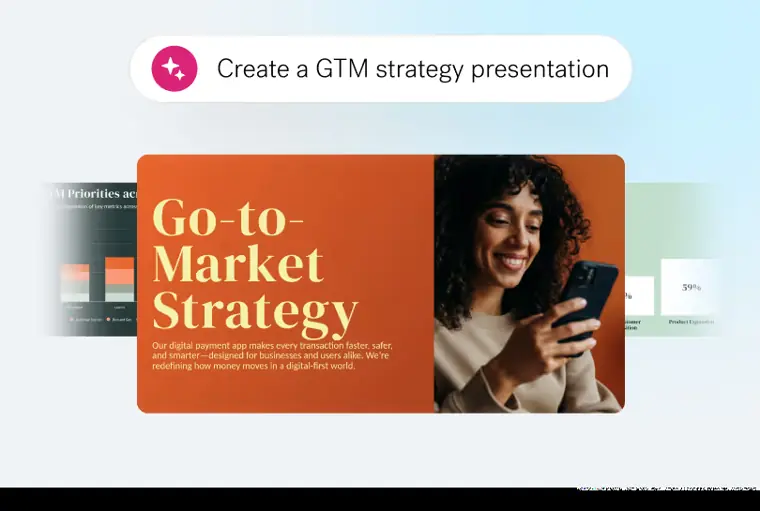
Create with AI
Generates complete presentations from prompts, outlines, and reference materials through a structured creation workflow.
Use caseA team member inputs a topic and an outline to produce a draft slide deck before refining visuals.
From beautiful.ai · image from Beautiful.ai -
Themes and brand control
Applies consistent company colors, typography, and logos across slides and decks from a single saved setup.
Use caseA team locks standard fonts and logos so every colleague produces matching decks.
From beautiful.ai -
Data visualization
Generates charts, diagrams, and graphs that connect directly to spreadsheets for rapid data updates.
Use caseA strategist displays report metrics using linked charts that update when underlying spreadsheet data changes.
From beautiful.ai -
PowerPoint import and export
Transfers decks to and from Microsoft PowerPoint so files can be shared or edited in external software.
Use caseA team exports a finished Beautiful.ai deck to editable PowerPoint format for external stakeholders.
From beautiful.ai/pricing -
Shared asset library
Stores team assets, reusable slide templates, and brand resources in a centralized workspace repository.
Use caseA collaborator retrieves approved company slides and graphics from the shared workspace repository during deck assembly.
From beautiful.ai/pricing
Written from Beautiful.ai's own website, checked . Each feature links to the page it comes from; images are Beautiful.ai's own.
Every plan
| Plan | Monthly | Billed yearly | Per | What it includes |
|---|---|---|---|---|
| Pro | $45 | $14.50 | per user | 1 user, AI generation, custom branding, PPTX/PDF export |
| Team | $50 | $40 | per user (2 to 20 seats) | custom branded themes, shared asset library; workspace limits 5 themes/10 templates/50 slide library/100 assets |
| Enterprise | Contact sales | Not listed | custom | contact sales; unlimited seats, brand guardrails |
From Beautiful.ai's own pricing page, checked . Prices are in US dollars per month; "billed yearly" is the monthly price when you pay for a year up front. A few figures (often the yearly price) are derived rather than printed on the page.
Before you pay
- Refunds
- Annual subscriptions may be eligible for a partial refund if requested within 24 hours of purchase or renewal, while monthly subscriptions are non refundable.
What Beautiful.ai says
Annual subscriptions may be eligible for a partial refund if a request is submitted within 24 hours of the initial purchase or renewal.
Source page - How to cancel
- Subscribers can cancel in the Billing section of their Profile.
What Beautiful.ai says
You may cancel your Beautiful.ai subscription on the Billing section of your Profile.
Source page - Cancel online yourself
- Yes
What Beautiful.ai says
You may cancel your Beautiful.ai subscription on the Billing section of your Profile.
Source page - Renews automatically
- Yes
What Beautiful.ai says
After your trial expires, your credit card on file will be charged automatically unless you cancel your Pro subscription before the 14 days are up.
Source page - Card needed for the trial
- Yes
What Beautiful.ai says
A free trial requires a credit card to get started, which will be charged in full if you don’t cancel your trial before the trial period ends.
Source page - Export your data
- Yes (PDF and editable PowerPoint)
- SOC 2
- Yes
- GDPR
- Yes
- Support
- Self serve knowledge base, email support, priority support
Only what Beautiful.ai's own pages state, with the quote behind each answer. Anything they don't publish is left out rather than guessed.
Beautiful.ai video tutorials
Independent creators on YouTube, not Beautiful.ai or us. The video loads from YouTube only when you press play.
The free trial
Trial only: 14 day free trial, credit card required; no free plan (students with .edu get 1 year free)
Questions people ask about Beautiful.ai
How much does Beautiful.ai cost?
Paid plans start at $45 a month (Pro). 3 plans are listed above, from Beautiful.ai's own pricing page.
Is Beautiful.ai free?
There is a free trial but no free plan: 14 day free trial, credit card required; no free plan (students with .edu get 1 year free).
Can I get a refund from Beautiful.ai?
Annual subscriptions may be eligible for a partial refund if requested within 24 hours of purchase or renewal, while monthly subscriptions are non refundable. Source
How do I cancel Beautiful.ai?
Subscribers can cancel in the Billing section of their Profile. Source
Do I need a credit card to try Beautiful.ai?
Yes, a card is required to start the trial. Source
Does Beautiful.ai offer a free trial?
Yes, you can try Pro or Team plan features with a 14 day free trial requiring a credit card. Source
What is your refund policy?
Annual subscriptions may be eligible for a partial refund within 24 hours of purchase or renewal; monthly subscriptions are non refundable. Source
Works with
- Languages
- 100+ languages
Where this came from
Plans, prices and limits were copied from Beautiful.ai's own pages, then checked .
How we collect prices and rank tools · Is something wrong? Correct this listing
Others that do the same job
Gammagamma.app
Generates presentations, docs, websites and social posts from a prompt or file, with editable card based layouts.
- Green flag: Free plan
- Green flag: Cancel online
- Green flag: No card for trial
- Green flag: Some credits roll over
 Decktopusdecktopus.com
AI presentation generator that builds decks from a topic, with forms, analytics and export.
- Green flag: Cancel online
- Green flag: Some credits roll over
- Green flag: Doesn't train on your data
- Red flag: No free plan
 Prezi (AI)prezi.com
Zooming, non linear presentation tool with Prezi AI that generates and restyles presentations.
- Green flag: Free plan
- Green flag: No card for trial
- Red flag: Trains on your data
 Pitchpitch.com
Collaborative presentation software with AI deck generation, templates, analytics and team workspaces.
- Green flag: Free plan
 Presentations.AIpresentations.ai
Generates branded presentations from prompts or documents, with PowerPoint and PDF export.
- Green flag: Free plan
Tometome.app
Former AI storytelling deck generator; presentation product shut down and company pivoted to an AI CRM.
- Red flag: Changed focus
- Red flag: No free plan