
Buffer (AI Assistant)
Social media scheduler with a built in AI Assistant for drafting, repurposing and rewriting posts.
Best for Creators and small businesses wanting simple, cheap scheduling
What it does
Buffer is a social media management workspace designed for solo creators, brands, and agencies. Users input content ideas, drafts, and campaign schedules across various networks to publish posts, track audience reach, and answer incoming comments. It includes an integrated AI assistant to help draft, refine, and adapt social copy for specific networks.
Read more: 3 features and how people use themShow less
-
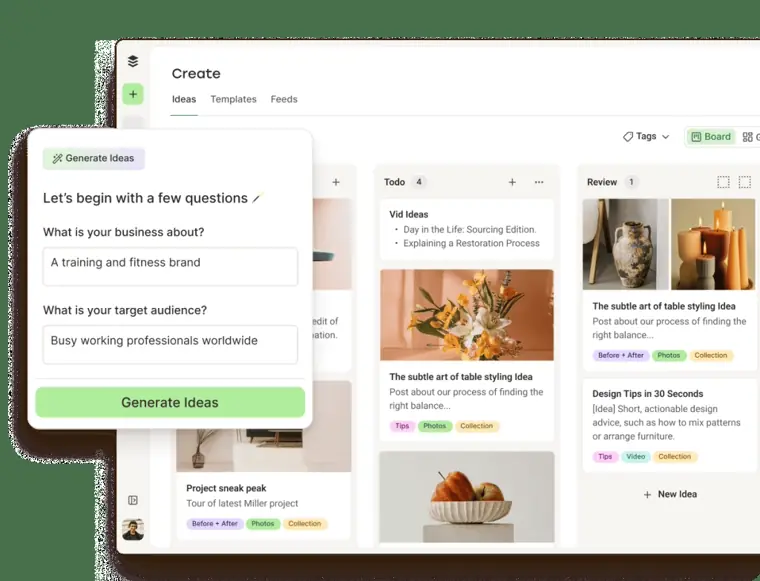
AI Assistant
Generates ideas, rewrites text, and adapts copy for specific social networks using built in AI prompts.
Use caseA creator drafts a short text update and uses the tool to generate a tailored caption for each connected network.
From buffer.com · image from Buffer -
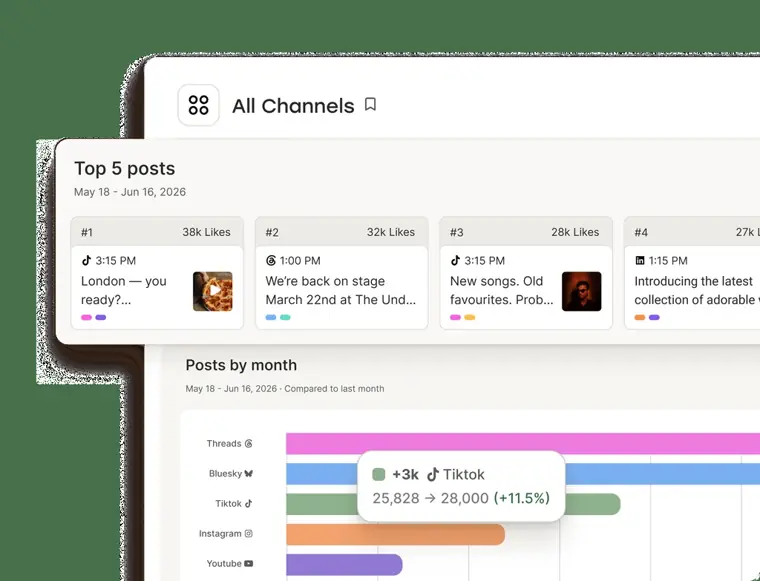
Insights and analytics
Monitors engagement metrics, follower increases, and impressions directly alongside published posts to assess performance.
Use caseA brand manager reviews past post performance and impressions to identify which topics generated the highest engagement.
From buffer.com/pricing · image from Buffer -
Start page
Creates a personalized landing page displaying links to content directly from a social media bio.
Use caseA business owner creates a single link page to showcase their website and products in their social profile bio.
From buffer.com/pricing
Written from Buffer's own website, checked . Each feature links to the page it comes from; images are Buffer's own.
Every plan
| Plan | Monthly | Billed yearly | Per | What it includes |
|---|---|---|---|---|
| Free | Free | $0 | per account | 3 channels, 1 user, 10 scheduled posts/channel, AI Assistant included |
| Essentials | $5 | $5 | per channel | 1 user, unlimited posts, full analytics, AI Assistant |
| Team | $10 | $10 | per channel | unlimited users, approvals, AI Assistant |
From Buffer (AI Assistant)'s own pricing page, checked . Prices are in US dollars per month; "billed yearly" is the monthly price when you pay for a year up front. A few figures (often the yearly price) are derived rather than printed on the page.
Before you pay
- Discounts
- Buffer offers a 50% discount to nonprofit charity organizations.
What Buffer says
We are thrilled to offer a 50% discount to nonprofit charity organizations.
Source page - Support
- Help Center, Discord community, and email support
What Buffer says
Visit the Help Center Join Discord We prioritize customer connection as a company and you could end up speaking with a teammate in any role at Buffer
Source page
Only what Buffer's own pages state, with the quote behind each answer. Anything they don't publish is left out rather than guessed.
Buffer video tutorials
Independent creators on YouTube, not Buffer or us. The video loads from YouTube only when you press play.
What the free plan includes
Up to 3 channels, 1 user, 10 scheduled posts per channel, 100 ideas, 5 AI reply suggestions/
Questions people ask about Buffer
How much does Buffer cost?
Paid plans start at $5 a month (Essentials). 3 plans are listed above, from Buffer's own pricing page.
Is Buffer free?
Yes, there is a free plan: Up to 3 channels, 1 user, 10 scheduled posts per channel, 100 ideas, 5 AI reply suggestions/week, 30 day insights.
Does Buffer have a student or other discount?
Buffer offers a 50% discount to nonprofit charity organizations. Source
Does Buffer have an API?
Yes.
How do I know if I’m on a legacy plan?
Log in to your Buffer account and head to the Billing tab. If your account is on a Pro, Premium, Business, or Enterprise plan, you are on a legacy version of Buffer. Source
Are there any legacy features that would not be included in the new plans?
Every feature that exists on legacy plans is also available on one of the new plans. Source
Can I try out the new plans ahead of time?
You can create a free Buffer account under a different email address and start a 14 day free trial before switching. Source
Works with
- AI models
- ChatGPT, Claude
Where this came from
Plans, prices and limits were copied from Buffer (AI Assistant)'s own pages, then checked .
- buffer.com/pricing
- buffer.com/
- developers.buffer.com/guides/integrations/mcp.html
- support.buffer.com/articles/what-are-the-benefits-of-buffers-new-pl...
- buffer.com/api/commit
- buffer.com/social-media-terms
- support.buffer.com/
- support.buffer.com/articles/buffers-accepted-payment-methods-PQpO40rDXV
- support.buffer.com/articles/buffers-nonprofit-discount-5DWYhyusYn
How we collect prices and rank tools · Is something wrong? Correct this listing
Others that do the same job
Metricoolmetricool.com
Social and ads analytics, scheduling and reporting across networks with a credit based AI assistant.
- Green flag: Free plan
- Green flag: No card for trial
 FeedHivefeedhive.com
AI assisted social media scheduler with content recycling, performance prediction and automations.
 Hootsuite (OwlyWriter AI)hootsuite.com
Enterprise grade social media management suite with AI content creation, listening and analytics.
- Green flag: No card for trial
- Red flag: Renamed
 Brand24brand24.com
Monitors brand mentions across social, news, blogs, forums and podcasts with AI sentiment and insights.
 Browse AIbrowse.ai
No code AI robots that scrape and monitor websites, sending data to sheets, APIs and automations.
- Green flag: Free plan
- Green flag: No card for trial
- Green flag: Refunds within 60 days
 MailerLitemailerlite.com
Affordable, simple email marketing tool with automations, landing pages, websites and AI writing assistant.
- Green flag: Free plan
- Green flag: No card for trial
- Red flag: Free plan watermark