
Clay
Spreadsheet style GTM platform that waterfalls 100+ data providers and AI agents to enrich and score leads.
Best for Growth teams building custom enrichment workflows
Used Clay and liked it? Upvote it. One upvote per person. Upvotes come from visitors, not from us, and never change "Our ranking".
What it does
Clay is go to market infrastructure used to find company data, enrich leads, and run automated prospecting plays. Users provide basic targets like domains, social profiles, or CRM lists, and the platform returns enriched contacts, research insights, and scored accounts. It is designed for sales, marketing, and operations teams building revenue systems.
Read more: 4 features and how people use themShow less
-
Multi provider waterfalls
Enriches contact and account lists across multiple data providers sequentially to improve match rates for data points like phone numbers and profiles.
Use caseA sales operations lead runs a list through multiple providers to boost contact phone number coverage across international regions.
From clay.com/pricing -
Claygent AI web research
Deploys an AI agent capable of browsing the web to conduct custom research, extract data points, and answer questions across table rows.
Use caseAn outbound representative uses automated agent research to find and qualify accounts before jumping on sales calls.
From clay.com/pricing -
CRM enrichment and sync
Connects directly to platforms like Salesforce or HubSpot to keep records populated with live data, new contacts, and updated company fields.
Use caseA marketing operations manager connects HubSpot to automatically update company records with newly enriched firmographics.
From clay.com -
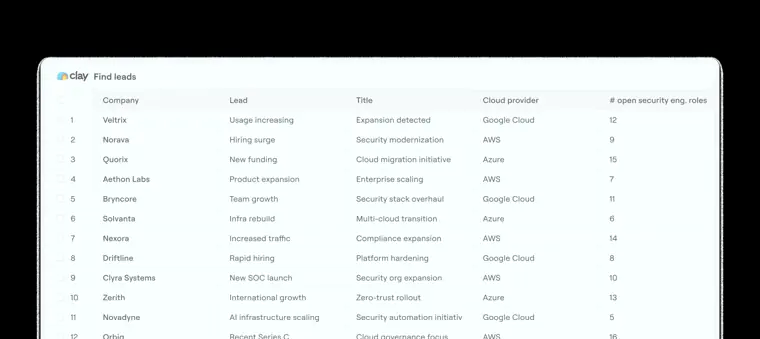
Signal tracking
Monitors changes across accounts and prospects, including job shifts, promotions, new hires, company updates, and web intent.
Use caseA business development rep monitors job changes across target accounts to reach out when contacts switch companies.
From clay.com/pricing · image from Clay
Written from Clay's own website, checked . Each feature links to the page it comes from; images are Clay's own.
Every plan
| Plan | Monthly | Billed yearly | Per | What it includes |
|---|---|---|---|---|
| Free | Free | $0 | per account | 500 actions/mo, 100 data credits/mo, 200 rows/table |
| Launch | $185 | $167 | per account | 15K actions/mo, 2.5K data credits/mo, no CRM integrations |
| Growth | $495 | $446 | per account | 40K actions/mo, 6K data credits/mo, CRM sync, HTTP API integrations |
| Enterprise | Not listed | Not listed | per account | contact sales; annual commitment, Clay API access |
From Clay's own pricing page, checked . Prices are in US dollars per month; "billed yearly" is the monthly price when you pay for a year up front. A few figures (often the yearly price) are derived rather than printed on the page.
Before you pay
- Unused credits roll over
- Partial
What Clay says
Actions: No rollover Actions represent your fixed monthly capacity. Unused Actions expire at the end of each billing cycle... Data Credits: Yes, with limits
Source page - Export your data
- Yes
What Clay says
CRM exports and syncs (Salesforce, HubSpot, etc.). Data warehouse exports and syncs. HTTP API calls. Ads audience exports (e.g., LinkedIn, Facebook).
Source page - Support
- Community
Only what Clay's own pages state, with the quote behind each answer. Anything they don't publish is left out rather than guessed.
Getting started with Clay
- Start by establishing a source to get data into your Clay table.
- Click Add column and select Use AI within your Clay table.
- Describe what you want to accomplish in plain English in the Generate tab.
- Click Generate to automatically create an optimized prompt, recommended AI model, and output fields.
- Review the generated setup in the Configure tab.
- Make any adjustments if needed, then run your enrichment.
Tips
- After generating a setup, easily edit your original description and regenerate to refine your AI column.
- Connecting your own GPT, Claude, or Gemini API key via the Account dropdown may reduce costs, though a Clay managed account is used by default.
- Set up Only run if conditions under Run settings so enrichments only execute when specific criteria are met.
Written from Clay's own help pages: university.clay.com/docs-topics/getting-started · university.clay.com/docs/use-ai-integration-overview
What the free plan includes
500 actions + 100 data credits/
Questions people ask about Clay
How much does Clay cost?
Paid plans start at $185 a month (Launch). 4 plans are listed above, from Clay's own pricing page.
Is Clay free?
Yes, there is a free plan: 500 actions + 100 data credits/mo, 200 rows per table, no phone enrichment, no CRM integrations, no scheduled runs.
Do unused Clay credits roll over?
Partly: some unused credits carry over, with limits. Source
Does Clay have an API?
Yes.
What happens if I run out of data credits mid run?
Processing stops when your balance reaches zero. You will not be charged beyond your available credits, unfinished rows do not run, and completed rows retain results. Source
Does Clay charge a markup on variable AI pricing?
No, Clay charges 0% markup on variable AI pricing for reasoning models. Source
Why not just use fixed pricing for everything?
Advanced reasoning models have variable costs per task, so a flat rate would require overcharging simpler tasks to cover expensive ones. Source
Will I always know what a task will cost before I run it?
For fixed price models the cost shown is exact, while variable price models show an upfront estimate with credits withheld before running. Source
Works with
- AI models
- Helium, Argon, Neon, GPT 4o, GPT 4.1, GPT 5.1, Claude 4.5 Haiku, Claude 4.5 Sonnet, Gemini 2.5 Pro, Kimi K2.6
Where this came from
Plans, prices and limits were copied from Clay's own pages, then checked .
- clay.com/pricing
- clay.com/
- university.clay.com/docs/actions-data-credits
- university.clay.com/
- university.clay.com/docs/ai-pricing
- clay.com/pricing-calculator
- clay.com/integrations?cat=marketing+and+outreach+tools
How we collect prices and rank tools · Is something wrong? Correct this listing
Others that do the same job
 Hunter.iohunter.io
Finds and verifies professional email addresses by domain or name, with built in cold email sequences.
- Green flag: Free plan
- Green flag: No card for trial
 Smartleadsmartlead.ai
Cold email automation with unlimited mailboxes, auto rotation, warmup and agency client workspaces.
- Green flag: No card for trial
 lemlistlemlist.com
Multichannel prospecting tool combining cold email, LinkedIn, calls and a lead database with AI personalization.
- Green flag: Credits roll over
 Seamless.AIseamless.ai
AI search engine that finds and verifies B2B emails and phone numbers in real time.
- Green flag: Free plan
 Apollo.ioapollo.io
All in one B2B contact database with prospecting search, email sequencing, dialer and CRM enrichment.
- Green flag: Free plan
- Green flag: No card for trial
 Instantlyinstantly.ai
Cold email platform with unlimited sending accounts, built in warmup, B2B lead database and AI reply agents.
- Green flag: No card for trial
- Green flag: Some credits roll over