
Cursor
Acquired: by SpaceX (SpaceXAI), Aug 2026
AI native VS Code based editor with agents, tab completion and cloud agents, now bundled with Grok via X Subscription.
Best for Developers wanting an AI first IDE with agents
Used Cursor and liked it? Upvote it. One upvote per person. Upvotes come from visitors, not from us, and never change "Our ranking".
What it does
Cursor is a coding agent and editor designed to turn software ideas into working code. Users provide instructions, codebases, or reference materials, and the system autonomously writes code, runs terminal commands, and builds features across desktop, mobile, and web surfaces. It is built for individual developers and engineering teams creating ambitious software projects.
Read more: 3 features and how people use themShow less
-
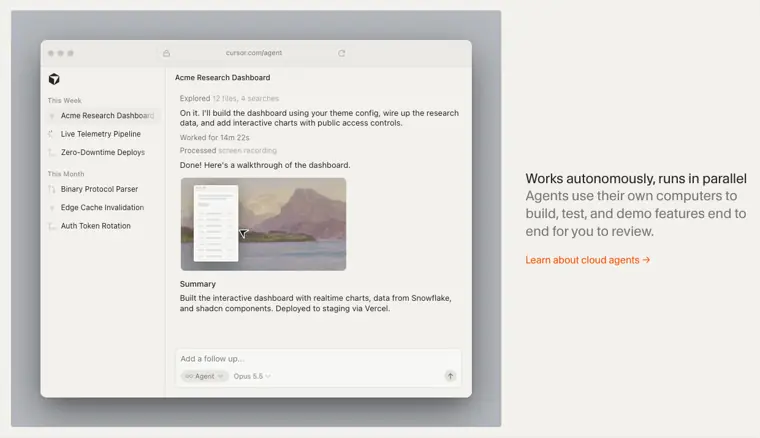
Cloud agents
Executes development tasks in parallel on remote machines to create, test, and demonstrate features end to end.
Use caseA software engineer hands off long running feature implementation to run autonomously in the background while focusing on architectural decisions.
From cursor.com · image from Cursor -
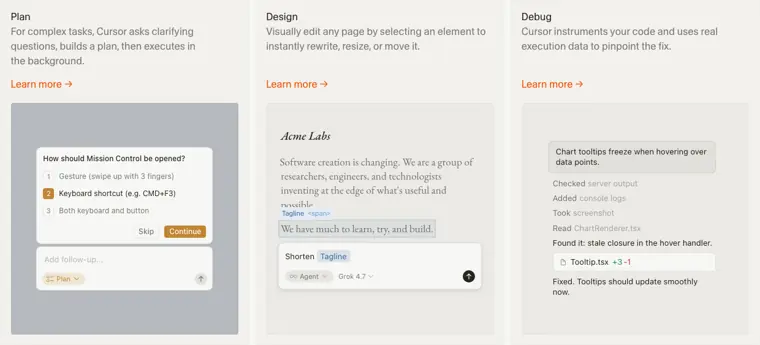
Plan mode
Asks clarifying questions about incoming tasks to formulate a structured development plan before executing changes in the background.
Use caseA developer outlines a complex application update and answers questions from the agent before implementation begins.
From cursor.com/product · image from Cursor -
Privacy mode
Protects company code from being stored or used to train AI models.
Use caseA team admin configures workspace settings so proprietary enterprise source files remain excluded from model training sets.
From cursor.com/pricing
Written from Cursor's own website, checked . Each feature links to the page it comes from; images are Cursor's own.
Every plan
| Plan | Monthly | Billed yearly | Per | What it includes |
|---|---|---|---|---|
| Free | Free | Not listed | per account | Limited agent and chat requests |
| Plus | $8 | Not listed | per account | Baseline shared Grok usage pool (Cursor + Grok apps + X), weekly refresh; Claude/GPT not included |
| Premium | $30 | Not listed | per account | 4x Plus usage; cloud agents, automations, AI code review; third party models via top ups at API price |
| Super | $100 | Not listed | per account | 15x Plus usage |
| Ultra | $200 | Not listed | per account | 50x Plus usage |
| Teams | $30 | Not listed | per user | Pooled usage, '$30+' per seat |
| Enterprise | Not listed | Not listed | per user | contact sales |
From Cursor's own pricing page, checked . Prices are in US dollars per month; "billed yearly" is the monthly price when you pay for a year up front. A few figures (often the yearly price) are derived rather than printed on the page.
Before you pay
- How to cancel
- Subscribers can cancel anytime at least 24 hours prior to renewal to avoid additional charges.
What Cursor says
Cancel anytime, at least 24 hours prior to renewal to avoid additional charges.
Source page - Renews automatically
- Yes
What Cursor says
Cancel anytime, at least 24 hours prior to renewal to avoid additional charges.
Source page - Unused credits roll over
- No
- Trains on your data
- Opt out
What Cursor says
Privacy Mode can be enabled in settings or by a team or enterprise admin. Privacy Mode is available to anyone (free or Pro). New team members inherit the team's Privacy Mode settings. When enabled, we will not train on your data.
Source page - Data retention
- Users can delete their account at any time from the Settings dashboard, or contact customer support for assistance.
What Cursor says
You can delete your account at any time from the Settings dashboard -- see our account deletion guide for instructions. For additional assistance with account deletion, contact customer support at hi@cursor.com.
Source page - SOC 2
- Yes
What Cursor says
Cursor holds AIUC 1, ISO/IEC 27001:2022, and ISO/IEC 42001:2023 certifications, along with a SOC 2 Type II attestation.
Source page - Support
- Email
What Cursor says
For additional assistance with account deletion, contact customer support at hi@cursor.com.
Source page
Only what Cursor's own pages state, with the quote behind each answer. Anything they don't publish is left out rather than guessed.
Getting started with Cursor
- Download Cursor, open the app, sign in, and pick a folder.
- Open Agent with Cmd I or Ctrl I and ask Cursor to explain the codebase.
- Ask Cursor to suggest a few safe improvements, pick one, and ask it to make the change.
- Review the diff and ask Cursor to run existing project checks such as tests, the type checker, linting, or a local build.
- Press Shift+Tab in the agent input to toggle Plan Mode for bigger changes that span multiple files or need research.
Tips
- Start with low risk first tasks like improving copywriting or fixing small UI issues.
- Click any checkpoint in the chat timeline to preview files and revert to that state if Agent takes a wrong turn.
- Press Cmd+Enter or Ctrl+Enter while Agent is working to send a message immediately and redirect its work without waiting in the queue.
Written from Cursor's own help pages: cursor.com/docs/get-started/quickstart · cursor.com/docs/agent/overview
What the free plan includes
Limited agent and chat requests; no Claude/
Questions people ask about Cursor
How much does Cursor cost?
Paid plans start at $8 a month (Plus). 7 plans are listed above, from Cursor's own pricing page.
Is Cursor free?
Yes, there is a free plan: Limited agent and chat requests; no Claude/GPT access on Free under the new X Subscription plans.
How do I cancel Cursor?
Subscribers can cancel anytime at least 24 hours prior to renewal to avoid additional charges. Source
Do unused Cursor credits roll over?
No, unused credits do not carry over to the next month. Source
Does Cursor train its AI on my data?
It can, but you can opt out. Source
What is the right plan for me?
Cursor recommends Premium for new AI users, Super for daily agent users, and Ultra for power users, while Plus is recommended for social creators with limited AI usage. Teams is recommended for professionals collaborating with others, and larger organizations needing invoicing, pooled usage, or advanced security should choose Enterprise. Source
What are my payment options?
Self serve plans accept all major credit and debit cards, whereas invoice based billing and wire transfers are available for Enterprise plans upon contacting sales. Source
How do usage limits work?
Each tier provides a shared AI usage pool across Cursor and Grok that refreshes weekly. If included usage runs out, users can continue with top offs or wait for the weekly refresh. Source
Is the Grok API included in my plan?
Paid plans include Grok API access, but API usage is billed separately at standard model rates rather than drawing from the included usage pool. Source
Works with
- AI models
- Grok 4.7, Grok 4.6, Grok 4.5, Composer 2.5, Claude Sonnet 5.5, Claude Opus 5.5, Gemini 4 Argon, GPT 5.6 Sol
Where this came from
Plans, prices and limits were copied from Cursor's own pages and the other sources listed, then checked .
- cursor.com/pricing
- smartscope.blog/en/blog/cursor-x-subscription-pricing-third-party-m...
- vktr.com/ai-market/spacex-completes-60-billion-cursor-acquisition/
- cursor.com
- cursor.com/docs/models-and-pricing
- cursor.com/help/models-and-usage/usage-limits
- cursor.com/download
- cursor.com/security
- cursor.com/docs/cloud-agent
- cursor.com/api/auth/checkoutDeepControl?tier=plus&yearly=false
- cursor.com/api/auth/checkoutDeepControl?tier=premium&yearly=false
How we collect prices and rank tools · Is something wrong? Correct this listing
Others that do the same job
 Kirokiro.dev
AWS's spec driven agentic IDE and CLI that turns prompts into specs, tasks and code.
- Green flag: Free plan
 Zedzed.dev
Fast open source Rust code editor with an agent panel, edit predictions and external agent support.
- Green flag: Free plan
- Green flag: No card for trial
 Windsurf (Devin Desktop)windsurf.com
Cognition's agentic IDE, formerly Windsurf, now rebranding as Devin Desktop with the Devin Local agent.
- Green flag: Free plan
- Red flag: Renamed
 Shopifyshopify.com
Leading ecommerce platform with Sidekick AI that designs stores, writes product copy and edits photos.
 Squarespacesquarespace.com
Design led website builder with AI site generation, built in commerce, scheduling and AI visibility tracking.
- Green flag: No card for trial
- Red flag: Credits reset monthly
 Dorikdorik.com
No code AI website builder with CMS, blogging, white label client dashboard and lifetime plans.