
Kiro
AWS's spec driven agentic IDE and CLI that turns prompts into specs, tasks and code.
Best for Spec driven development on AWS friendly teams
Used Kiro and liked it? Upvote it. One upvote per person. Upvotes come from visitors, not from us, and never change "Our ranking".
What it does
Kiro is an agentic engineering platform built and operated by AWS that provides both an IDE and a CLI. You give it natural language prompts, architectural designs, or existing docs, and it generates executable specifications, implementation tasks, code, and property tests. It is designed for individual developers, growing software teams, and enterprise engineering organizations building software.
Read more: 5 features and how people use themShow less
-
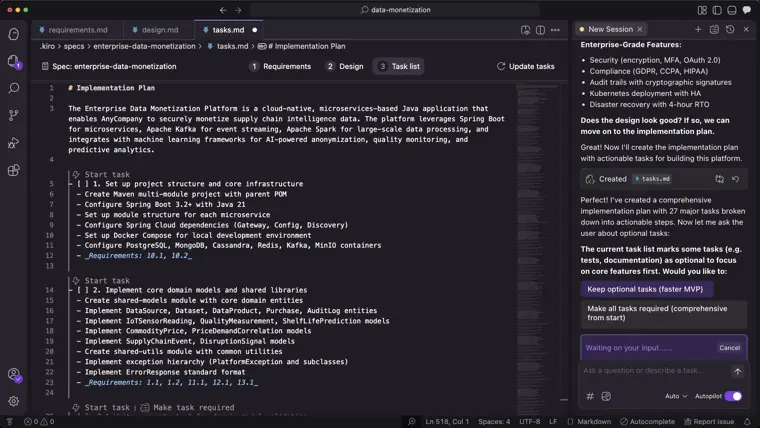
Spec driven development
Converts prompts into structured requirements, architectural designs, and ordered implementation tasks before generating code. It guides development through structured phases to produce maintainable code that matches specified intent.
Use caseA software engineer converts a rough concept into a working prototype over a weekend using structured task lists.
From kiro.dev · image from Kiro -
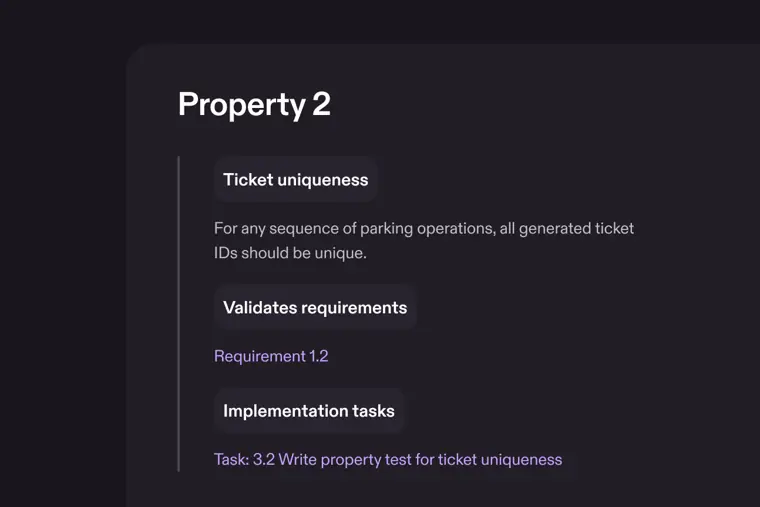
Property based testing
Validates system behavior across full input ranges using rules rather than isolated examples. It detects edge case issues and defects that typical unit tests fail to catch.
Use caseA developer adds rate limiting to an export endpoint and generates automated property tests to verify it across all inputs.
From kiro.dev · image from Kiro -
Requirements validation
Evaluates requirements for conflicting constraints, ambiguities, and logical inconsistencies prior to design or coding. It applies automated reasoning techniques to catch planning mistakes early.
Use caseA technical architect identifies conflicting requirements in a project specification before writing any implementation code.
From kiro.dev/enterprise -
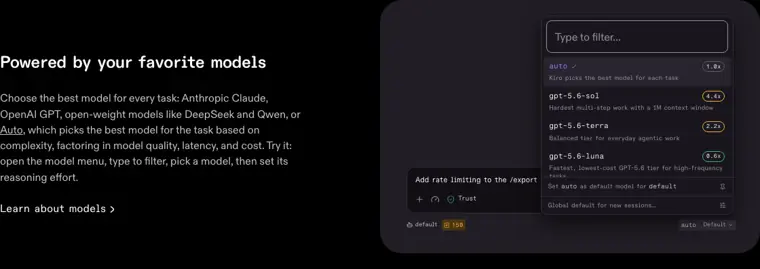
Auto model routing
Selects the optimal model for a given task according to complexity. It balances model quality, latency, and operational expense across frontier and open weight options.
Use caseA programmer submits varying coding tasks and lets the system pick between lightweight models for simple work and frontier models for complex work.
From kiro.dev · image from Kiro -
Headless CLI for pipelines
Executes coding workflows, review tasks, and bug fixes directly in continuous integration and delivery pipelines. It runs without requiring a user to open a desktop editor.
Use caseA DevOps engineer reviews pull requests and applies automated bug fixes inside a continuous integration pipeline.
From kiro.dev
Written from Kiro's own website, checked . Each feature links to the page it comes from; images are Kiro's own.
Every plan
| Plan | Monthly | Billed yearly | Per | What it includes |
|---|---|---|---|---|
| Free | Free | Not listed | per user | 50 credits/mo |
| Pro | $20 | Not listed | per user | 1,000 credits/mo; add ons $0.04/credit |
| Pro+ | $40 | Not listed | per user | 2,000 credits/mo |
| Pro Max | $100 | Not listed | per user | 5,000 credits/mo |
| Power | $200 | Not listed | per user | 10,000 credits/mo |
| Enterprise | Not listed | Not listed | per user | contact sales; overages $0.04/credit |
From Kiro's own pricing page, checked . Prices are in US dollars per month; "billed yearly" is the monthly price when you pay for a year up front.
Before you pay
- Data retention
- Separately, inputs may be stored for up to 60 days for abuse detection purposes.
What Kiro says
Separately, Kiro may also store inputs for up to 60 days for additional abuse detection, and model specific retention requirements may apply
Source page - Export your data
- Yes
What Kiro says
You can export daily per user activity telemetry for the Kiro subscribers in your organization.
Source page
Only what Kiro's own pages state, with the quote behind each answer. Anything they don't publish is left out rather than guessed.
Getting started with Kiro
- Launch Kiro and open your project directory using File > Open Folder, dragging and dropping the folder, or running kiro . in your command line.
- Access the Kiro Panel by clicking the Kiro Ghost icon in the activity bar.
- Start a conversational chat session in the chat pane to interact with the AI.
- Generate steering documents from the Kiro panel to provide project context and guide AI behavior.
- Create a new spec by clicking the Spec button to define requirements, design, and implementation tasks.
- Execute the generated spec tasks and track their progress in the tasks file.
Written from Kiro's own help pages: kiro.dev/docs/getting-started/first-project/
What the free plan includes
50 credits/
Questions people ask about Kiro
How much does Kiro cost?
Paid plans start at $20 a month (Pro). 6 plans are listed above, from Kiro's own pricing page.
Is Kiro free?
Yes, there is a free plan: 50 credits/mo; Claude Sonnet 4.5 and open weight models (rate limited).
Works with
- AI models
- GPT 5.6 Sol, GPT 5.6 Terra, GPT 5.6 Luna, Claude Fable 5.1, Claude Opus 5.5, Claude Sonnet 5.5, Claude Opus 5, Claude Opus 4.8, Claude Opus 4.7, Claude Opus 4.6, Claude Opus 4.5, Claude Sonnet 5, Claude Sonnet 4.6, Claude Sonnet 4.5, Claude Sonnet 4.0, Auto, Claude Haiku 4.5, Kimi K3, DeepSeek 3.2, MiniMax M2.5, GLM 5, MiniMax M2.1, Qwen3 Coder Next
Where this came from
Plans, prices and limits were copied from Kiro's own pages and the other sources listed, then checked .
- kiro.dev/pricing/
- kiro.dev/docs/privacy-and-security/data-protection/
- kiro.dev/
- kiro.dev/docs/upgrade-guides/migrating-from-vscode/
- kiro.dev/docs/guides/learn-by-playing/
- kiro.dev/docs/getting-started/first-project/
- kiro.dev/docs/models/
- kiro.dev/docs/enterprise/monitor-and-track/user-activity/
- kiro.dev/docs/privacy-and-security/
How we collect prices and rank tools · Is something wrong? Correct this listing
Others that do the same job
 Zedzed.dev
Fast open source Rust code editor with an agent panel, edit predictions and external agent support.
- Green flag: Free plan
- Green flag: No card for trial
 Cursorcursor.com
AI native VS Code based editor with agents, tab completion and cloud agents, now bundled with Grok via X Subscription.
- Green flag: Free plan
- Red flag: Acquired
- Red flag: Credits reset monthly
 Windsurf (Devin Desktop)windsurf.com
Cognition's agentic IDE, formerly Windsurf, now rebranding as Devin Desktop with the Devin Local agent.
- Green flag: Free plan
- Red flag: Renamed
 Shopifyshopify.com
Leading ecommerce platform with Sidekick AI that designs stores, writes product copy and edits photos.
 Squarespacesquarespace.com
Design led website builder with AI site generation, built in commerce, scheduling and AI visibility tracking.
- Green flag: No card for trial
- Red flag: Credits reset monthly
 Dorikdorik.com
No code AI website builder with CMS, blogging, white label client dashboard and lifetime plans.