
Zed
Fast open source Rust code editor with an agent panel, edit predictions and external agent support.
Best for Speed focused devs wanting an open source AI editor
Used Zed and liked it? Upvote it. One upvote per person. Upvotes come from visitors, not from us, and never change "Our ranking".
What it does
Zed is a minimal code editor written in Rust for developers working on macOS, Linux, and Windows. You open your source code to write, run tools, and direct native or external AI agents. It gives you fast editing, edit predictions, and real time project collaboration with teammates.
Read more: 5 features and how people use themShow less
-
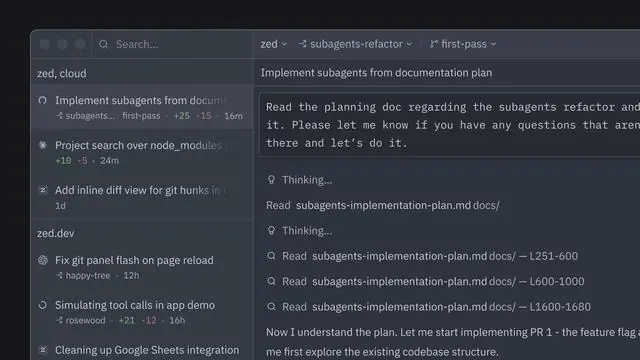
Agent panel
Provides an interface to submit prompts to AI agents, include project context, review code changes, and manage conversation threads.
Use caseA developer directs the native agent to review code modifications and manage prompt threads across project files.
From zed.dev/docs/ai/quick-start · image from Zed -
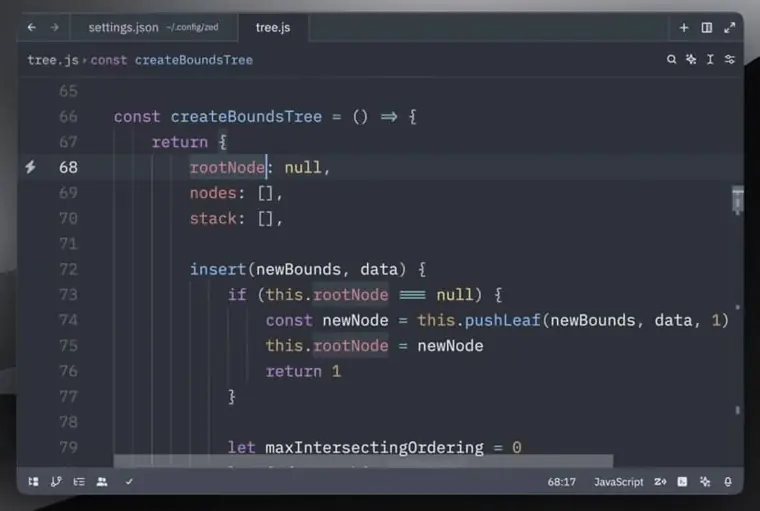
Edit prediction
Generates AI completions directly in the editor buffer as you type your code.
Use caseA software engineer accepts suggested code completions inline while writing application logic.
From zed.dev/docs/ai/quick-start · image from Zed -
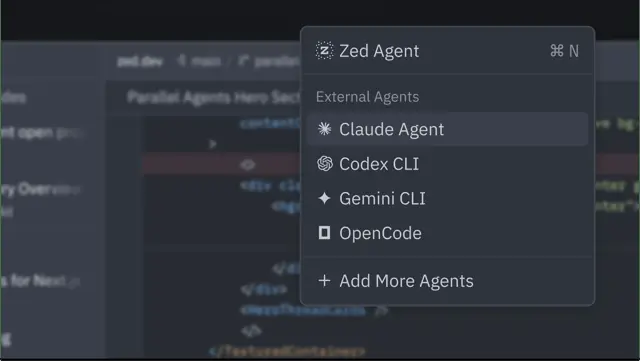
External agents
Integrates outside coding assistants like Claude Agent or Codex CLI directly into the editor using ACP.
Use caseA developer hooks Claude Agent or Codex into the workspace to use their existing assistant tools and auth.
From zed.dev/pricing · image from Zed -
Multiplayer collaboration
Enables engineers to code together simultaneously, communicate through chat, and share screens and projects.
Use caseTwo engineers join a shared project session to pair program and discuss changes over chat.
From zed.dev -
Custom API keys
Connects your personal API keys from external model providers directly to power AI features without Zed hosted usage.
Use caseA programmer configures their own Anthropic or OpenAI API key to run queries through their existing account.
From zed.dev/docs/ai/quick-start
Written from Zed's own website, checked . Each feature links to the page it comes from; images are Zed's own.
Every plan
| Plan | Monthly | Billed yearly | Per | What it includes |
|---|---|---|---|---|
| Personal | Free | Not listed | per user | BYOK or external agents only |
| Pro | $10 | Not listed | per user | $5 hosted tokens/mo, then usage at API list +10%; unlimited edit predictions |
| Business | $30 | Not listed | per seat | Hosted AI at usage rates or BYOK; admin data controls |
From Zed's own pricing page, checked . Prices are in US dollars per month; "billed yearly" is the monthly price when you pay for a year up front.
Before you pay
- Card needed for the trial
- No
What Zed says
We offer a 14 day free trial of Pro with $5 of GPT 6 Luna usage and unlimited accepted edit predictions. No credit card is required.
Source page - Trains on your data
- Opt out
What Zed says
Zed does not collect training data for the Edit Prediction model unless all of these conditions are met: 1. You opt in by toggling Training Data Collection
Source page - Data retention
- Normal AI requests are not retained by Zed, while provider designated safety models retain data for at least 30 days.
What Zed says
Normal AI requests are not retained by Zed. For Zed hosted models, provider agreements prohibit training on your prompts or code context and require zero data retention
Source page
Only what Zed's own pages state, with the quote behind each answer. Anything they don't publish is left out rather than guessed.
Getting started with Zed
- Go to Agent Settings with agent: open settings to configure LLM providers, External Agents, or MCP servers.
- Open the Settings Editor with zed: open settings to configure tool permissions or set up edit prediction providers.
- Start in the Agent Panel to prompt the agent, add context, review changes, and manage threads.
- Use the Threads Sidebar to organize agent work and run multiple agent threads or Terminal Threads at once.
Tips
- Provider keys saved through Zed are stored in the system keychain, not in settings.json.
- To turn AI off completely, open the Settings Editor with zed: open settings, search for Disable AI, and enable it.
Written from Zed's own help pages: zed.dev/docs/ai/quick-start · zed.dev/docs/ai/overview
What the free plan includes
Personal: free editor, no hosted AI included; use own API keys or external agents; 14 day Pro trial ($5 credit, no card)
Questions people ask about Zed
How much does Zed cost?
Paid plans start at $10 a month (Pro). 3 plans are listed above, from Zed's own pricing page.
Is Zed free?
Yes, there is a free plan: Personal: free editor, no hosted AI included; use own API keys or external agents; 14 day Pro trial ($5 credit, no card).
Does Zed train its AI on my data?
It can, but you can opt out. Source
Do I need a credit card to try Zed?
No, you can start without a credit card. Source
Which Zed plan is right for me?
Our Personal plan is for users who want a best in class code editor without AI capabilities, or for users who prefer to use their own keys/external agents. Our Pro plan comes with Zed hosted models out of the box. Our Business plan is for teams that need centralized control over how Zed is used. Source
What's the difference between Pro and Business?
Pro is for individual developers: it comes with Zed hosted AI models and unlimited edit predictions. Business is an org level layer on top of that, not a replacement. Members can hold their own Pro subscriptions. What Business adds is the admin layer – org wide controls over AI features, data sharing policies, and unified billing across every seat. Source
Do Business seats include AI credits?
Business seats don't bundle a fixed LLM credit allotment. You can use Zed hosted AI at standard usage rates, or bring your own API keys from Anthropic, OpenAI, Google, and others – in which case spend goes directly to your provider. Some teams already have existing AI contracts; Zed can run through them without requiring you to switch or double up. Source
How does the free trial work?
We offer a 14 day free trial of Pro with $5 of GPT 6 Luna usage and unlimited accepted edit predictions. No credit card is required. The trial ends when you use the $5 balance or 14 days pass, whichever comes first. Your $5 trial balance is shared across Zed and Delta. Start your trial on your Account page. Source
Works with
- AI models
- GPT 6 Luna, Qwen2.5 Coder 7B, Claude Fable 5.1, Claude Fable 5, Anthropic, Google, OpenAI
Where this came from
Plans, prices and limits were copied from Zed's own pages and the other sources listed, then checked .
- zed.dev/pricing
- zed.dev/docs/ai/ai-improvement
- zed.dev/
- zed.dev/git
- zed.dev/docs/ai/quick-start
- zed.dev/docs/reference/all-settings
- zed.dev/docs/ai/privacy-and-security
- zed.dev/docs/business/privacy
- github.com/login?client_id=Iv1.7e72654f487b56be&return_to=%2Flogin%...
How we collect prices and rank tools · Is something wrong? Correct this listing
Others that do the same job
 Kirokiro.dev
AWS's spec driven agentic IDE and CLI that turns prompts into specs, tasks and code.
- Green flag: Free plan
 Cursorcursor.com
AI native VS Code based editor with agents, tab completion and cloud agents, now bundled with Grok via X Subscription.
- Green flag: Free plan
- Red flag: Acquired
- Red flag: Credits reset monthly
 Windsurf (Devin Desktop)windsurf.com
Cognition's agentic IDE, formerly Windsurf, now rebranding as Devin Desktop with the Devin Local agent.
- Green flag: Free plan
- Red flag: Renamed
 Shopifyshopify.com
Leading ecommerce platform with Sidekick AI that designs stores, writes product copy and edits photos.
 Squarespacesquarespace.com
Design led website builder with AI site generation, built in commerce, scheduling and AI visibility tracking.
- Green flag: No card for trial
- Red flag: Credits reset monthly
 Dorikdorik.com
No code AI website builder with CMS, blogging, white label client dashboard and lifetime plans.