
FreshBooks
Invoicing first accounting for service businesses and freelancers, with expenses, time tracking, projects and reports.
Best for Freelancers and service businesses that bill clients
Used FreshBooks and liked it? Upvote it. One upvote per person. Upvotes come from visitors, not from us, and never change "Our ranking".
What it does
FreshBooks is cloud accounting and invoicing software designed for freelancers, solopreneurs, and small businesses with employees or contractors. Users enter expenses, track work hours, and manage client details to produce invoices, run financial reports, process payments, and manage payroll. It helps business owners keep their books organized, track daily operations, and bill their clients.
Read more: 5 features and how people use themShow less
-
Invoicing
Builds and sends customized invoices in minutes while calculating taxes automatically. It can pull tracked time and recorded expenses directly into the bill.
Use caseA freelancer compiles logged hours and business expenses into a customized bill for a client.
From freshbooks.com -
Billing and payments
Accepts online payments through cards, bank transfers, or digital wallets with automated billing and late payment reminders. It allows clients to pay bills without needing direct follow ups.
Use caseA business owner collects payment through bank transfers or credit cards and sends automated reminders to avoid chasing unpaid bills.
From freshbooks.com -
Expense tracking
Records business expenditures by importing bank account feeds and scanning receipts with mobile devices. It automatically assigns transactions to specific spending categories.
Use caseA self employed worker snaps pictures of paper receipts to log business purchases without typing in details manually.
From freshbooks.com -
Payroll
Calculates payroll tax deductions, issues direct deposits, and records employee benefit details. It creates corresponding bookkeeping transactions automatically for every pay run.
Use caseA business owner pays team members via direct deposit and submits state and federal payroll tax filings.
From freshbooks.com -
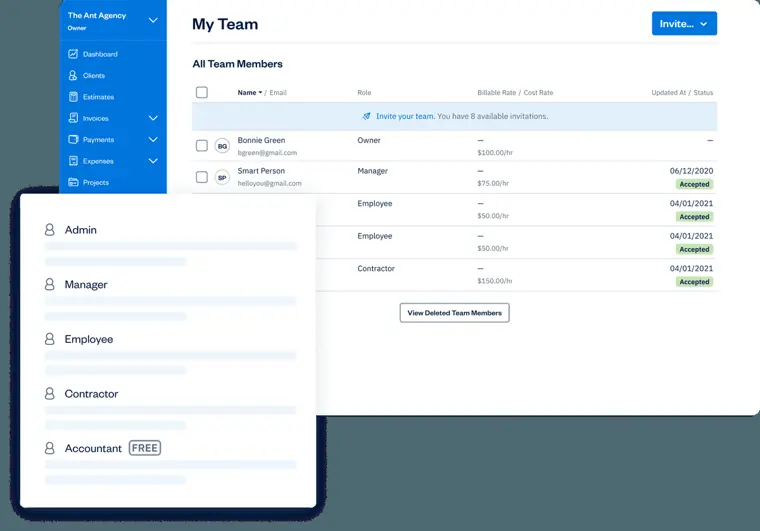
Team management
Organizes staff members into custom roles such as manager, employee, contractor, or accountant with distinct access permissions. It tracks project performance, time logs, and submitted costs across workers.
Use caseAn administrator invites an external accountant to inspect the chart of accounts and complete bank reconciliations.
From freshbooks.com/team-management · image from FreshBooks
Written from FreshBooks's own website, checked . Each feature links to the page it comes from; images are FreshBooks's own.
Every plan
| Plan | Monthly | Billed yearly | Per | What it includes |
|---|---|---|---|---|
| Lite | $23 | Not listed | per account | 5 billable clients; extra team members $11/mo |
| Plus | $43 | Not listed | per account | 50 clients; extra team members $11/mo |
| Premium | $70 | Not listed | per account | Unlimited clients; extra team members $11/mo |
| Select | Not listed | Not listed | per account | contact sales; unlimited clients, 2 team members included, Advanced Payments included |
From FreshBooks's own pricing page, checked . Prices are in US dollars per month; "billed yearly" is the monthly price when you pay for a year up front. A few figures (often the yearly price) are derived rather than printed on the page.
Before you pay
- Refunds
- FreshBooks offers a risk free 30 day money back guarantee.
- Refund window
- 30 days
- Card needed for the trial
- No
- Data retention
- After the completion of the collection purpose, data is deleted or anonymized, or retained where an ongoing legitimate business purpose exists.
What FreshBooks says
we will either delete the Personal Information or, to the extent permitted under applicable law, anonymize it.
Source page - Export your data
- Yes, CSV and PDF formats are supported for exporting reports
What FreshBooks says
Export for Excel - Download the report as a CSV file Print or Save PDF - Print the report or save the report as a PDF
Source page - Support
- Phone, help center
Only what FreshBooks's own pages state, with the quote behind each answer. Anything they don't publish is left out rather than guessed.
Getting started with FreshBooks
- Sign up for a FreshBooks account.
- Add your business details.
- Navigate to the FreshBooks dashboard to explore invoicing features and add billable clients.
- Choose to accept credit card payments with FreshBooks payments.
- Download the FreshBooks mobile app to handle your accounting and mileage tracking on the go.
Tips
- During the 30 day free trial, you receive access to all features except Advanced Payments.
- Invite up to 10 Accountants per business at no extra cost on Plus and Premium plans.
- All of your information stays in your account when transitioning from a free trial to a paid plan.
Written from FreshBooks's own help pages: freshbooks.com/
FreshBooks video tutorials
Independent creators on YouTube, not FreshBooks or us. The video loads from YouTube only when you press play.
The free trial
Trial only: 30 day free trial, no credit card required
Questions people ask about FreshBooks
How much does FreshBooks cost?
Paid plans start at $23 a month (Lite). 4 plans are listed above, from FreshBooks's own pricing page.
Is FreshBooks free?
There is a free trial but no free plan: 30 day free trial, no credit card required.
Can I get a refund from FreshBooks?
FreshBooks offers a risk free 30 day money back guarantee. The refund window stated is 30 days. Source
Do I need a credit card to try FreshBooks?
No, you can start without a credit card. Source
Does FreshBooks have an API?
Yes.
What do I get in my 30 day free trial of FreshBooks?
During a trial, small business owners get access to all FreshBooks features except Advanced Payments (like FreshBooks invoicing, time tracking, and expensing). Source
What is accounting software?
Accounting software is a tool that allows you to track and manage the day to day finances of your businesses. It allows you to create invoices, track expenses, run reports, accept payments, and monitor business finances. Source
Where this came from
Plans, prices and limits were copied from FreshBooks's own pages, then checked .
- freshbooks.com/pricing
- freshbooks.com/
- support.freshbooks.com/hc/en-us?_gl=1%2A1kqhw1q%2A_gcl_au%2ANjc2MTU...
- support.freshbooks.com/hc/en-us/articles/219089507-What-is-a-Profit...
- support.freshbooks.com/hc/en-us/articles/219103028-What-is-a-Sales-...
- support.freshbooks.com/hc/en-us/articles/360053137632-How-does-Proj...
- freshbooks.com/policies/privacy
- freshbooks.com/accept-payments
- freshbooks.com/policies/terms-of-service
How we collect prices and rank tools · Is something wrong? Correct this listing
Others that do the same job
 Puzzlepuzzle.io
AI native general ledger for startups with auto categorization, real time metrics and optional bookkeeper reviewed close.
QuickBooks Onlinequickbooks.intuit.com/online
Small business accounting suite with Intuit Intelligence AI agents for categorization, reconciliation, invoicing and tax estimates.
- Green flag: Free plan
- Green flag: No card for trial
 Digitsdigits.com
AI driven general ledger that books and reconciles transactions 24/7 with live financials, bill pay and invoicing.
 Xeroxero.com/us
Cloud accounting with bank feeds, invoicing and bills, plus JAX, an AI finance agent that automates routine work.
- Red flag: No free plan
 Docytdocyt.com
AI native accounting and ERP for hotels and multi location businesses with continuous reconciliation and zero day close.
- Red flag: Changed focus
- Red flag: No free plan
 Truewindtruewind.ai
AI 'digital accountant' that turns source data into journal entries and reconciliations to speed up month end close.
- Red flag: Changed focus
- Red flag: No free plan