
Ginger Software
Grammar and spelling checker with sentence rephraser, translator and keyboard apps for 40+ languages.
Best for Non native English speakers fixing grammar
What it does
Ginger Software is an AI writing assistant that checks and corrects written text. You enter sentences or drafts into applications or web browsers, and it returns context based grammar fixes, spelling corrections, and phrasing suggestions. It is designed for students, business professionals, and anyone writing emails, documents, or social posts.
Read more: 3 features and how people use themShow less
-
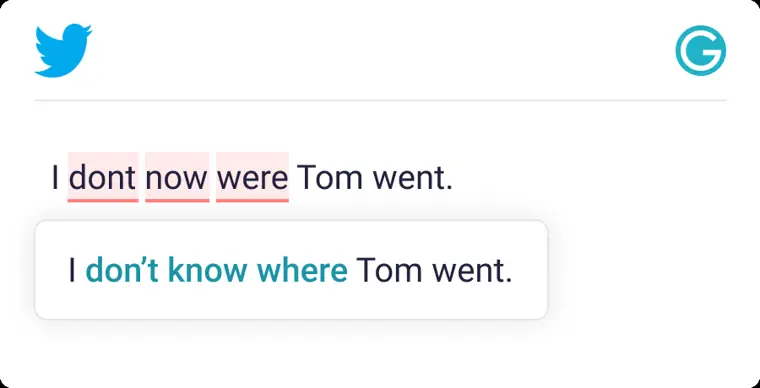
Context based corrections
Analyzes full sentences to suggest corrections for spelling and grammar errors in one click. Speeds up writing time by examining the broader context rather than isolated words.
Use caseAn employee drafts a long email in Gmail and accepts one click grammar fixes before sending it to a customer.
From gingersoftware.com · image from Ginger Software -
Sentence rephrase
Generates alternative wordings for existing text to help convey your intended meaning. Helps shorten and clarify wordy sentences.
Use caseA writer simplifies a wordy sentence in a Word document by picking an alternative suggested by the rephraser.
From gingersoftware.com -
AI based synonyms
Displays a selection of alternate words and expressions when you tap or double click a word on any website. Helps you locate the exact term you want to use.
Use caseA professional writing a post on LinkedIn double clicks a word to select a more fitting synonym.
From gingersoftware.com
Written from Ginger Software's own website, checked . Each feature links to the page it comes from; images are Ginger Software's own.
Every plan
| Plan | Monthly | Billed yearly | Per | What it includes |
|---|---|---|---|---|
| Free | Free | $0 | per account | Limited corrections (unverified; one third party source says no free tier) |
| Premium | $9.99 | $4.99 | per user | Unlimited corrections, rephrasing, translation (third party snapshot May 2026) |
From Ginger Software's own pricing page, checked . Prices are in US dollars per month; "billed yearly" is the monthly price when you pay for a year up front. Some of these figures came from third party reports and could not be confirmed on the official page.
Before you pay
- GDPR
- Yes
Only what Ginger Software's own pages state, with the quote behind each answer. Anything they don't publish is left out rather than guessed.
Ginger Software video tutorials
Independent creators on YouTube, not Ginger Software or us. The video loads from YouTube only when you press play.
What the free plan includes
Limited free corrections and rephrasings (unverified)
Questions people ask about Ginger Software
How much does Ginger Software cost?
Paid plans start at $9.99 a month (Premium). 2 plans are listed above, from Ginger Software's own pricing page.
Is Ginger Software free?
Yes, there is a free plan: Limited free corrections and rephrasings (unverified).
Works with
- Languages
- English
Where this came from
Plans, prices and limits were copied from Ginger Software's own pages, then checked .
How we collect prices and rank tools · Is something wrong? Correct this listing
Others that do the same job
 Hemingway Editorhemingwayapp.com
Readability editor that highlights hard sentences, passive voice and adverbs; Plus adds AI rewrites and grammar fixes.
- Green flag: Free plan
- Green flag: No card for trial
- Green flag: Doesn't train on your data
 ProWritingAidprowritingaid.com
Grammar, style and readability checker with in depth line editing reports, rephrasing and story critiques for long form writers.
- Green flag: Free plan
- Green flag: Credits don't expire
- Green flag: Refunds within 3 days
- Green flag: Doesn't train on your data
 LanguageToollanguagetool.org
Multilingual grammar, spelling and style checker with AI paraphrasing, browser add ons and team style guides.
- Green flag: Free plan
- Green flag: Cancel online
 Outwriteoutwrite.com
Grammar checker and AI rewriter with paraphrasing, style suggestions and a plagiarism checker on paid plans.
- Green flag: Free plan
- Green flag: Cancel online
- Red flag: No refunds
Trinkatrinka.ai
Grammar checker built for academic and technical writing, with journal style checks, paraphraser and plagiarism scans.
- Green flag: Free plan
 Article Forgearticleforge.com
Keyword to article generator producing 1,500+ word SEO articles with bulk mode and auto blog posting.