
Outwrite
Grammar checker and AI rewriter with paraphrasing, style suggestions and a plagiarism checker on paid plans.
Best for Students wanting grammar plus paraphrasing
Used Outwrite and liked it? Upvote it. One upvote per person. Upvotes come from visitors, not from us, and never change "Our ranking".
What it does
Outwrite is an AI writing assistant that checks and refines your text across online platforms. You enter your draft writing to receive corrections for errors, sentence rewrites, and stylistic improvements. It is designed for students, professionals, casual writers, and teams.
Read more: 5 features and how people use themShow less
-
Spelling and grammar
Identifies misspelled words and grammatically incorrect phrases to correct mistakes in your text.
Use caseAn individual checks their text to eliminate spelling, grammar, and punctuation mistakes before sending an email.
From outwrite.com/pricing -
Sentence rewriting
Generates multiple alternative phrasings for a sentence to adjust its length, fluency, and variety.
Use caseA writer rewrites sentences to make them shorter, longer, or different to improve variety.
From outwrite.com/pricing -
Style improvements
Applies AI to recommend stylistic and structural changes that enhance writing eloquence.
Use caseA team member refines draft text to improve the overall quality, flow, and clarity of company communications.
From outwrite.com/pricing -
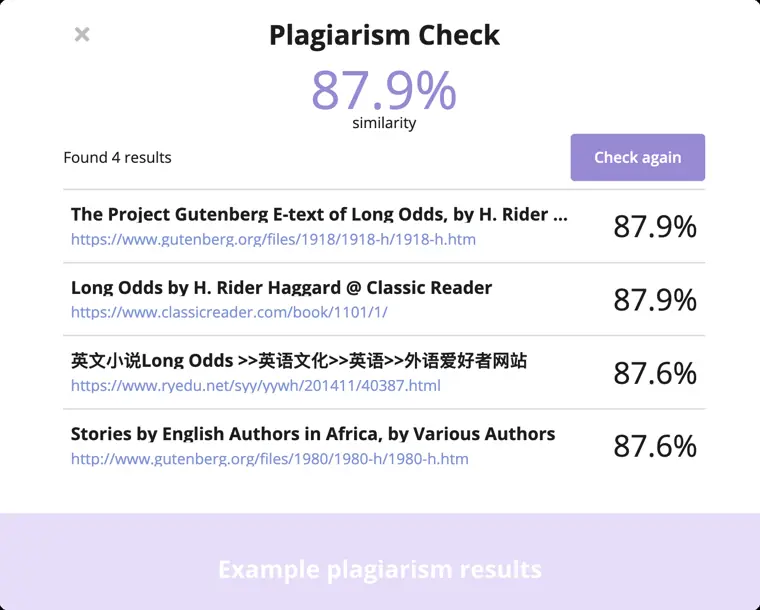
Plagiarism checks
Scans your document against publicly available web content to verify text originality.
Use caseA student searches internet sources to ensure their document is original before submitting an assignment.
From outwrite.com/pricing · image from Outwrite -
Writing statistics
Calculates readability and grade level metrics in real time as you edit.
Use caseA business professional views readability and grade level scores to monitor the complexity of their work.
From outwrite.com
Written from Outwrite's own website, checked . Each feature links to the page it comes from; images are Outwrite's own.
Every plan
| Plan | Monthly | Billed yearly | Per | What it includes |
|---|---|---|---|---|
| Essential (Free) | Free | $0 | per account | Spelling & grammar, thesaurus |
| Pro | $9.95 | Not listed | per user | Style, structure, sentence rewriting, 50 plagiarism checks/mo, priority support |
| Teams | $7.95 | Not listed | per user | Everything in Pro + team management, consolidated billing |
From Outwrite's own pricing page, checked . Prices are in US dollars per month; "billed yearly" is the monthly price when you pay for a year up front. A few figures (often the yearly price) are derived rather than printed on the page.
Before you pay
- Refunds
- Refunds are only provided if Outwrite is unable to provide the Services or at management's absolute discretion, calculated proportionally for the unused Subscription Period, and no refunds are given for change of mind.
What Outwrite says
Outwrite will only provide you with a refund of the Subscription Fee in the event they are unable to provide the Services, or if the management of Outwrite makes a decision
Source page - How to cancel
- Subscribers cancel via the Billing page of the Platform if subscribed by credit card, or by turning off Auto Renewing in their Apple account if subscribed through Apple.
What Outwrite says
If you subscribed via credit card, cancellation instructions can be performed by visiting the Billing page of the Platform. If you subscribed through an Apple account, you will be required to turn off "Auto Renewing"
Source page - Cancel online yourself
- Yes
What Outwrite says
You can cancel your Pro subscription at any time by visiting the Billing section of your account settings.
Source page - Renews automatically
- Yes
- Commercial use
- Not allowed
What Outwrite says
you will not use the Services or the Platform in connection with any commercial endeavours except those that are specifically endorsed or approved by the management of Outwrite;
Source page - Support
- Email, help center
Only what Outwrite's own pages state, with the quote behind each answer. Anything they don't publish is left out rather than guessed.
Getting started with Outwrite
- Create a free Outwrite account.
- Answer a few questions about your goals and writing preferences.
- Create or upload a document to the Outwrite Editor.
- Start editing your document.
Written from Outwrite's own help pages: outwrite.com/faq
Outwrite video tutorials
Independent creators on YouTube, not Outwrite or us. The video loads from YouTube only when you press play.
What the free plan includes
Essential: spelling & grammar, thesaurus, custom dictionary, writing stats on web, extensions, Google Docs, Word
Questions people ask about Outwrite
How much does Outwrite cost?
Paid plans start at $7.95 a month (Teams). 3 plans are listed above, from Outwrite's own pricing page.
Is Outwrite free?
Yes, there is a free plan: Essential: spelling & grammar, thesaurus, custom dictionary, writing stats on web, extensions, Google Docs, Word.
Can I get a refund from Outwrite?
Refunds are only provided if Outwrite is unable to provide the Services or at management's absolute discretion, calculated proportionally for the unused Subscription Period, and no refunds are given for change of mind. Source
How do I cancel Outwrite?
Subscribers cancel via the Billing page of the Platform if subscribed by credit card, or by turning off Auto Renewing in their Apple account if subscribed through Apple. Source
Can I use Outwrite output commercially?
No, commercial use is not allowed. Source
How can I change my plan?
You can change your billing cycle by visiting the Billing section of your account settings, switching between monthly and yearly plans. Source
Can I cancel my subscription at any time?
Yes, you can cancel at any time via the Billing section of your account settings and retain access for the paid period. Source
What’s the difference between Essential and Pro?
The free plan fixes spelling and grammar errors, while Pro adds features like sentence paraphrasing, style suggestions, and passive voice detection. Source
Do you offer a group plan?
Yes, the Outwrite for Teams plan is available for groups of 3 or more people at a discounted rate. Source
Where this came from
Plans, prices and limits were copied from Outwrite's own pages and the other sources listed, then checked .
- outwrite.com/pricing
- outwrite.com/faq
- outwrite.com/
- app.outwrite.com/auth/register
- support.outwrite.com/article/64-pro-features
- support.outwrite.com/
- outwrite.com/docs
- outwrite.com/terms
How we collect prices and rank tools · Is something wrong? Correct this listing
Others that do the same job
 Hemingway Editorhemingwayapp.com
Readability editor that highlights hard sentences, passive voice and adverbs; Plus adds AI rewrites and grammar fixes.
- Green flag: Free plan
- Green flag: No card for trial
- Green flag: Doesn't train on your data
 ProWritingAidprowritingaid.com
Grammar, style and readability checker with in depth line editing reports, rephrasing and story critiques for long form writers.
- Green flag: Free plan
- Green flag: Credits don't expire
- Green flag: Refunds within 3 days
- Green flag: Doesn't train on your data
 LanguageToollanguagetool.org
Multilingual grammar, spelling and style checker with AI paraphrasing, browser add ons and team style guides.
- Green flag: Free plan
- Green flag: Cancel online
Trinkatrinka.ai
Grammar checker built for academic and technical writing, with journal style checks, paraphraser and plagiarism scans.
- Green flag: Free plan
 Ginger Softwaregingersoftware.com
Grammar and spelling checker with sentence rephraser, translator and keyboard apps for 40+ languages.
- Green flag: Free plan
 Article Forgearticleforge.com
Keyword to article generator producing 1,500+ word SEO articles with bulk mode and auto blog posting.