
LanguageTool
Multilingual grammar, spelling and style checker with AI paraphrasing, browser add ons and team style guides.
Best for Multilingual writers checking non English text
Used LanguageTool and liked it? Upvote it. One upvote per person. Upvotes come from visitors, not from us, and never change "Our ranking".
What it does
LanguageTool is an AI writing assistant that checks texts across multiple languages. Writers paste text or type directly into the tool to receive corrections for spelling, grammar, punctuation, and stylistic choices. It is designed for individual writers and organizations who want to produce polished, error free content in programs and browsers.
Read more: 4 features and how people use themShow less
-
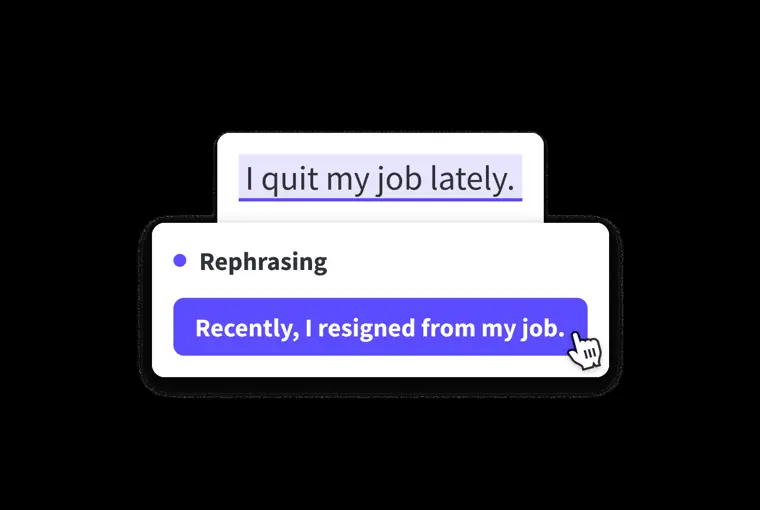
AI paraphrasing
Rewrites whole sentences to match preferred tones such as formal, fluent, simple, or concise. Generates alternative sentence options when you double click a word or view suggestions in the editor sidebar.
Use caseA language learner rewrites robotic sounding sentences to sound natural like a native speaker.
From languagetool.org · image from LanguageTool -
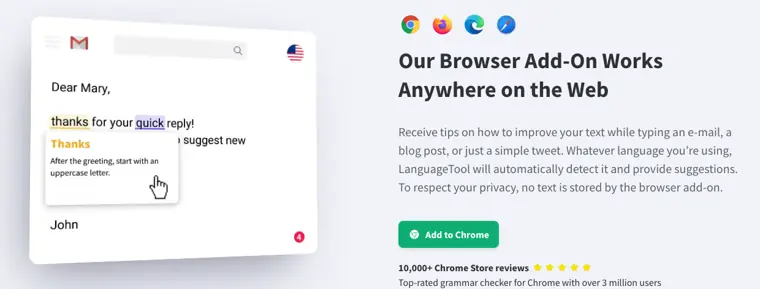
Browser add ons
Detects languages automatically and delivers corrections while you compose content anywhere on the web. Displays suggestion cards and error highlights without storing your text.
Use caseA writer composes a blog post online and reviews grammar and spelling suggestions directly in the browser.
From languagetool.org · image from LanguageTool -
Windows desktop application
Provides system wide error correction directly inside supported desktop writing applications. Underlines spelling errors in red, grammar issues in yellow, and style issues in blue.
Use caseAn office employee checks text for spelling and punctuation errors while drafting an email in Outlook.
From languagetool.org -
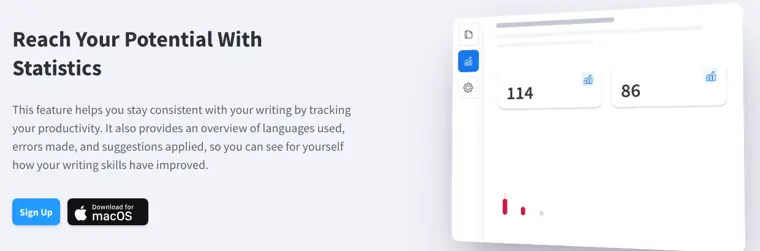
Writing statistics
Tracks productivity and records your writing progress over time. Displays metrics covering languages used, total errors made, and corrections applied.
Use caseA writer checks their history of errors and suggestions in the editor to verify improvement over time.
From languagetool.org · image from LanguageTool
Written from LanguageTool's own website, checked . Each feature links to the page it comes from; images are LanguageTool's own.
Every plan
| Plan | Monthly | Billed yearly | Per | What it includes |
|---|---|---|---|---|
| Free (Basic) | Free | $0 | per account | 2,000 chars/field, 3 AI rephrasings/day |
| Premium (Individual) | $24.90 | $5.83 | per user | 150,000 chars/field, unlimited paraphrasing, personal style guide; USD $69.90/yr (third party snapshot 2026 to 09 to 27); official EUR: €19.90/mo, €39.90/quarter, €59.89/yr (€4.90/mo), €99.90/2 yrs |
| Premium Teams | Not listed | Not listed | per user (2 to 1,000 users) | Team style guide, team dictionary, user management; price did not render |
From LanguageTool's own pricing page, checked . Prices are in US dollars per month; "billed yearly" is the monthly price when you pay for a year up front. A few figures (often the yearly price) are derived rather than printed on the page.
Before you pay
- Refunds
- Transforming an individual premium subscription into a team subscription receives a prorated refund upon manual cancellation by support.
What LanguageTool says
Our team will then manually cancel your subscription and create a prorated refund.
Source page - How to cancel
- Subscribers can cancel their subscription at any time directly in their account settings.
What LanguageTool says
You can cancel your subscription at any time in your account settings.
Source page - Cancel online yourself
- Yes
What LanguageTool says
You can cancel your subscription at any time in your account settings.
Source page - Renews automatically
- Yes
What LanguageTool says
Yes, all our subscriptions renew automatically at the end of each billing cycle (monthly or annually, depending on your subscription).
Source page - Data retention
- No text is stored by the browser add on, while texts in the editor are securely stored.
- Discounts
- Students, teachers, and professors can receive up to 20% off a Premium subscription with an educational discount.
What LanguageTool says
Students, teachers, and professors can benefit from LanguageTool’s exclusive educational discount. Receive up to 20% off a Premium subscription if you qualify.
Source page - Support
- Email, community, help center
What LanguageTool says
please contact LanguageTool’s customer service at support@languagetoolplus.com.
Source page
Only what LanguageTool's own pages state, with the quote behind each answer. Anything they don't publish is left out rather than guessed.
LanguageTool video tutorials
Independent creators on YouTube, not LanguageTool or us. The video loads from YouTube only when you press play.
What the free plan includes
2,000 characters per text field; limited Picky Mode; 3 AI rephrasings per day
Questions people ask about LanguageTool
How much does LanguageTool cost?
Paid plans start at $24.90 a month (Premium (Individual)). 3 plans are listed above, from LanguageTool's own pricing page.
Is LanguageTool free?
Yes, there is a free plan: 2,000 characters per text field; limited Picky Mode; 3 AI rephrasings per day.
Can I get a refund from LanguageTool?
Transforming an individual premium subscription into a team subscription receives a prorated refund upon manual cancellation by support. Source
How do I cancel LanguageTool?
Subscribers can cancel their subscription at any time directly in their account settings. Source
Does LanguageTool have a student or other discount?
Students, teachers, and professors can receive up to 20% off a Premium subscription with an educational discount. Source
Does LanguageTool have an API?
Yes.
Does my LanguageTool Premium subscription renew automatically?
Yes, all subscriptions renew automatically at the end of each billing cycle (monthly or annually). Source
How can I purchase a team plan?
For 2 to 20 users, licenses can be purchased on the Enterprise page; for more than 20 users, customers must fill out the contact form on the business page. Source
What subscriptions does LanguageTool offer?
LanguageTool offers individual subscriptions (Monthly, Quarterly, Annual, 2 year) and team subscriptions. Source
Is LanguageTool a comprehensive grammar checker?
Yes, it provides in depth analysis including grammar checks, word choice suggestions, and style recommendations. Source
Works with
- Integrations
- Firefox, Chrome, Edge, Safari, Opera, Yandex, Outlook, Microsoft Word, Google Docs, LibreOffice
- Languages
- English, German, Portuguese, Spanish, French, Dutch, and more than 30 other languages and dialects
Where this came from
Plans, prices and limits were copied from LanguageTool's own pages and the other sources listed, then checked .
- help.languagetool.org/hc/en-us/articles/39254510973335
- languagetool.org/premium
- frontdeskreview.com/software/grammar-checkers/languagetool/
- languagetool.org/
- help.languagetool.org/hc/en-us/articles/39254510973335-What-subscri...
- help.languagetool.org/hc/en-us
- help.languagetool.org/hc/en-us/articles/39254517234455-Does-my-Lang...
- help.languagetool.org/hc/en-us/articles/39254517212439-How-can-I-pu...
- help.languagetool.org/hc/en-us/articles/39254472101655-How-does-the...
- help.languagetool.org/hc/en-us/profiles/17732219249559-Meghana-Nagaraju
How we collect prices and rank tools · Is something wrong? Correct this listing
Others that do the same job
 Hemingway Editorhemingwayapp.com
Readability editor that highlights hard sentences, passive voice and adverbs; Plus adds AI rewrites and grammar fixes.
- Green flag: Free plan
- Green flag: No card for trial
- Green flag: Doesn't train on your data
 ProWritingAidprowritingaid.com
Grammar, style and readability checker with in depth line editing reports, rephrasing and story critiques for long form writers.
- Green flag: Free plan
- Green flag: Credits don't expire
- Green flag: Refunds within 3 days
- Green flag: Doesn't train on your data
 Outwriteoutwrite.com
Grammar checker and AI rewriter with paraphrasing, style suggestions and a plagiarism checker on paid plans.
- Green flag: Free plan
- Green flag: Cancel online
- Red flag: No refunds
Trinkatrinka.ai
Grammar checker built for academic and technical writing, with journal style checks, paraphraser and plagiarism scans.
- Green flag: Free plan
 Ginger Softwaregingersoftware.com
Grammar and spelling checker with sentence rephraser, translator and keyboard apps for 40+ languages.
- Green flag: Free plan
 Article Forgearticleforge.com
Keyword to article generator producing 1,500+ word SEO articles with bulk mode and auto blog posting.