
Gling
Auto cuts bad takes, silences and filler words from raw footage.
Best for Talking head YouTubers
What it does
Gling is video editing software created for video content creators. Users upload raw video or audio recordings, and the tool returns a clean cut free of pauses, repeated takes, and filler words. Creators can further adjust the transcript or send the project to another editor.
Read more: 3 features and how people use themShow less
-
Bad take removal
Detects mistakes or duplicate takes throughout raw footage and cuts them automatically.
Use caseA creator records multiple attempts of speaking to camera and lets the software trim out the failed tries.
From gling.ai -
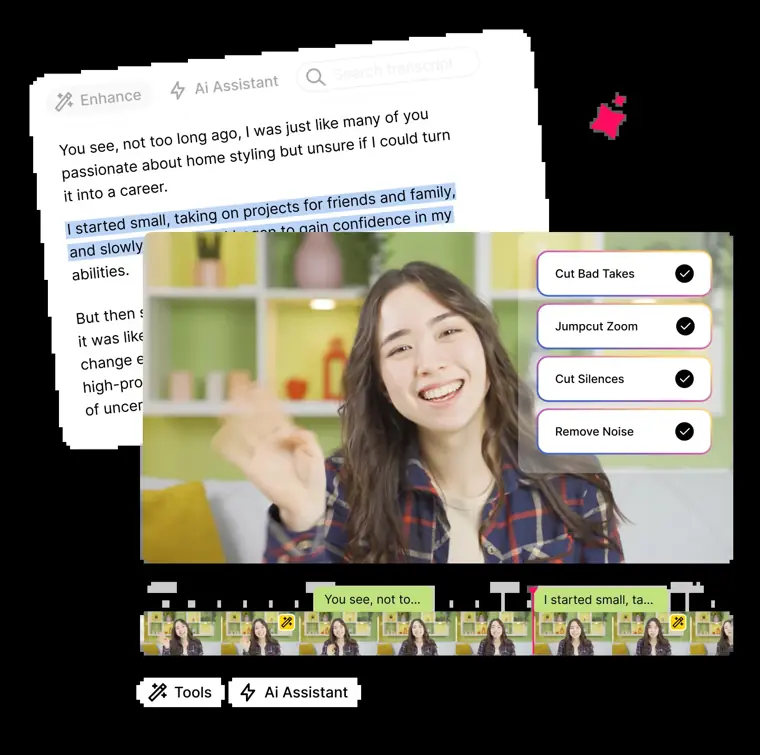
Text based trimmer
Transcribes spoken media so users can review the transcript and adjust text or remove timeline clips directly.
Use caseA video creator edits an interview by reading the transcript and deleting parts of the text to shorten the video.
From gling.ai · image from Gling -
Timeline and media export
Outputs the cleaned timeline as an XML project for major editors or saves it directly as an MP4 or MP3 file with subtitles.
Use caseAn editor sends a cleaned up cut directly into Premiere, Final Cut Pro, or DaVinci Resolve to complete the final grade and effects.
From gling.ai
Written from Gling's own website, checked . Each feature links to the page it comes from; images are Gling's own.
Every plan
| Plan | Monthly | Billed yearly | Per | What it includes |
|---|---|---|---|---|
| Free | Free | $0 | per user | 1 hr AI edited media/mo, watermark, no NLE export |
| Plus | $20 | $10 | per user | 10 hrs/mo or 300 words generated video |
| Pro | $40 | $20 | per user | 30 hrs/mo or 900 words; premium support |
| Elite | $100 | $50 | per user | 100 hrs/mo or 2,700 words; premium support |
From Gling's own pricing page, checked . Prices are in US dollars per month; "billed yearly" is the monthly price when you pay for a year up front.
Before you pay
- Watermark on the free plan
- Yes
- Export your data
- Yes
What Gling says
Export your clean timeline to Final Cut, DaVinci, or Premiere. Or download as MP4/MP3 with captions in SRT.
Source page - Support
- Premium support
Only what Gling's own pages state, with the quote behind each answer. Anything they don't publish is left out rather than guessed.
Getting started with Gling
- Upload your raw recording video or audio file.
- Review the AI edited video and refine manually by adjusting parts of the text or removing clips from the timeline.
- Download your video as an MP4/MP3 or export the timeline to Final Cut, DaVinci, or Premiere.
Written from Gling's own help pages: gling.ai/
Gling video tutorials
Independent creators on YouTube, not Gling or us. The video loads from YouTube only when you press play.
What the free plan includes
1 hr/
Questions people ask about Gling
How much does Gling cost?
Paid plans start at $20 a month (Plus). 4 plans are listed above, from Gling's own pricing page.
Is Gling free?
Yes, there is a free plan: 1 hr/mo, watermarked.
Does the Gling free plan add a watermark?
Yes, free plan output carries a watermark or branding. Source
Where this came from
Plans, prices and limits were copied from Gling's own pages, then checked .
How we collect prices and rank tools · Is something wrong? Correct this listing
Others that do the same job
 AutoPodautopod.fm
Premiere Pro / Resolve plug ins that auto edit multicam podcasts and social clips.
- Green flag: Cancel online
- Red flag: No refunds
 Choppitychoppity.com
Clip maker and editor turning long videos into captioned, reframed shorts.
- Green flag: Free plan
- Green flag: Cancel online
- Green flag: No card for trial
- Green flag: Refunds within 14 days
 Creatifycreatify.ai
Generates UGC style video and image ads from a product URL with AI actors.
- Green flag: Free plan
- Green flag: Credits roll over
- Red flag: Free plan watermark
 Descriptdescript.com
Edit video and podcasts by editing the transcript, with AI audio cleanup.
- Green flag: Free plan
- Green flag: Cancel online
- Green flag: No card for trial
- Red flag: Free plan watermark
 Hailuo AI (MiniMax)hailuoai.video
MiniMax's Hailuo 2.3 / H3 models for realistic, physics heavy short clips.
- Green flag: Free plan
 HeyGenheygen.com
AI avatar videos from a script, plus video translation with voice cloning and lip sync.
- Green flag: Free plan