
Choppity
Clip maker and editor turning long videos into captioned, reframed shorts.
Best for Small teams wanting an editor heavy clipper
What it does
Choppity is an AI video editor for social media. Users paste a YouTube link or upload long form videos, and the platform analyzes the content to produce captioned, cropped short clips. It is built for podcasters, content creators, and marketing teams.
Read more: 6 features and how people use themShow less
-
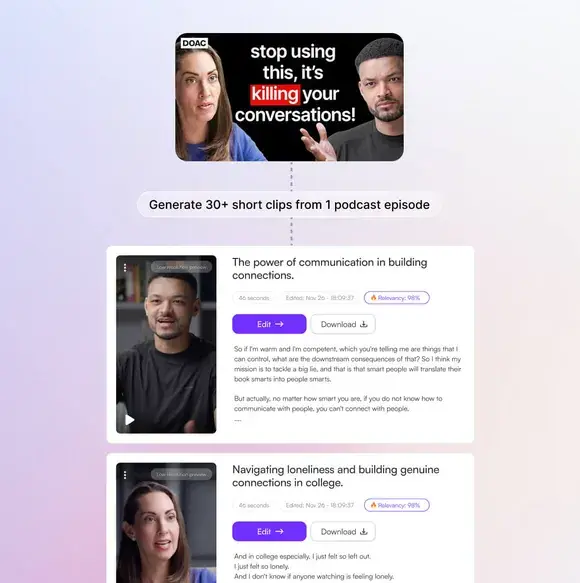
Short clips generator
Scans long recordings for key moments like jokes and hooks, producing styled short videos with relevance scores.
Use caseA podcaster uploads a full episode to create thirty vertical cuts for TikTok and YouTube Shorts without editing manually.
From choppity.com · image from Choppity -
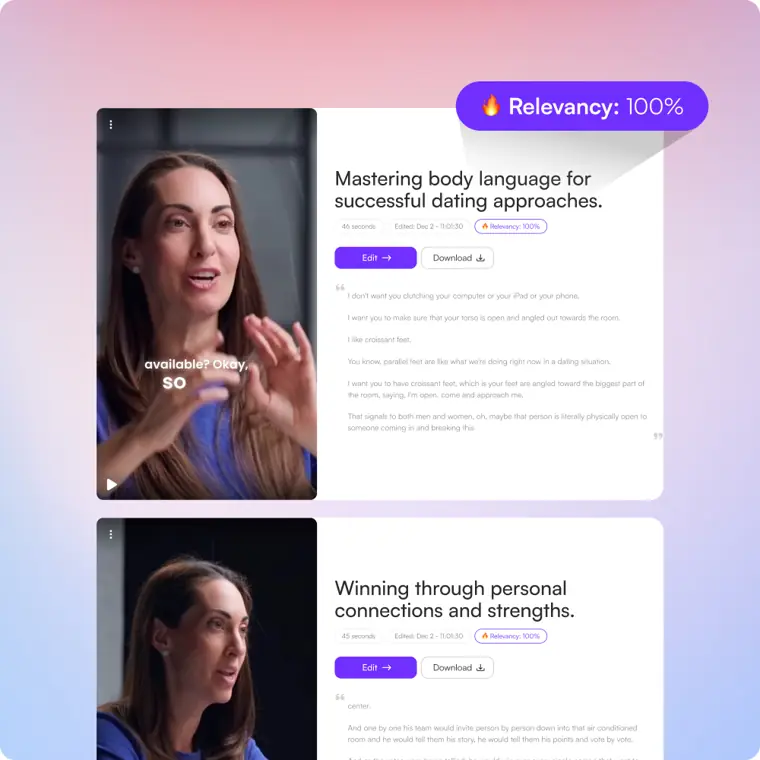
Find specific moments
Scans transcripts for requested keywords, sentences, topics, or reactions, ranking each matched segment by relevancy percentage.
Use caseA creator searches their footage for every instance where an interviewee mentions a specific company name to extract those clips quickly.
From choppity.com · image from Choppity -
Automated framing
Crops landscape video files into vertical dimensions and keeps the active subject in the center of the frame.
Use caseA video editor converts horizontal talking footage into vertical clips without having to set keyframes by hand.
From choppity.com -
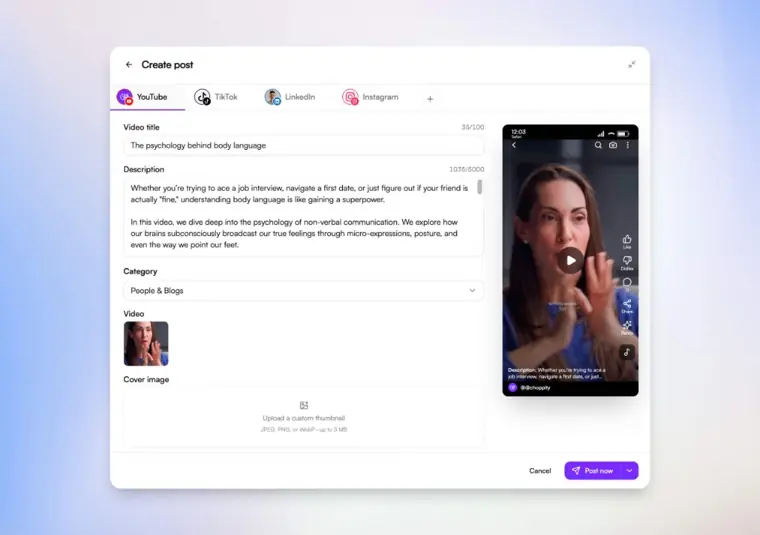
Social media scheduler
Publishes finished videos immediately to connected channels or schedules them for future dates and times with layout previews.
Use caseA team schedules an approved batch of social clips across multiple channels so posts go live on a set cadence.
From choppity.com · image from Choppity -
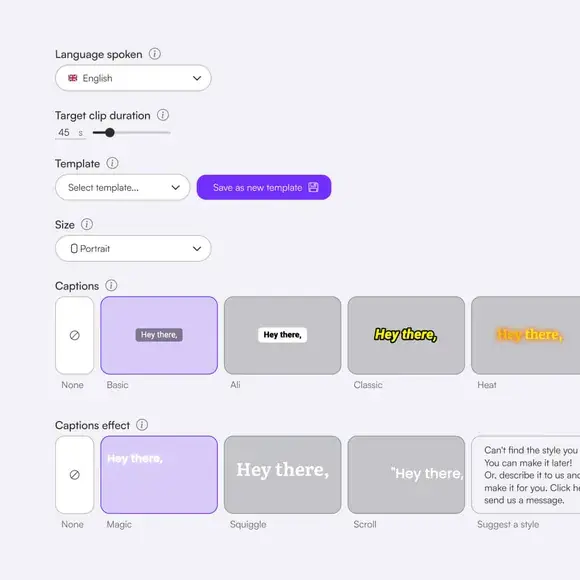
Automated captions
Generates subtitles in seconds and provides styling controls for fonts, highlights, and animations.
Use caseA video producer adds animated subtitles styled to match creator branding before exporting shorts for Instagram Reels.
From choppity.com · image from Choppity -
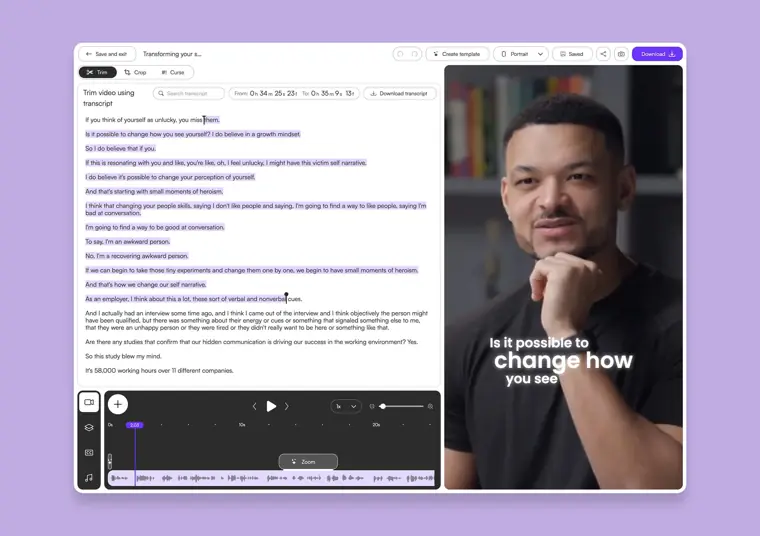
Text based video editing
Enables video trimming by deleting or highlighting lines within the generated transcript text.
Use caseA creator trims unwanted words out of a short clip by deleting them from the written transcript instead of scrubbing a timeline.
From choppity.com · image from Choppity
Written from Choppity's own website, checked . Each feature links to the page it comes from; images are Choppity's own.
Every plan
| Plan | Monthly | Billed yearly | Per | What it includes |
|---|---|---|---|---|
| Free | Free | $0 | 1 seat | 1 hr AI video analysis; 2 GB storage; 3 day project storage |
| Starter | $24 | $16.80 | 1 seat | 3 hrs AI analysis; 40 GB; 30 day project storage; 1 social account |
| Creator | $32 | $22.40 | 1 seat | 5 hrs AI analysis; 100 GB; bulk upload 10; 3 social accounts; API access |
| Team | $48 | $33.60 | unlimited seats | 5 hrs AI analysis; 200 GB; 6 social accounts; 5 brand templates |
| Enterprise | Not listed | Not listed | organization | contact sales |
From Choppity's own pricing page, checked . Prices are in US dollars per month; "billed yearly" is the monthly price when you pay for a year up front.
Before you pay
- Refund window
- 14 days
What Choppity says
Your request must be made within 14 days of your payment — to start, submit a case with our support team
Source page - How to cancel
- Users can cancel or downgrade directly from their account settings.
What Choppity says
You can easily cancel or downgrade your subscription from your account settings.
Source page - Cancel online yourself
- Yes
What Choppity says
You can easily cancel or downgrade your subscription from your account settings.
Source page - Card needed for the trial
- No
- Unused credits roll over
- No
- Export your data
- Yes (1080p HD & 4K)
What Choppity says
Exports/downloads | — | 1080p HD & 4K | 1080p HD & 4K | 1080p HD & 4K | 1080p HD & 4K |
Source page - Discounts
- Discounts are available for non profits and charities upon contacting the team.
What Choppity says
If you are a non profit or charity, get in touch with our team and we'll see what we can do to help!
Source page
Only what Choppity's own pages state, with the quote behind each answer. Anything they don't publish is left out rather than guessed.
Choppity video tutorials
Independent creators on YouTube, not Choppity or us. The video loads from YouTube only when you press play.
What the free plan includes
1 hr analysis, projects kept 3 days
Questions people ask about Choppity
How much does Choppity cost?
Paid plans start at $24 a month (Starter). 5 plans are listed above, from Choppity's own pricing page.
Is Choppity free?
Yes, there is a free plan: 1 hr analysis, projects kept 3 days.
How do I cancel Choppity?
Users can cancel or downgrade directly from their account settings. Source
Do unused Choppity credits roll over?
No, unused credits do not carry over to the next month. Source
Do I need a credit card to try Choppity?
No, you can start without a credit card. Source
Does Choppity have a student or other discount?
Discounts are available for non profits and charities upon contacting the team. Source
Does Choppity have an API?
Yes (creator+).
Can I switch plans?
Yes. Upgrade or downgrade whenever you need. Changes take effect on your next billing cycle. No penalties, no locked contracts. Source
What happens if I cancel?
Your access ends at the end of your current billing period. You keep your clips and exports until then. No surprise charges. Source
Do you offer refunds?
Yes, we offer refunds. Your request must be made within 14 days of your payment — to start, submit a case with our support team and we'll evaluate it. After the 14 day window we don't refund partial months, but you can cancel anytime. Source
Where this came from
Plans, prices and limits were copied from Choppity's own pages, then checked .
- choppity.com/pricing
- choppity.com/
- choppity.com/pricing/
- choppity.com/features/social-media-scheduler/
- choppity.com/features/find-specific-moments/
How we collect prices and rank tools · Is something wrong? Correct this listing
Others that do the same job
 OpusClipopus.pro
Turns long videos into ranked vertical shorts with captions, reframing and virality scores.
- Green flag: Free plan
- Green flag: No card for trial
- Green flag: Some credits roll over
 quso.ai (formerly Vidyo.ai)quso.ai
Turns long videos, podcasts and streams into captioned shorts and posts, then schedules them.
- Green flag: Free plan
- Green flag: No card for trial
 Submagicsubmagic.co
Adds viral style animated captions, emojis, B roll and zooms to short form video.
- Green flag: Cancel online
- Green flag: No card for trial
- Red flag: No refunds
2short.ai2short.ai
Finds the best moments in YouTube videos and exports them as Shorts.
- Green flag: Free plan
 Klapklap.app
One click long video to vertical TikToks, Reels and Shorts with captions.
- Green flag: No card for trial
 Vizardvizard.ai
Clips long videos into social ready shorts with captions, editing and scheduling.
- Green flag: Free plan