
Julius AI
Chat with spreadsheets and databases to get analysis, charts, reports and presentations from plain English questions.
Best for Non technical users analyzing files and databases conversationally
Used Julius AI and liked it? Upvote it. One upvote per person. Upvotes come from visitors, not from us, and never change "Our ranking".
What it does
Chat with spreadsheets and databases to get analysis, charts, reports and presentations from plain English questions.
Read more: 3 features and how people use themShow less
-
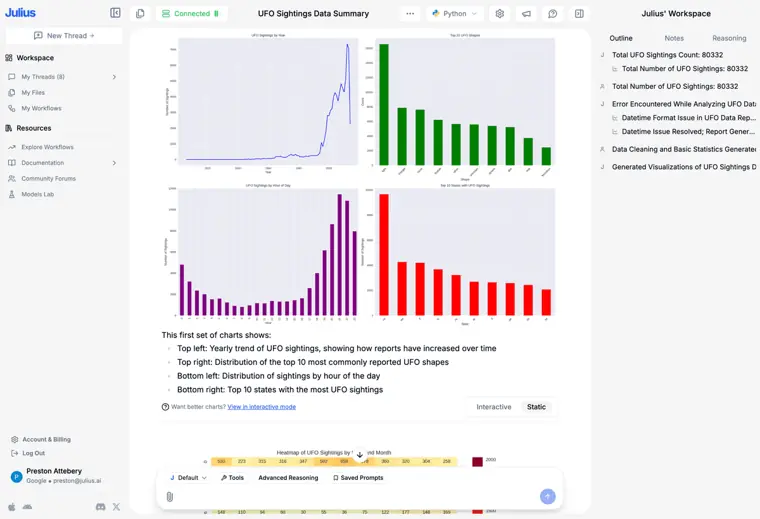
Data visualizations and charts
Converts datasets into charts and graphs based on plain language prompts. Allows you to define variables, labels, and specific visual styles directly in chat.
Use caseA business leader asks for a visual representation of findings and specifies the chart type and labels to understand trends.
From julius.ai/home/ai-for-data-analysis · image from Julius AI -
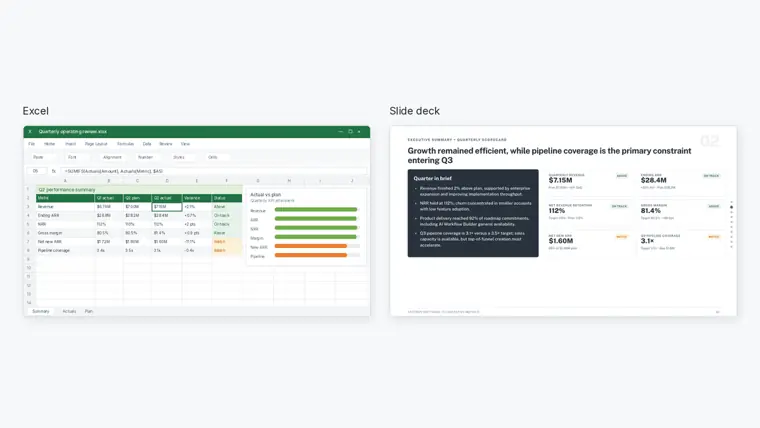
AI presentation maker
Transforms prompts, raw notes, or data insights into polished slide decks. Places your findings directly into a structured presentation without requiring external software.
Use caseA team member turns analyzed business findings and charts directly into a polished presentation to share with stakeholders.
From julius.ai/pricing · image from Julius AI -

AI image generator
Creates work visuals, product shots, and diagrams from text descriptions without graphic design tools. Enables iterative adjustments to backgrounds, lighting, and styles through follow up text replies.
Use caseA marketer generates an ad visual showing three glass serum bottles with citrus slices and natural light from a one sentence prompt.
From julius.ai/home/ai-image-generator · image from Julius AI
Written from Julius AI's own website, checked . Each feature links to the page it comes from; images are Julius AI's own.
Every plan
| Plan | Monthly | Billed yearly | Per | What it includes |
|---|---|---|---|---|
| Free | Free | Not listed | per account | Daily credit allowance (unlisted), Lite models, Google Drive/OneDrive/SharePoint connectors |
| Plus | $20 | $16 | per account | 2,000 credits/mo + 100 daily refresh credits, premium models, 16 GB RAM, 7 day file storage, DB connectors |
| Pro | $45 | $37 | per account | 5,000 credits/mo + 100 daily refresh, 32 GB RAM, unlimited parallel agents, priority email support |
| Business | $450 | $375 | per workspace (up to 50 members) | 60,000 credits/mo + 100 daily refresh, shared workspace, central billing, usage dashboard, no table limit on connections |
| Enterprise | Contact sales | Not listed | custom | contact sales; unlimited credits, SSO, audit logs, RBAC, custom connectors |
From Julius AI's own pricing page, checked . Prices are in US dollars per month; "billed yearly" is the monthly price when you pay for a year up front.
Before you pay
- Refunds
- Refunds are reviewed on a case by case basis upon contacting support, while credits are non refundable.
What Julius AI says
Refunds are not automatically granted and are reviewed on a case by case basis. If you believe you are entitled to a refund, please contact us at team@julius.ai
Source page - Unused credits roll over
- No
What Julius AI says
Unused credits expire at the end of each billing cycle and do not carry over.
Source page - Data retention
- When you delete data within the app, it is completely erased from servers.
What Julius AI says
When you delete data within the app, it is completely erased from our servers.
Source page - Export your data
- Yes
What Julius AI says
If you’re unable to click and download files/visualizations from Julius directly, try the following troubleshooting steps
Source page - SOC 2
- Yes
- Discounts
- Startup discount available upon reaching out to team@julius.ai.
What Julius AI says
We offer special pricing for qualifying startups. Reach out to us at team@julius.ai with details about your company
Source page - Support
- Email, chat, help center
Only what Julius AI's own pages state, with the quote behind each answer. Anything they don't publish is left out rather than guessed.
Getting started with Julius AI
- Upload your data by using the paperclip icon in the Chat page to add files in formats like CSV, Excel, PDF, JSON, or images.
- Link a data source on the My Files page or directly within the Chat interface.
- Ask Julius to analyze or transform your data using natural language prompts to generate insights, visualizations, and code.
Written from Julius AI's own help pages: julius.ai/docs/faqs
Julius AI video tutorials
Independent creators on YouTube, not Julius AI or us. The video loads from YouTube only when you press play.
What the free plan includes
Daily credit allowance (amount not published), Julius Lite models only, limited presentation/
Questions people ask about Julius AI
How much does Julius AI cost?
Paid plans start at $20 a month (Plus). 5 plans are listed above, from Julius AI's own pricing page.
Is Julius AI free?
Yes, there is a free plan: Daily credit allowance (amount not published), Julius Lite models only, limited presentation/image/video/website tools.
Can I get a refund from Julius AI?
Refunds are reviewed on a case by case basis upon contacting support, while credits are non refundable. Source
Do unused Julius AI credits roll over?
No, unused credits do not carry over to the next month. Source
Does Julius AI have a student or other discount?
Startup discount available upon reaching out to team@julius.ai. Source
What is the refund policy?
Refunds are evaluated case by case upon contacting support, while credits are non refundable and expire at the end of each billing cycle without carrying over. Source
Can I build presentations, websites, and videos on any plan?
Yes, every plan including Free allows you to create presentations, websites, and videos, though upgrading provides more credits to keep iterating. Source
How can we manage our Julius subscription?
You can adjust your subscription and update billing details directly from the Subscription page. Source
Is there a discount for startups?
Yes, special pricing is available for qualifying startups by contacting team@julius.ai. Source
Works with
- Integrations
- Google Drive, OneDrive, SharePoint, Snowflake, BigQuery, PostgreSQL, MySQL, SQL Server
- AI models
- Julius Lite, GPT 6.1 Sol, Claude Opus 5.5
Where this came from
Plans, prices and limits were copied from Julius AI's own pages, then checked .
How we collect prices and rank tools · Is something wrong? Correct this listing
Others that do the same job
 Better Analyst (formerly Formula Bot)betteranalyst.com
All in one AI analytics app for chat analysis, dashboards, formulas, reports and scheduled data tasks.
- Green flag: Free plan
- Red flag: Renamed
Free plan · Per seat
Visit site Better Analyst (formerly Formula Bot) (opens the tool's site) Puzzlepuzzle.io
AI native general ledger for startups with auto categorization, real time metrics and optional bookkeeper reviewed close.
 Rowsrows.com
Online spreadsheet with built in integrations and an AI analyst that cleans, summarizes and charts data.
- Green flag: Free plan
- Green flag: No card for trial
- Green flag: Doesn't train on your data
 Zenizeni.ai
AI powered bookkeeping, CFO, tax and payroll service for startups, run by a dedicated finance team.
- Red flag: No free plan
Clio (Clio Duo / Clio Work)clio.com
Cloud legal practice management with billing, intake and the Clio Work AI workspace for research and drafting.
- Green flag: Doesn't train on your data
 FreshBooksfreshbooks.com
Invoicing first accounting for service businesses and freelancers, with expenses, time tracking, projects and reports.
- Green flag: No card for trial
- Green flag: Refunds within 30 days