
Rows
Online spreadsheet with built in integrations and an AI analyst that cleans, summarizes and charts data.
Best for Teams building live reports from SaaS data
What it does
Rows is a spreadsheet platform designed for teams and individuals to import, model, and analyze data without complex database queries. You input files like PDFs or connect online business apps, and you get live reports, interactive dashboards, and AI driven analysis. It is built for business teams, analysts, and creators who need to combine and share data easily.
Read more: 3 features and how people use themShow less
-
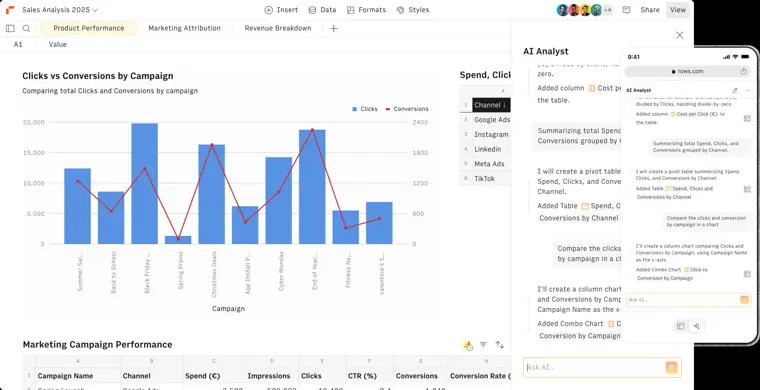
AI analyst
Processes plain language requests to analyze datasets, build models, and create reports from your documents and connected tools. It can also import and extract data directly from files like PDFs and images.
Use caseA business analyst asks the AI to build dynamic models and calculators that behave like a spreadsheet without manually writing formulas.
From rows.com · image from Rows -
Built in integrations
Connects spreadsheets directly to cloud platforms, social networks, databases, and advertising accounts without writing custom code. It pulls information straight into tables and can refresh data on automatic schedules.
Use caseA marketing manager imports live ad campaign performance directly from Facebook Ads and Google Ads into a single sheet without writing code.
From rows.com -
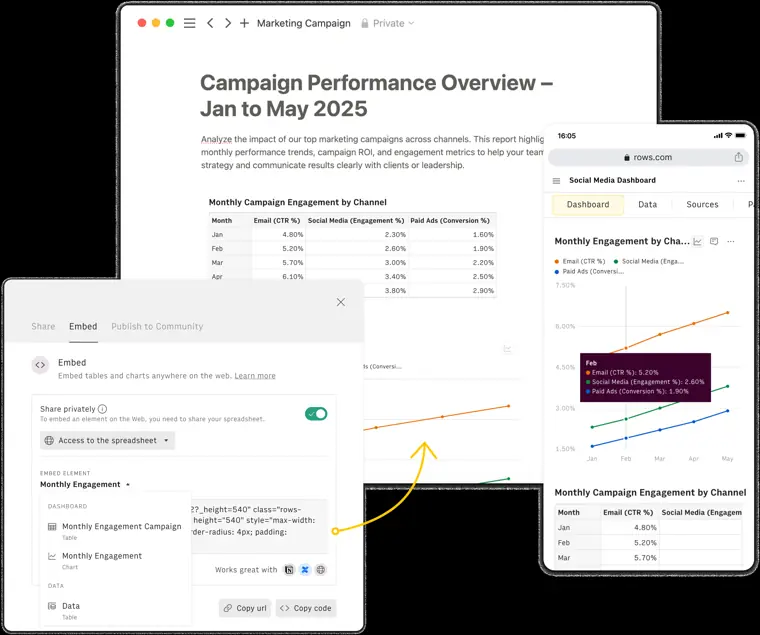
Embeddable reports
Publishes live spreadsheets, charts, and interactive calculators to outside destinations while keeping the data synchronized. It lets external viewers interact with the content on any screen size.
Use caseA content marketer embeds a dynamic pricing calculator into a website and adds marketing campaign results inside a Notion doc.
From rows.com · image from Rows
Written from Rows's own website, checked . Each feature links to the page it comes from; images are Rows's own.
Every plan
| Plan | Monthly | Billed yearly | Per | What it includes |
|---|---|---|---|---|
| Free | Free | $0 | per account | 5 AI tasks/mo, 3 guests, 500 API calls/mo |
| Plus | $8 | $6 | per user | 200 AI tasks/mo, 10 guests, 50k API calls/mo |
| Pro | $79 | $59 | per account + $8/user monthly ($6 annual) | 1,000 AI tasks/mo, 100 to 200 guests, 1M API calls/mo |
| Enterprise | Contact sales | Not listed | custom | contact sales; unlimited AI tasks, SAML SSO, advanced API |
From Rows's own pricing page, checked . Prices are in US dollars per month; "billed yearly" is the monthly price when you pay for a year up front. A few figures (often the yearly price) are derived rather than printed on the page.
Before you pay
- Card needed for the trial
- No
What Rows says
Rows offers a Free plan that is free forever, with no trial period or need for a credit card.
Source page - Trains on your data
- No
- Data retention
- Spreadsheets can be recovered from Trash or are auto deleted after 30 days, personal data is deleted or restricted once its purpose is accomplished, and users can delete their data anytime.
What Rows says
Rows does not access your spreadsheets, and you can delete your data anytime.
Source page - Export your data
- Yes
What Rows says
Import & Export Import & Export Import & Export Import & Export Import & Export
Source page - Support
- Email, chat priority, video support, dedicated CS manager
Only what Rows's own pages state, with the quote behind each answer. Anything they don't publish is left out rather than guessed.
Getting started with Rows
- Sign up and sign in to Rows using Google authentication or by entering your email address.
- Create a simple empty spreadsheet and get to know the spreadsheet editor.
- Perform standard editing tasks such as reordering and renaming tables.
- Create a spreadsheet based on the template for the Google Sheets data importer.
- Import data from other sources such as Google Sheets or a CSV file.
- Automatically insert cell references into your formulas.
Tips
- Use keyboard shortcuts to format, access, navigate, and perform actions quickly.
- Understand the limitations of the point and click feature when selecting cells and inserting cell references into formulas.
- Check the platform limits to ensure you get the best experience using Rows.
Written from Rows's own help pages: rows.com/docs/gs-getting-started-overview
What the free plan includes
5 AI tasks/
Questions people ask about Rows
How much does Rows cost?
Paid plans start at $8 a month (Plus). 4 plans are listed above, from Rows's own pricing page.
Is Rows free?
Yes, there is a free plan: 5 AI tasks/month, 3 guests, 500 API calls/month, 1 MB imports, manual data table imports, 7 day history, branded embeds.
Does Rows train its AI on my data?
No, the company says your data is not used for training. Source
Do I need a credit card to try Rows?
No, you can start without a credit card. Source
Does Rows have an API?
Yes.
What are AI Tasks?
AI Tasks are actions that require accessing artificial intelligence algorithms, including AI Analyst interactions and file processing with AI Vision. Source
Is Rows SOC 2 Type II certified?
Yes, Rows is SOC 2 Type II certified. Source
Is Rows GDPR compliant?
Yes, Rows is GDPR compliant and subject to German data protection authorities. Source
Works with
- Integrations
- Google Analytics, Facebook, Instagram, LinkedIn, YouTube, Notion, Google Search Console, Google Drive, Stripe
- AI models
- OpenAI (gpt 3.5 turbo)
Where this came from
Plans, prices and limits were copied from Rows's own pages and the other sources listed, then checked .
- rows.com/pricing
- rows.com/docs/how-do-you-manage-security
- rows.com/product
- rows.com/docs/platform-limits
- rows.com/docs/is-rows-soc-2-certified
- rows.com/docs/is-rows-gdpr-compliant
- rows.com/templates/track-social-media-growth
- rows.com/privacy
- rows.com/docs
How we collect prices and rank tools · Is something wrong? Correct this listing
Others that do the same job
Equalsequals.com
Connected spreadsheet with live data from warehouses and SaaS tools plus AI for finance reporting.
- Red flag: Changed focus
 Julius AIjulius.ai
Chat with spreadsheets and databases to get analysis, charts, reports and presentations from plain English questions.
- Green flag: Free plan
- Red flag: Credits reset monthly
- Red flag: No refunds
 Puzzlepuzzle.io
AI native general ledger for startups with auto categorization, real time metrics and optional bookkeeper reviewed close.
 Zenizeni.ai
AI powered bookkeeping, CFO, tax and payroll service for startups, run by a dedicated finance team.
- Red flag: No free plan
Clio (Clio Duo / Clio Work)clio.com
Cloud legal practice management with billing, intake and the Clio Work AI workspace for research and drafting.
- Green flag: Doesn't train on your data
 FreshBooksfreshbooks.com
Invoicing first accounting for service businesses and freelancers, with expenses, time tracking, projects and reports.
- Green flag: No card for trial
- Green flag: Refunds within 30 days