
Napkin AI
Turns text into editable diagrams, infographics and visuals for slides and documents.
Best for Turning text into diagrams for slides
Used Napkin AI and liked it? Upvote it. One upvote per person. Upvotes come from visitors, not from us, and never change "Our ranking".
What it does
Napkin AI is a visual communication platform that turns written text into editable visual graphics and presentation decks. Users write, paste, or import their text to automatically produce diagrams, flowcharts, mind maps, and data charts. It is designed for professionals such as project managers, educators, and consultants who need to share ideas visually.
Read more: 4 features and how people use themShow less
-
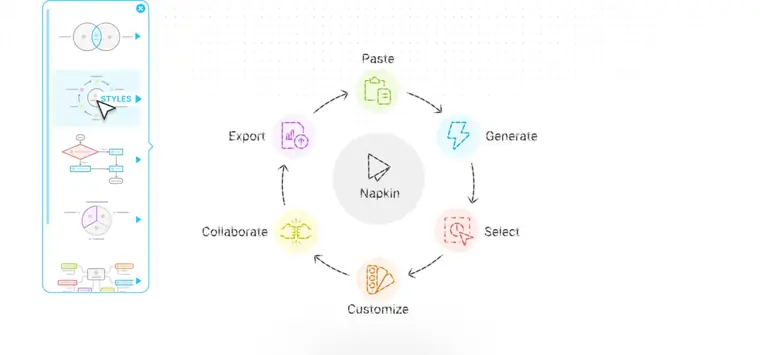
Text to visual generation
Analyzes written content directly without complex prompting and generates relevant visual formats. Users then choose the graphic layout that best matches their concept.
Use caseA project manager creates presentations or visual ideas based on their own concepts.
From napkin.ai · image from Napkin AI -
Custom visual editing
Lets you alter colors, reshape elements freely, and adjust graphics until they match your preferred style.
Use caseA design professor creates data and information graphics adjusted to fit the brand they are working in.
From napkin.ai -
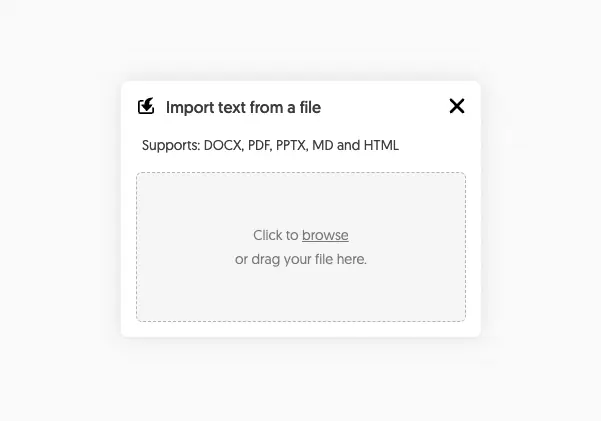
File import
Imports existing documents and slide decks directly into the platform to convert written materials into visuals.
Use caseA professional imports a DOC or PDF document to automatically extract and visualize text concepts.
From napkin.ai/pricing · image from Napkin AI -
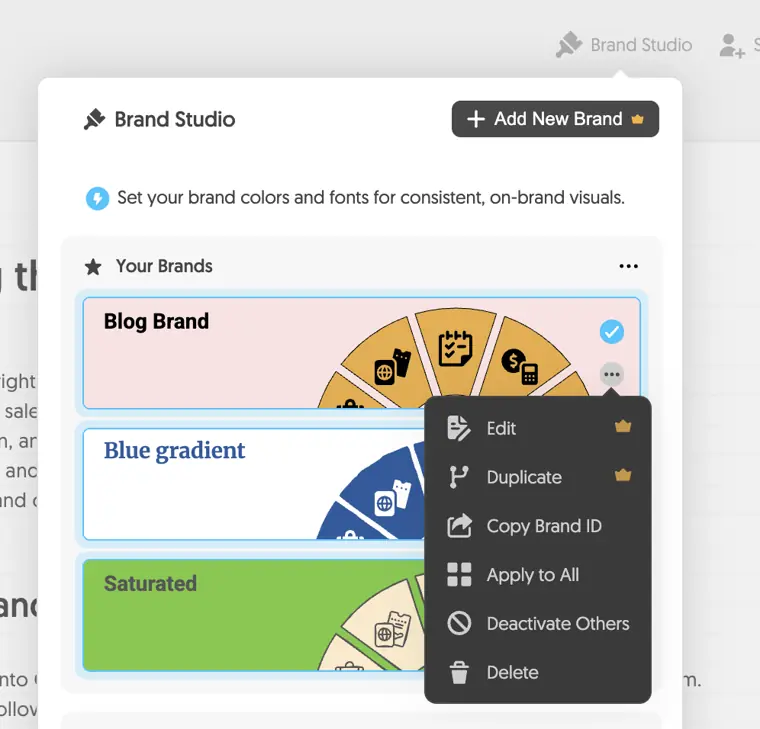
Brand styles
Applies custom organizational fonts and colors inside a dedicated brand studio.
Use caseA business team applies company color palettes and uploaded typography across their team graphics.
From napkin.ai/pricing · image from Napkin AI
Written from Napkin AI's own website, checked . Each feature links to the page it comes from; images are Napkin AI's own.
Every plan
| Plan | Monthly | Billed yearly | Per | What it includes |
|---|---|---|---|---|
| Free | Free | $0 | per user | 500 credits/week, Napkin branding, PNG/PDF export |
| Plus | $9 | Not listed | per user | 10,000 credits/mo, no branding, PPT and SVG export, 3 brand styles |
| Pro | $22 | Not listed | per user | 30,000 credits/mo, unlimited custom branding, upload fonts |
| Enterprise | Contact sales | Not listed | custom | contact sales |
From Napkin AI's own pricing page, checked . Prices are in US dollars per month; "billed yearly" is the monthly price when you pay for a year up front. A few figures (often the yearly price) are derived rather than printed on the page.
Before you pay
- How to cancel
- Subscribers can cancel their plan at any time.
- Watermark on the free plan
- Yes
- Trains on your data
- Opt out
What Napkin AI says
Napkin will not use your data to train our models if you opt out of data sharing.
Source page - Export your data
- Yes
- Discounts
- Discounts are not offered to non profits or students.
- Support
- Email
What Napkin AI says
For inquiries about choosing the right plan for your organization, contact us at contact@napkin.ai
Source page
Only what Napkin AI's own pages state, with the quote behind each answer. Anything they don't publish is left out rather than guessed.
Napkin AI video tutorials
Independent creators on YouTube, not Napkin AI or us. The video loads from YouTube only when you press play.
What the free plan includes
500 AI credits/
Questions people ask about Napkin AI
How much does Napkin AI cost?
Paid plans start at $9 a month (Plus). 4 plans are listed above, from Napkin AI's own pricing page.
Is Napkin AI free?
Yes, there is a free plan: 500 AI credits/week, Napkin branding on visuals, PNG and PDF export, built in styles.
How do I cancel Napkin AI?
Subscribers can cancel their plan at any time. Source
Does the Napkin AI free plan add a watermark?
Yes, free plan output carries a watermark or branding. Source
Does Napkin AI train its AI on my data?
It can, but you can opt out. Source
Does Napkin AI have a student or other discount?
Discounts are not offered to non profits or students. Source
Does Napkin AI have an API?
Yes.
What are AI credits?
AI credits measure and allocate app usage, charging roughly 1 credit per word selected for visual generation. Source
Is there a discount on annual billing?
Yes, annual plans offer a 25% discount compared to monthly billing. Source
Can I change my plan or cancel at any time?
Yes, you can upgrade, downgrade, or cancel at any time, keeping paid features until the current billing period ends. Source
Do you offer discounts to Non Profits or Students?
Napkin does not currently offer non profit or student discounts. Source
Works with
- Integrations
- Make, n8n
- AI models
- Claude
- Languages
- 60+ languages
Where this came from
Plans, prices and limits were copied from Napkin AI's own pages, then checked .
How we collect prices and rank tools · Is something wrong? Correct this listing
Others that do the same job
 Plus AIplusai.com
AI add in that generates and edits slides directly inside Google Slides and PowerPoint.
- Red flag: Card needed for trial
Gammagamma.app
Generates presentations, docs, websites and social posts from a prompt or file, with editable card based layouts.
- Green flag: Free plan
- Green flag: Cancel online
- Green flag: No card for trial
- Green flag: Some credits roll over
 Beautiful.aibeautiful.ai
Presentation software with smart templates that auto format slides and AI that drafts decks from prompts.
- Green flag: Cancel online
- Red flag: Card needed for trial
- Red flag: No refunds
 Decktopusdecktopus.com
AI presentation generator that builds decks from a topic, with forms, analytics and export.
- Green flag: Cancel online
- Green flag: Some credits roll over
- Green flag: Doesn't train on your data
- Red flag: No free plan
 Prezi (AI)prezi.com
Zooming, non linear presentation tool with Prezi AI that generates and restyles presentations.
- Green flag: Free plan
- Green flag: No card for trial
- Red flag: Trains on your data
 Pitchpitch.com
Collaborative presentation software with AI deck generation, templates, analytics and team workspaces.
- Green flag: Free plan