
Reply.io
Sales engagement platform for multichannel sequences plus Jason, an AI SDR that runs outbound on autopilot.
Best for Multichannel outreach with optional AI SDR
Used Reply.io and liked it? Upvote it. One upvote per person. Upvotes come from visitors, not from us, and never change "Our ranking".
What it does
Reply.io is an outbound sales engagement platform that helps businesses contact prospective customers across multiple communication channels. Users supply target prospect lists and messaging parameters to send automated emails, messages, and calls that adapt based on recipient responses. It is designed for sales teams, agencies, and revenue professionals looking to run human led or automated outbound sales pipelines.
Read more: 4 features and how people use themShow less
-
Multichannel conditional sequences
Executes coordinated outreach across email, LinkedIn, calls, SMS, and WhatsApp. It alters communication paths dynamically according to prospect actions and engagement.
Use caseA sales representative sets up an outreach workflow that automatically sends a LinkedIn message after an initial email goes unopened.
From reply.io -
Automated email warmup
Builds sender reputation for connected mailboxes by sending interactions through a peer to peer network of genuine inboxes.
Use caseA sales outreach manager connects new corporate mailboxes and automatically prepares them for high volume sending to avoid spam folders.
From reply.io -
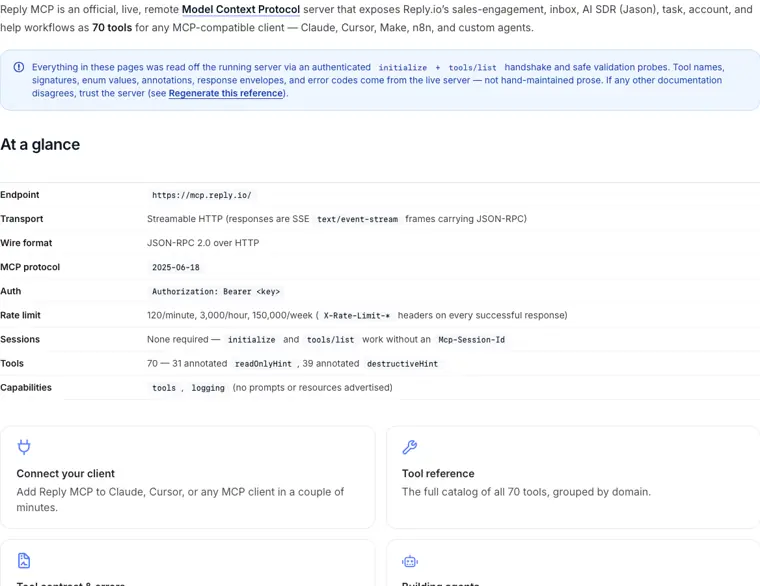
Model Context Protocol server
Exposes Reply tools directly to MCP compatible AI clients such as Claude and Cursor. It enables users to trigger and control outreach operations through natural language and code environments.
Use caseA developer runs terminal commands through Cursor to launch outreach sequences and inspect active contacts without opening the web dashboard.
From docs.reply.io/mcp/overview · image from Reply.io -
LinkedIn prospecting
Extracts lead contact records and profile information directly from LinkedIn or Sales Navigator into campaigns with one click.
Use caseA recruiter or salesperson searches LinkedIn for target titles and imports full profiles straight into an active campaign list.
From reply.io
Written from Reply.io's own website, checked . Each feature links to the page it comes from; images are Reply.io's own.
Every plan
| Plan | Monthly | Billed yearly | Per | What it includes |
|---|---|---|---|---|
| Email Volume | $59 | $49 | per account (unlimited users) | From 1,000 active contacts/month (up to $999/mo for 500,000); unlimited emails and mailboxes; LinkedIn $69 and Calls & SMS $29 add ons |
| Multichannel | $99 | $89 | per user | Unlimited active contacts, 5 mailboxes per user, LinkedIn/calls/SMS, WhatsApp semi automation |
| AI SDR Starter | $800 | $500 | per account | 1,000 to 3,000 active contacts, autopilot/copilot, unlimited mailboxes and warmup |
| AI SDR Growth | $2,500 | $1,500 | per account | 5,000 to 10,000 active contacts |
| AI SDR Enterprise | Not listed | Not listed | per account | contact sales; 25,000 to 50,000 active contacts |
| Agency Core | Not listed | $166 | per account (multiple client workspaces) | Unlimited clients, users, mailboxes, warmup; page also says $210 |
| Agency AI SDR | Not listed | $500 | per client | Agency Core + AI SDR autonomous/approval mode |
From Reply.io's own pricing page, checked . Prices are in US dollars per month; "billed yearly" is the monthly price when you pay for a year up front. A few figures (often the yearly price) are derived rather than printed on the page.
Before you pay
- Card needed for the trial
- No
- Discounts
- 15% off annual plans using promo code SCARY15
What Reply.io says
Use promo code SCARY15 at sign up to run email, LinkedIn, calls, and SMS in one sequence, book more meetings, and lock in the discount for the full year.
Source page - Support
- Help center, slack channel
What Reply.io says
Search the Help Center, read articles, map the app, report unsupported requests
Source page
Only what Reply.io's own pages state, with the quote behind each answer. Anything they don't publish is left out rather than guessed.
Getting started with Reply.io
- Click on your account name in the bottom left corner of the platform or access Settings.
- Select Plans & Billing from the dropdown menu.
- Click on the Upgrade/Change Plan button near your current billing plan name to open the billing wizard.
- Select a plan that suits your needs, such as Email Volume, Multichannel, or AI SDR.
- Click on Add funds under the Wallet section to add funds for Direct Calls, SMS, and phone number validation.
- Enter the desired amount of money, click Confirm, and enter your account, billing, and payment details before clicking Subscribe.
Tips
- Toggle the Automatically re fill slider in the Wallet section and save settings to automatically replenish funds when your balance hits a set threshold.
- Increase Email validation and Reply credits at any time by clicking on the + button in the Team shared add ons section.
- Verify your API credentials and authenticated user status by sending an HTTPS request to https://api.reply.io/v3/whoami with your Authorization: Bearer token.
Written from Reply.io's own help pages: support.reply.io/en/articles/978136-overview-... · docs.reply.io/api-reference/introduction
Reply.io video tutorials
Independent creators on YouTube, not Reply.io or us. The video loads from YouTube only when you press play.
The free trial
Trial only: 14 day free trial (includes API access)
Questions people ask about Reply.io
How much does Reply.io cost?
Paid plans start at $59 a month (Email Volume). 7 plans are listed above, from Reply.io's own pricing page.
Is Reply.io free?
There is a free trial but no free plan: 14 day free trial (includes API access).
Do I need a credit card to try Reply.io?
No, you can start without a credit card. Source
Does Reply.io have a student or other discount?
15% off annual plans using promo code SCARY15 Source
Does Reply.io have an API?
Yes.
How does authentication work for the Reply MCP server?
Pass your Reply.io API key as an Authorization: Bearer header. Calls without credentials return 401 with a challenge, and OAuth protected resource metadata is also available. Source
How do you export active contacts?
Go to Settings → Plans & Billing, navigate to the Active Contacts section, and click Export to receive a CSV file. Source
What is the maximum number of emails that can be sent daily from one email account?
Up to 400 emails daily for paid plans and 200 emails for trial accounts. Source
When should an agent use MCP instead of the REST API?
Use MCP for interactive, natural language workflows and everyday operations, and use the REST API for bulk imports/updates, background jobs, and report exports. Source
Works with
- Integrations
- Claude, Cursor, LinkedIn, WhatsApp, Zapier, Calendly, HubSpot, Salesforce, Google, Microsoft
Where this came from
Plans, prices and limits were copied from Reply.io's own pages, then checked .
- reply.io/pricing/
- reply.io/
- support.reply.io/en/articles/100799-existing-limits-in-reply
- docs.reply.io/mcp/overview
- reply.io/reply-io-pricing.txt
- reply.io/integrations/
How we collect prices and rank tools · Is something wrong? Correct this listing
Others that do the same job
 Smartleadsmartlead.ai
Cold email automation with unlimited mailboxes, auto rotation, warmup and agency client workspaces.
- Green flag: No card for trial
 lemlistlemlist.com
Multichannel prospecting tool combining cold email, LinkedIn, calls and a lead database with AI personalization.
- Green flag: Credits roll over
 Instantlyinstantly.ai
Cold email platform with unlimited sending accounts, built in warmup, B2B lead database and AI reply agents.
- Green flag: No card for trial
- Green flag: Some credits roll over
 Woodpeckerwoodpecker.co
Cold email tool priced per contacted prospect, with unlimited inboxes, verification and deliverability protection.
 Hunter.iohunter.io
Finds and verifies professional email addresses by domain or name, with built in cold email sequences.
- Green flag: Free plan
- Green flag: No card for trial
 Seamless.AIseamless.ai
AI search engine that finds and verifies B2B emails and phone numbers in real time.
- Green flag: Free plan