
Surfer
Content editor that scores drafts against top ranking pages, writes with AI, and tracks brand mentions in AI search.
Best for Content teams optimizing articles for Google and AI search
Used Surfer and liked it? Upvote it. One upvote per person. Upvotes come from visitors, not from us, and never change "Our ranking".
What it does
Surfer is an AI visibility and search optimization platform designed for marketers, agencies, and SEO teams. Users provide target search queries, brand prompts, or existing drafts, and the platform provides competitive SERP analysis, real time content scoring, and brand mention tracking across AI engines. It helps businesses plan, write, and improve content to win organic search rankings and citations in AI answers.
Read more: 3 features and how people use themShow less
-
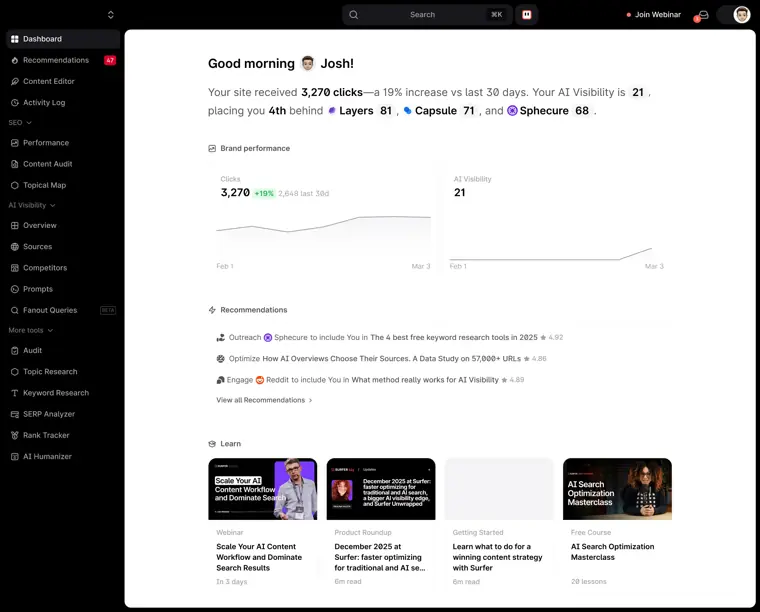
AI visibility tracker
Monitors brand citations and perception across AI answer engines including ChatGPT, Gemini, and Google AI Overviews. It tracks how specific prompts surface brand mentions and reveals coverage gaps.
Use caseA marketing manager tracks fifty target prompts across ChatGPT and Gemini to observe how frequently the company is cited compared to competitors.
From surferseo.com/pricing · image from Surfer -
SERP analyzer
Evaluates the top search engine results for a target keyword and compares your pages against competitors. It extracts data on entities, content metrics, and sentiment to uncover ranking factors.
Use caseAn SEO specialist inspects top ranking competitor pages for a target query to identify missing topics and refine an optimization strategy.
From surferseo.com -
Topical map
Maps out relevant subject areas and content ideas to help organize site structure and establish topic coverage. It guides users on what supporting articles to build across a niche.
Use caseAn agency strategist creates a map of cluster topics to plan an editorial calendar for a client.
From surferseo.com/academy
Written from Surfer's own website, checked . Each feature links to the page it comes from; images are Surfer's own.
Every plan
| Plan | Monthly | Billed yearly | Per | What it includes |
|---|---|---|---|---|
| AI Search Analytics | $95 | $82 | per account | 50 AI prompts tracked daily, 5 brand workspaces, 5 seats; no content editor docs listed |
| Discovery | $59 | $49 | per account | 120 documents, 10 pages tracked, 1 seat, no AI tracking |
| Standard | $119 | $99 | per account | 360 documents, 50 pages tracked, 25 AI prompts weekly, 3 seats, WordPress + Google Docs |
| Pro | $219 | $182 | per account | 360 documents, 200 pages tracked, 50 AI prompts daily, 5 workspaces, 5 seats, Contentful |
| Peace of Mind | $359 | $299 | per account | Unlimited documents (fair use), 500 pages, 100 AI prompts daily, 10 seats, API, Zapier |
| Enterprise | Not listed | Not listed | per account | contact sales |
From Surfer's own pricing page, checked . Prices are in US dollars per month; "billed yearly" is the monthly price when you pay for a year up front.
Before you pay
- How to cancel
- To cancel, go to Settings from the profile dropdown, navigate to Billing > Your subscription, and click Cancel subscription.
What Surfer says
Navigate to Billing > Your subscription. The Cancel subscription option is available in the bottom right corner of this section.
Source page - Renews automatically
- Yes
What Surfer says
Voilà! Your account will no longer renew automatically , and you can use all the tools until the end of your current billing cycle.
Source page - Export your data
- Yes
- Support
- Live chat, email
What Surfer says
You can contact us at support@surferseo.com or via live chat by clicking the icon in the bottom right corner.
Source page
Only what Surfer's own pages state, with the quote behind each answer. Anything they don't publish is left out rather than guessed.
Surfer video tutorials
Independent creators on YouTube, not Surfer or us. The video loads from YouTube only when you press play.
Questions people ask about Surfer
How much does Surfer cost?
Paid plans start at $59 a month (Discovery). 6 plans are listed above, from Surfer's own pricing page.
Is Surfer free?
No. Surfer has no free plan.
How do I cancel Surfer?
To cancel, go to Settings from the profile dropdown, navigate to Billing > Your subscription, and click Cancel subscription. Source
Does Surfer have an API?
Yes.
Can you pause a Surfer subscription?
No, you cannot pause a subscription; the only way to prevent renewal is to cancel it. Source
What happens after you cancel your subscription?
It stays active until the end of your current billing cycle. Source
Is Surfer available worldwide?
Surfer is offered everywhere except Cuba, Iran, Iraq, North Korea, Russia, South Sudan, Sudan, Syria, and Venezuela. Source
When does the Fair Usage Policy apply?
It applies only to features that do not have usage limits explicitly stated on the pricing page or plan details. Source
Works with
- Integrations
- WordPress, Google Docs, Contentful, Zapier, Google Search Console
- Languages
- All languages are supported across core tools, UI is in English, Polish, and French, and Surfer AI article generation supports 29 languages.
Where this came from
Plans, prices and limits were copied from Surfer's own pages and the other sources listed, then checked .
- surferseo.com/pricing/
- costbench.com/software/ai-seo-tools/surfer-seo/
- surferseo.com/
- docs.surferseo.com/en/articles/5700345-how-can-i-cancel-my-subscription
- docs.surferseo.com/en
- docs.surferseo.com/en/articles/12944161-fair-usage-policy
- docs.surferseo.com/en/articles/5700321-nlp
- docs.surferseo.com/en/articles/8052688-surfer-language-and-location-support
How we collect prices and rank tools · Is something wrong? Correct this listing
Others that do the same job
 Frasefrase.io
Researches, writes and optimizes SEO articles, audits pages, and tracks visibility in ChatGPT, Perplexity and Google AI.
- Green flag: No card for trial
- Red flag: Free plan watermark
 NeuronWriterneuronwriter.com
Budget NLP content editor with SERP based recommendations, AI writing, content planning and AI answer monitoring.
- Green flag: No card for trial
- Green flag: Refunds within 30 days
 Content Harmonycontentharmony.com
Credit based content workflows bundling keyword reports, search intent analysis, briefs and a content grader.
 MarketMusemarketmuse.com
Content strategy platform that models topical authority, finds gaps, and generates briefs and strategy docs.
- Green flag: Free plan
 Scalenutscalenut.com
AI SEO and GEO platform for keyword clustering, article creation, optimization and AI visibility tracking.
 Dashworddashword.com
Lightweight content brief and optimization tool with free unlimited content scoring, AI writer, API and MCP.
- Green flag: Free plan
- Green flag: Cancel online
- Green flag: No card for trial
- Red flag: No refunds