
Dashword
Lightweight content brief and optimization tool with free unlimited content scoring, AI writer, API and MCP.
Best for Small agencies needing simple briefs and scoring
Used Dashword and liked it? Upvote it. One upvote per person. Upvotes come from visitors, not from us, and never change "Our ranking".
What it does
Dashword is a content marketing platform that researches search engine results to help users produce high ranking content. You provide a target keyphrase or draft, and the tool delivers competitive research briefs, recommended keywords and topics, and real time content scoring. It is designed for individuals, writers, and content teams seeking to optimize drafts and maintain legacy content.
Read more: 3 features and how people use themShow less
-
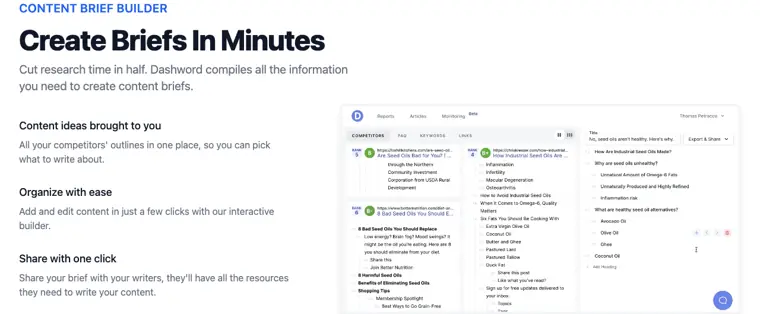
Content brief builder
Compiles competitor outlines and research into an interactive builder so users can construct and share writing briefs with their team.
Use caseA content strategist compiles competitor outlines and topic ideas into an interactive brief to share with freelance writers before they draft an article.
From dashword.com · image from Dashword -
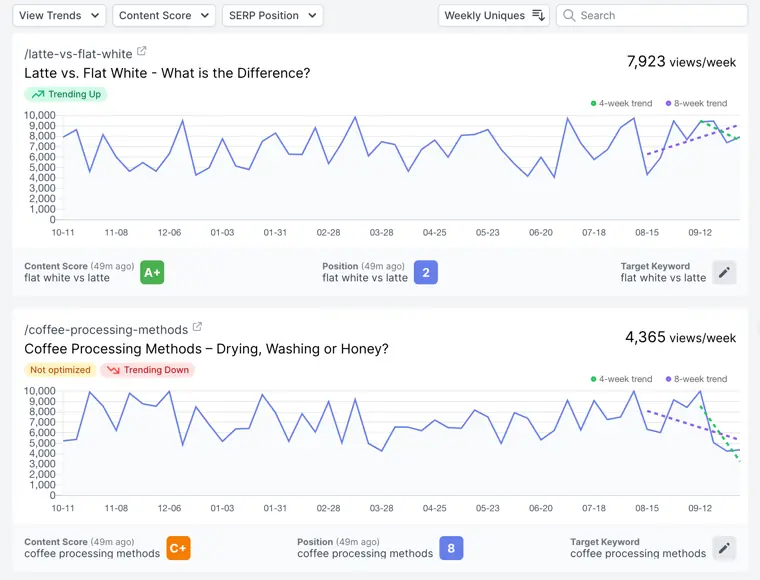
Content monitoring
Crawls published pages automatically and tracks ranking changes and traffic drops to determine when content requires updates.
Use caseA website manager tracks traffic trends across existing articles to identify underperforming pages that need updates.
From dashword.com · image from Dashword -
MCP server integration
Connects external AI clients to Dashword so autonomous agents can retrieve research briefs and evaluate content drafts directly.
Use caseA developer connects Cursor or Claude to generate content reports and score drafts directly through the agent workflow.
From dashword.com/pricing
Written from Dashword's own website, checked . Each feature links to the page it comes from; images are Dashword's own.
Every plan
| Plan | Monthly | Billed yearly | Per | What it includes |
|---|---|---|---|---|
| Free | Free | $0 | per account | 1 free report, unlimited content scoring |
| Startup | $99 | $79.20 | per account | 30 content reports, 5 seats, 100k AI words |
| Business | $349 | $279.20 | per account | From $349; 100 reports, 10 seats, bulk reports, SSO |
From Dashword's own pricing page, checked . Prices are in US dollars per month; "billed yearly" is the monthly price when you pay for a year up front. A few figures (often the yearly price) are derived rather than printed on the page.
Before you pay
- Refunds
- Paid subscription fees are non refundable, except when required by law.
What Dashword says
Except when required by law, paid Subscription fees are non refundable.
Source page - How to cancel
- Subscribers can cancel their subscription renewal through their online account management page or by contacting the customer support team.
What Dashword says
You may cancel your Subscription renewal either through your online account management page or by contacting Dashword OÜ customer support team.
Source page - Cancel online yourself
- Yes
What Dashword says
You may cancel your Subscription renewal either through your online account management page or by contacting Dashword OÜ customer support team.
Source page - Renews automatically
- Yes
What Dashword says
At the end of each Billing Cycle, your Subscription will automatically renew under the exact same conditions unless you cancel it or Dashword OÜ cancels it.
Source page - Card needed for the trial
- No
- Failed generations cost credits
- No
What Dashword says
One report credit is charged per completed report. A report that fails to build is refunded.
Source page - GDPR
- Yes
What Dashword says
GDPR Data Protection Rights We would like to make sure you are fully aware of all of your data protection rights.
Source page - Discounts
- A 20% discount is available for annual billing.
What Dashword says
Yes, we offer a 20% discount if you choose annual billing. Contact us to set you up.
Source page - Support
- Email
What Dashword says
You may cancel your Subscription renewal either through your online account management page or by contacting Dashword OÜ customer support team.
Source page
Only what Dashword's own pages state, with the quote behind each answer. Anything they don't publish is left out rather than guessed.
Getting started with Dashword
- Log in to your Dashword account.
- Type in your keyword, select the country to target, and click the Generate report button.
- Open the completed report to review competitor benchmarks, search results, and relevant terms.
- Click the Create new article button at the top of the report page to enter the content editor.
- Write your content while tracking the real time content grade, word count, and relevant terms list.
Written from Dashword's own help pages: dashword.com/how-to-use
What the free plan includes
First report free, no card; unlimited free content scoring; API on free accounts
Questions people ask about Dashword
How much does Dashword cost?
Paid plans start at $99 a month (Startup). 3 plans are listed above, from Dashword's own pricing page.
Is Dashword free?
Yes, there is a free plan: First report free, no card; unlimited free content scoring; API on free accounts.
Can I get a refund from Dashword?
Paid subscription fees are non refundable, except when required by law. Source
How do I cancel Dashword?
Subscribers can cancel their subscription renewal through their online account management page or by contacting the customer support team. Source
Does Dashword charge credits for failed generations?
No, failed generations are not charged. Source
Do I need a credit card to try Dashword?
No, you can start without a credit card. Source
Does Dashword have a student or other discount?
A 20% discount is available for annual billing. Source
Does Dashword have an API?
Yes.
Can I try it for free?
Yes! When you sign up you'll get a free report. Source
Which plans include API access?
All of them. The API is available to every account with a verified email address, free plans included. Source
Can I cancel at any time?
Yes, you can cancel your subscription at any time with no minimum contract. Source
What happens to my data when I cancel?
You will still be able to access your data, but you won't be able to generate additional keyword reports. Source
Where this came from
Plans, prices and limits were copied from Dashword's own pages, then checked .
- dashword.com/pricing
- dashword.com/
- dashword.com/guides
- dashword.com/how-to-use
- dashword.com/api-docs
- dashword.com/privacy
- dashword.com/terms
How we collect prices and rank tools · Is something wrong? Correct this listing
Others that do the same job
 Frasefrase.io
Researches, writes and optimizes SEO articles, audits pages, and tracks visibility in ChatGPT, Perplexity and Google AI.
- Green flag: No card for trial
- Red flag: Free plan watermark
 NeuronWriterneuronwriter.com
Budget NLP content editor with SERP based recommendations, AI writing, content planning and AI answer monitoring.
- Green flag: No card for trial
- Green flag: Refunds within 30 days
 Surfersurferseo.com
Content editor that scores drafts against top ranking pages, writes with AI, and tracks brand mentions in AI search.
- Red flag: No free plan
 Content Harmonycontentharmony.com
Credit based content workflows bundling keyword reports, search intent analysis, briefs and a content grader.
 MarketMusemarketmuse.com
Content strategy platform that models topical authority, finds gaps, and generates briefs and strategy docs.
- Green flag: Free plan
 Scalenutscalenut.com
AI SEO and GEO platform for keyword clustering, article creation, optimization and AI visibility tracking.