
ThoughtSpot
Search- and agent driven BI platform where users ask questions of warehouse data and get AI dashboards.
Best for Business users self serving answers from cloud warehouses
Used ThoughtSpot and liked it? Upvote it. One upvote per person. Upvotes come from visitors, not from us, and never change "Our ranking".
What it does
ThoughtSpot is an analytics platform that connects directly to cloud data warehouses and business applications. Users query data using natural language prompts or conversational AI agents and receive interactive dashboards, charts, and automated insights. It is designed for business teams, data analysts, data engineers, and developers who need accessible data exploration.
Read more: 4 features and how people use themShow less
-
Spotter conversational analytics agent
Answers business questions posed in plain language by reasoning through multi step analysis, forecasting, and displaying the rationale behind calculations.
Use caseA business team member asks a question in plain English to obtain instant answers and trace numbers without waiting in an analyst queue.
From thoughtspot.com/product/agents -
SpotterViz dashboard generation
Interprets business queries, validates key metrics against governed semantic models, and builds interactive Liveboards through conversation.
Use caseA project manager creates custom Liveboards tailored for four distinct client personas using conversational prompts.
From thoughtspot.com/product/visualize -
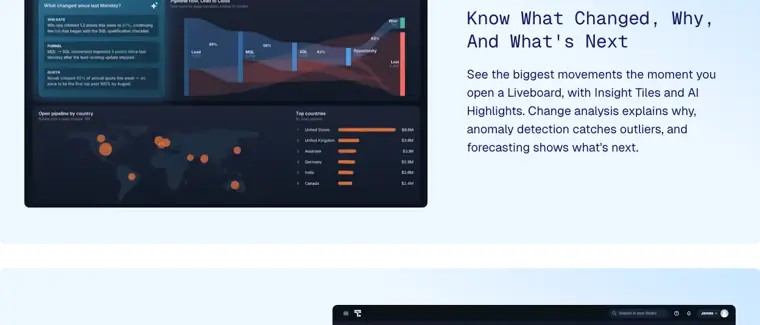
Liveboard drilldowns and change analysis
Surfaces major metric shifts using AI Highlights, detects anomalies, and lets users right click any data point to drill down through attributes without predefined paths.
Use caseA team member opens a Liveboard to review major metric movements and drills down into underlying data attributes to determine the cause of an anomaly.
From thoughtspot.com/product/visualize · image from ThoughtSpot -
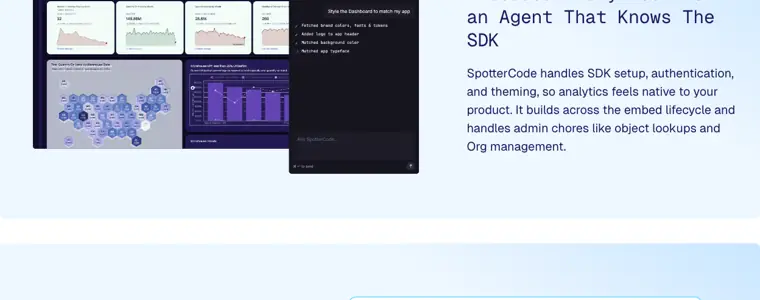
SpotterCode embedded analytics
Configures software development kits, sets up authentication, applies themes, and embeds interactive charts, Liveboards, or chat directly into external applications.
Use caseA developer configures SDK authentication and custom styling to embed analytics natively into a customer facing product within weeks.
From thoughtspot.com/product/agents · image from ThoughtSpot
Written from ThoughtSpot's own website, checked . Each feature links to the page it comes from; images are ThoughtSpot's own.
Every plan
| Plan | Monthly | Billed yearly | Per | What it includes |
|---|---|---|---|---|
| Essentials | Not listed | $25 | per user, 5 to 50 users | Up to 25M rows, interactive dashboards |
| Pro (per user) | Not listed | $50 | per user, up to 1,000 | 250M rows, 25 Spotter AI agent queries/user/month, natural language search, Analyst Studio |
| Pro (usage based) | Not listed | Not listed | credits, from $0.10/credit | Up to 1,000 users, 250M rows, Spotter agents |
| Enterprise | Contact sales | Not listed | custom | contact sales; unlimited users/data, SSO, RLS, VPC |
| Embedded Developer | Free | Not listed | per account | Up to 10 users, 25M rows, REST API + Visual Embed SDK (free 1 year on per user version) |
| Embedded Enterprise | Contact sales | Not listed | custom | contact sales |
From ThoughtSpot's own pricing page, checked . Prices are in US dollars per month; "billed yearly" is the monthly price when you pay for a year up front. A few figures (often the yearly price) are derived rather than printed on the page.
Before you pay
- GDPR
- Yes
Only what ThoughtSpot's own pages state, with the quote behind each answer. Anything they don't publish is left out rather than guessed.
Getting started with ThoughtSpot
- Choose Search and analyze data to help inform my business decisions on the initial welcome screen.
- Click Try a search to open the search data panel.
- Enter a search in the search bar and click Go.
- Click the Pin button to create a Liveboard of your Answer.
- Choose whether to add it to an existing Liveboard or create a new Liveboard, then click Pin again.
- Click View Liveboard at the bottom of the screen to view your Liveboard.
Tips
- Repeat your onboarding experience at any time by selecting Profile from the user icon in the upper right corner and clicking Revisit onboarding experience under Experience.
- Find your Liveboards by hovering over the menu in the upper left part of the screen and clicking Liveboards in the slide out panel.
- Contact your administrator to configure onboarding for you and other new users if you did not experience it upon initial sign in.
Written from ThoughtSpot's own help pages: docs.thoughtspot.com/cloud/26.10.0.cl/user-on...
ThoughtSpot video tutorials
Independent creators on YouTube, not ThoughtSpot or us. The video loads from YouTube only when you press play.
The free trial
Trial only: Free trial on Essentials/
Questions people ask about ThoughtSpot
Is ThoughtSpot free?
There is a free trial but no free plan: Free trial on Essentials/Pro (length not stated); Embedded Developer plan free for up to 10 users, 25M rows.
Does ThoughtSpot have an API?
Yes.
Works with
- Integrations
- Snowflake, Databricks, Redshift
Where this came from
Plans, prices and limits were copied from ThoughtSpot's own pages and the other sources listed, then checked .
- thoughtspot.com/pricing
- thoughtspot.com/press-releases/thoughtspot-receives-soc-2-type-2-at...
- thoughtspot.com/
- thoughtspot.com/press-releases/thoughtspot-receives-soc-2-type-2-at...
- thoughtspot.com/trust
- thoughtspot.com/sql-tutorial
- docs.thoughtspot.com/cloud/26.10.0.cl/
- thoughtspot.com/privacy-statement
- thoughtspot.com/faqs
- thoughtspot.com/legal
How we collect prices and rank tools · Is something wrong? Correct this listing
Others that do the same job
 Microsoft Power BI (Copilot)microsoft.com/en-us/power-platform/products/power-bi
Microsoft's BI and reporting platform with Copilot for natural language report building and data Q&A.
- Green flag: Free plan
- Green flag: No card for trial
- Green flag: Doesn't train on your data
 Tableau (Tableau AI / Tableau+)tableau.com
Salesforce's visual analytics platform with Tableau Agent and Pulse for AI assisted authoring and insights.
- Red flag: Acquired
 Julius AIjulius.ai
Chat with spreadsheets and databases to get analysis, charts, reports and presentations from plain English questions.
- Green flag: Free plan
- Red flag: Credits reset monthly
- Red flag: No refunds
 Puzzlepuzzle.io
AI native general ledger for startups with auto categorization, real time metrics and optional bookkeeper reviewed close.
 Rowsrows.com
Online spreadsheet with built in integrations and an AI analyst that cleans, summarizes and charts data.
- Green flag: Free plan
- Green flag: No card for trial
- Green flag: Doesn't train on your data
 Zenizeni.ai
AI powered bookkeeping, CFO, tax and payroll service for startups, run by a dedicated finance team.
- Red flag: No free plan