
Vizard
Clips long videos into social ready shorts with captions, editing and scheduling.
Best for Marketers and agencies clipping webinars
Used Vizard and liked it? Upvote it. One upvote per person. Upvotes come from visitors, not from us, and never change "Our ranking".
What it does
Vizard is video software that automatically converts long recordings into short social clips. Users upload video footage or webinars to receive edited, formatted clips with captions ready for channels like TikTok, Instagram, and YouTube Shorts. The product serves creators, podcasters, coaches, business owners, and marketing teams.
Read more: 4 features and how people use themShow less
-
AI clipping
Detects interesting parts of long recordings, cuts them into clips, and reframes the video to center subjects in vertical orientation.
Use caseA podcaster produces social ready short videos from an interview recording without manual resizing.
From vizard.ai -
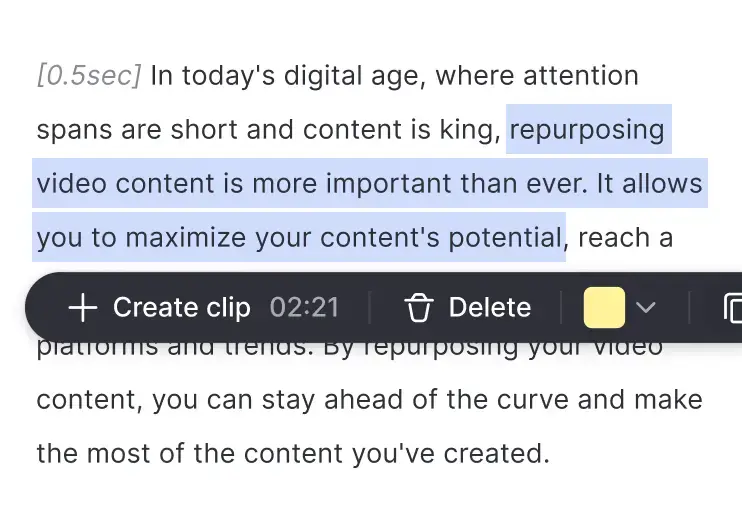
Edit by text
Trims video segments by letting you delete parts of the transcribed text like editing a document.
Use caseA video editor cuts out unwanted sections of footage by removing lines of transcribed dialogue.
From vizard.ai · image from Vizard -
Caption translation
Translates subtitles across numerous international languages to help videos connect with audiences worldwide.
Use caseA business owner translates subtitles into foreign languages to distribute webinar highlights internationally.
From vizard.ai -
Team workspace
Provides a shared workspace where members can manage ongoing editing projects, review videos in real time, and send previews to outside contacts.
Use caseA team leader invites colleagues to review work in progress and share clip previews with clients.
From vizard.ai
Written from Vizard's own website, checked . Each feature links to the page it comes from; images are Vizard's own.
Every plan
| Plan | Monthly | Billed yearly | Per | What it includes |
|---|---|---|---|---|
| Free | Free | Not listed | 60 credits/month (1 credit = 1 min) | 720p export, 10 min exports, 3 day storage, 1 social account |
| Creator | $29 | Not listed | from 600 credits/month | 4K, any export length, 100GB, 6 social accounts |
| Business | $39 | Not listed | from 600 credits/month, per seat | 20 social accounts, unlimited storage, shared workspace, brand kit |
| Enterprise | Contact sales | Not listed | custom | contact sales |
From Vizard's own pricing page, checked . Prices are in US dollars per month; "billed yearly" is the monthly price when you pay for a year up front. A few figures (often the yearly price) are derived rather than printed on the page.
Before you pay
- Export your data
- Yes
What Vizard says
Download, share as links or publish directly from Vizard. Voila - your work is done!
Source page
Only what Vizard's own pages state, with the quote behind each answer. Anything they don't publish is left out rather than guessed.
Getting started with Vizard
- Upload your raw footage for transcription and processing.
- Click 'Get AI clips' to automatically generate fully designed video clips.
- Download, share as links, or publish your clips directly.
Written from Vizard's own help pages: vizard.ai/
Vizard video tutorials
Independent creators on YouTube, not Vizard or us. The video loads from YouTube only when you press play.
What the free plan includes
60 credits/
Questions people ask about Vizard
How much does Vizard cost?
Paid plans start at $29 a month (Creator). 4 plans are listed above, from Vizard's own pricing page.
Is Vizard free?
Yes, there is a free plan: 60 credits/mo, 720p, 10 min exports.
Does Vizard have an API?
Yes.
Works with
- Languages
- over 100 languages
Where this came from
Plans, prices and limits were copied from Vizard's own pages, then checked .
How we collect prices and rank tools · Is something wrong? Correct this listing
Others that do the same job
 Choppitychoppity.com
Clip maker and editor turning long videos into captioned, reframed shorts.
- Green flag: Free plan
- Green flag: Cancel online
- Green flag: No card for trial
- Green flag: Refunds within 14 days
 OpusClipopus.pro
Turns long videos into ranked vertical shorts with captions, reframing and virality scores.
- Green flag: Free plan
- Green flag: No card for trial
- Green flag: Some credits roll over
 quso.ai (formerly Vidyo.ai)quso.ai
Turns long videos, podcasts and streams into captioned shorts and posts, then schedules them.
- Green flag: Free plan
- Green flag: No card for trial
 Submagicsubmagic.co
Adds viral style animated captions, emojis, B roll and zooms to short form video.
- Green flag: Cancel online
- Green flag: No card for trial
- Red flag: No refunds
2short.ai2short.ai
Finds the best moments in YouTube videos and exports them as Shorts.
- Green flag: Free plan
 Klapklap.app
One click long video to vertical TikToks, Reels and Shorts with captions.
- Green flag: No card for trial