
Submagic
Adds viral style animated captions, emojis, B roll and zooms to short form video.
Best for Short form creators wanting viral captions
Used Submagic and liked it? Upvote it. One upvote per person. Upvotes come from visitors, not from us, and never change "Our ranking".
What it does
Submagic is an AI video editing tool designed to create short form videos. Users upload raw footage, podcasts, or YouTube links, and the platform outputs edited clips complete with captions, extra footage, and cuts. It is built for business owners, media companies, marketing teams, agencies, advertisers, and content creators.
Read more: 5 features and how people use themShow less
-
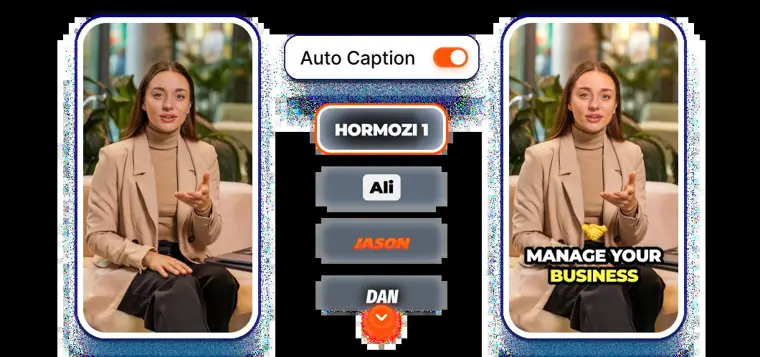
Auto captions
Transcribes spoken audio into styled subtitles across dozens of languages. It matches words to modern styling templates to improve retention.
Use caseA marketing agency employee prepares social media videos in languages they do not personally speak.
From submagic.co · image from Submagic -
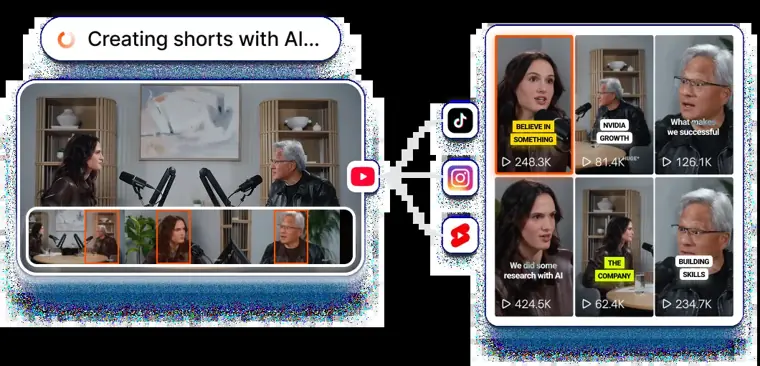
Magic clips
Scans long recordings to pinpoint key moments and splits them into short format videos. It automates repurposing long material into ready to post clips.
Use caseA content creator repurposes full interviews and podcasts into multiple short clips for social platforms.
From submagic.co · image from Submagic -
Magic B rolls
Reads your transcript and automatically places relevant stock imagery or video cutaways into the edit. It allows users to place visual cutaways manually or automate insertion in one click.
Use caseA video editor hides jump cuts between takes during talking head footage without shooting extra clips.
From submagic.co/features/b-roll -
Auto zoom
Applies animated zoom in and zoom out movements synced directly to spoken words in the transcript. It offers six distinct styles to add motion to static footage without keyframing.
Use caseA business owner creates dynamic short form clips from a static camera shot without manually setting keyframes.
From submagic.co/features/auto-zooms -
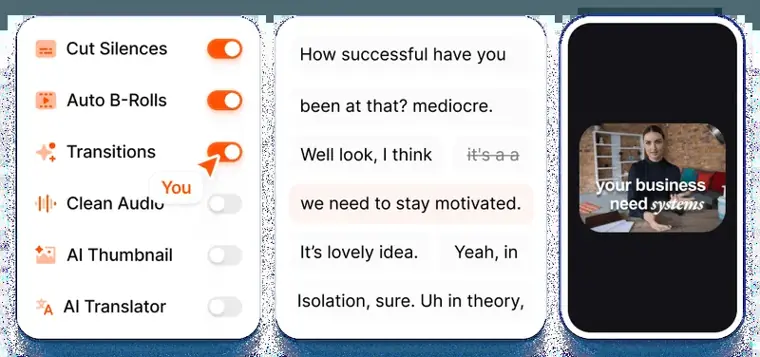
Silence removal
Detects and cuts out dead air and bad takes directly from the text transcript. It trims unwanted pauses without requiring timeline scrubbing.
Use caseA team trims pauses and mistakes from recorded talking head clips before rendering final outputs.
From submagic.co · image from Submagic
Written from Submagic's own website, checked . Each feature links to the page it comes from; images are Submagic's own.
Every plan
| Plan | Monthly | Billed yearly | Per | What it includes |
|---|---|---|---|---|
| Free Trial | Free | Not listed | per account | Try for free, no credit card; limits not stated |
| Starter | $19 | $12 | per account | 45 credits (15 videos)/mo; 2 min/video; 1080p 30fps; 1 publishing profile per platform |
| Pro | $39 | $23 | per account | 120 credits (40 videos)/mo; 5 min/video; 1080p 30fps |
| Business | $69 | $41 | per account | 300 credits (100 videos)/mo; 30 min/video; 4K 60fps; 3 publishing profiles per platform |
| Custom (Enterprise) | Contact sales | Not listed | custom | contact sales; SSO, API limits, dedicated CSM |
From Submagic's own pricing page, checked . Prices are in US dollars per month; "billed yearly" is the monthly price when you pay for a year up front. A few figures (often the yearly price) are derived rather than printed on the page.
Before you pay
- Refunds
- Cancellations take effect at the end of the current period with no refunds due for the period already commenced.
What Submagic says
Upon cancellation, access to the Platform will be suspended at the end of the current contractual period, with no refund due for the period already commenced.
Source page - How to cancel
- Subscribers can cancel at any time via the platform by going to Control Panel > Billing > 'Cancel Subscription'.
What Submagic says
The Customer may cancel at any time via the Platform (Control Panel > Billing > "Cancel Subscription").
Source page - Cancel online yourself
- Yes
What Submagic says
The Customer may cancel at any time via the Platform (Control Panel > Billing > "Cancel Subscription").
Source page - Renews automatically
- Yes
- Card needed for the trial
- No
- Data retention
- Users can request deletion of personal data by contacting david@submagic.co or using the account Privacy & data page.
What Submagic says
You can request deletion of your stored personal data by contacting us at david@submagic.co or, where available, by using the “Privacy & data” page in your account.
Source page - Export your data
- Yes (up to 4K resolution and 60fps)
What Submagic says
Submagic supports high quality exports up to 4K resolution and 60fps, ensuring your videos look sharp on every platform.
Source page - Support
- Email, live chat
Only what Submagic's own pages state, with the quote behind each answer. Anything they don't publish is left out rather than guessed.
Submagic video tutorials
Independent creators on YouTube, not Submagic or us. The video loads from YouTube only when you press play.
The free trial
Trial only: 3 short videos (trial)
Questions people ask about Submagic
How much does Submagic cost?
Paid plans start at $19 a month (Starter). 5 plans are listed above, from Submagic's own pricing page.
Is Submagic free?
There is a free trial but no free plan: 3 short videos (trial).
Can I get a refund from Submagic?
Cancellations take effect at the end of the current period with no refunds due for the period already commenced. Source
How do I cancel Submagic?
Subscribers can cancel at any time via the platform by going to Control Panel > Billing > 'Cancel Subscription'. Source
Do I need a credit card to try Submagic?
No, you can start without a credit card. Source
Does Submagic have an API?
Yes.
How do I create short with Submagic?
Upload your video, and Submagic's AI automatically detects highlights, adds captions, and formats the clip for short form platforms. You can edit the result like text and export in minutes. Source
Can I turn a long video into multiple shorts?
Upload a long form video such as a podcast or interview. Submagic finds key moments and turns one video into multiple ready to post shorts automatically. Source
Does Submagic add captions automatically?
Submagic generates captions automatically in multiple languages and applies modern, readable styles optimized for short form viewing with 99% accuracy. Source
What makes editing faster than traditional timelines?
Submagic replaces traditional timelines with text based editing. You can cut, trim, and remove silences by editing the transcript instead of scrubbing through footage. Source
Works with
- Integrations
- YouTube, TikTok, Instagram Reels, Google, Outlook, Stripe, Amazon Web Services (AWS), Vercel, Supabase
- Languages
- 123 languages (or 50+ languages supported)
Where this came from
Plans, prices and limits were copied from Submagic's own pages, then checked .
- submagic.co/pricing
- submagic.co/
- submagic.co/privacy
- app.submagic.co/signup?includeMagicClips=false&plan=basic&renewalPe...
- submagic.co/languages-supported
- submagic.co/terms-of-use
How we collect prices and rank tools · Is something wrong? Correct this listing
Others that do the same job
 Choppitychoppity.com
Clip maker and editor turning long videos into captioned, reframed shorts.
- Green flag: Free plan
- Green flag: Cancel online
- Green flag: No card for trial
- Green flag: Refunds within 14 days
 OpusClipopus.pro
Turns long videos into ranked vertical shorts with captions, reframing and virality scores.
- Green flag: Free plan
- Green flag: No card for trial
- Green flag: Some credits roll over
 quso.ai (formerly Vidyo.ai)quso.ai
Turns long videos, podcasts and streams into captioned shorts and posts, then schedules them.
- Green flag: Free plan
- Green flag: No card for trial
2short.ai2short.ai
Finds the best moments in YouTube videos and exports them as Shorts.
- Green flag: Free plan
 Klapklap.app
One click long video to vertical TikToks, Reels and Shorts with captions.
- Green flag: No card for trial
 Vizardvizard.ai
Clips long videos into social ready shorts with captions, editing and scheduling.
- Green flag: Free plan