
InVideo AI
Prompt or script to a fully edited video with stock, AI voiceover and generative clips.
Best for Faceless YouTubers and marketers
Used InVideo AI and liked it? Upvote it. One upvote per person. Upvotes come from visitors, not from us, and never change "Our ranking".
What it does
InVideo AI is an agentic video editor designed for video creators, filmmakers, and marketing teams. Users provide plain language instructions, scripts, or uploaded footage to generate and adjust multi track timeline video projects. The platform delivers edited videos with automated cuts, color matching, and generative media outputs.
Read more: 4 features and how people use themShow less
-
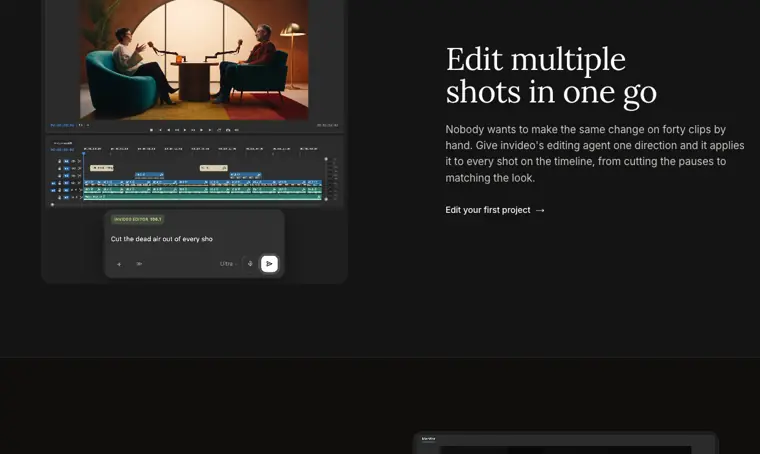
Natural language editing agent
Executes timeline modifications across clips based on plain language text directions. Watches and logs footage into memory so specific moments can be retrieved simply by describing them.
Use caseAn editor applies a single instruction to forty timeline clips to cut out pauses and match color across every shot.
From invideo.io · image from InVideo AI -
Multiplayer editing mode
Enables multiple team members to work together in real time on shared video projects. Displays live cursors to indicate what each person is doing across the timeline.
Use caseA creative team reviews and refines a shared video project together while monitoring each other's timeline cursors in real time.
From invideo.io -
Storyboarding
Converts scripts or concepts into a structured plan organized shot by shot. Lets users adjust and refine the sequence prior to final media generation.
Use caseA filmmaker organizes an initial concept into a detailed sequence of individual shots before initiating generation.
From invideo.io -
Custom agent creation
Configures dedicated AI agents tailored to specific production roles. Can also connect external agents to handle tasks like trimming, grading, and sound mixing directly on the timeline.
Use caseA producer assigns a custom agent to serve as a specialized music designer or cinematographer during project post production.
From invideo.io
Written from InVideo AI's own website, checked . Each feature links to the page it comes from; images are InVideo AI's own.
Every plan
| Plan | Monthly | Billed yearly | Per | What it includes |
|---|---|---|---|---|
| Starter | $20 | $10 | per seat | 400 credits/seat/mo; up to 5 editor seats; 200 GB; 100 premium stock |
| Plus | $60 | $30 | per seat | 2,000 credits/seat/mo; up to 10 seats + 10 guest seats; 600 GB; 200 premium stock |
| Max | $150 | $75 | per seat | 5,000 credits/seat/mo; up to 20 seats + 20 guest seats; 2,000 GB; 500 premium stock |
From InVideo AI's own pricing page, checked . Prices are in US dollars per month; "billed yearly" is the monthly price when you pay for a year up front. A few figures (often the yearly price) are derived rather than printed on the page.
Before you pay
- Unused credits roll over
- No
- Export your data
- Yes (4K export)
- SOC 2
- Yes (Enterprise plan)
Only what InVideo AI's own pages state, with the quote behind each answer. Anything they don't publish is left out rather than guessed.
InVideo AI video tutorials
Independent creators on YouTube, not InVideo AI or us. The video loads from YouTube only when you press play.
What the free plan includes
10 min AI generation + 4 exports/
Questions people ask about InVideo AI
How much does InVideo AI cost?
Paid plans start at $20 a month (Starter). 3 plans are listed above, from InVideo AI's own pricing page.
Is InVideo AI free?
Yes, there is a free plan: 10 min AI generation + 4 exports/week.
Do unused InVideo AI credits roll over?
No, unused credits do not carry over to the next month. Source
What is a credit, and how is it charged?
Credits work like currency on our platform and are used for video creation, generative models and across other features, not for downloading content. Generative models are priced differently. All models are available at their original API pricing. You can use your credits however you like across the platform. We reserve the right to update credit costs at any time, without prior notice. Heads up: Unused credits don't roll over to the next month. Source
When do credits reset?
Your credit allowance resets every month, on the day of the month you subscribed (not the first of the calendar month) — on annual plans too. Unused credits don't roll over. Source
Am I charged per generation?
Yes. Credits are charged differently for video creation, generative models, and premium features depending on model, output length, and resolution. Source
What if I run out of credits mid cycle?
You can upgrade your plan for a higher monthly allowance or buy a one time credit pack. Source
Works with
- AI models
- Nano Banana, Ideogram 4.5, Seedance, GPT Image
Where this came from
Plans, prices and limits were copied from InVideo AI's own pages, then checked .
- invideo.io/pricing
- invideo.io/
- invideo.io/pricing/
- invideo.io/help/billing/how-do-credits-work/
- invideo.io/ideas/?section=invideo-community
How we collect prices and rank tools · Is something wrong? Correct this listing
Others that do the same job
 Flikifliki.ai
Text and blogs to narrated videos with lifelike AI voices in 80+ languages.
- Green flag: Free plan
- Green flag: Cancel online
- Green flag: No card for trial
- Red flag: Free plan watermark
 Pictorypictory.ai
Converts scripts, blog URLs, slides and recordings into short branded videos.
- Green flag: No card for trial
 Revid.airevid.ai
Creates and auto publishes short form videos from ideas, links or viral templates.
- Green flag: No card for trial
- Red flag: No free plan
 Zebracatzebracat.ai
Faceless short form and marketing videos from text, blogs or ideas.
- Green flag: Free plan
- Green flag: No card for trial
- Green flag: Refunds within 7 days
 Vislavisla.us
Turns scripts, ideas or recordings into edited business videos with stock and avatars.
- Green flag: Free plan
- Red flag: Free plan watermark
 Steve AIsteve.ai
Scripts, blogs or audio into animated, live action or avatar videos.
- Green flag: Free plan