
Steve AI
Scripts, blogs or audio into animated, live action or avatar videos.
Best for Educators wanting animated explainers
Used Steve AI and liked it? Upvote it. One upvote per person. Upvotes come from visitors, not from us, and never change "Our ranking".
What it does
Steve AI is an online video creation platform that converts text, audio, images, and ideas into animated or live videos. Users input scripts, prompts, photos, or voice tracks to generate videos complete with narration, scene pacing, and motion graphics. The platform is designed for creators, marketers, businesses, and YouTubers looking to produce content without needing editing skills or filming equipment.
Read more: 5 features and how people use themShow less
-
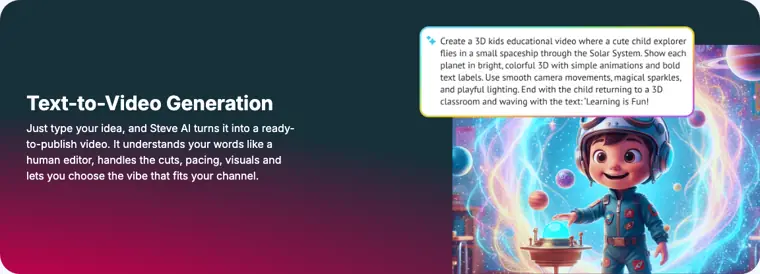
Text to video generation
Converts written text, rough ideas, or notes into published videos by automatically handling scene cuts, pacing, narration, and visuals.
Use caseA YouTuber turns a finished script into a ready to publish video without filming or showing their face.
From steve.ai/features · image from Steve AI -
Blog to video conversion
Extracts text from website links and blog posts to generate social videos with matching visuals and narration automatically.
Use caseA content marketer repurposes published blog posts and articles into video formats tailored for social platforms.
From steve.ai/features -
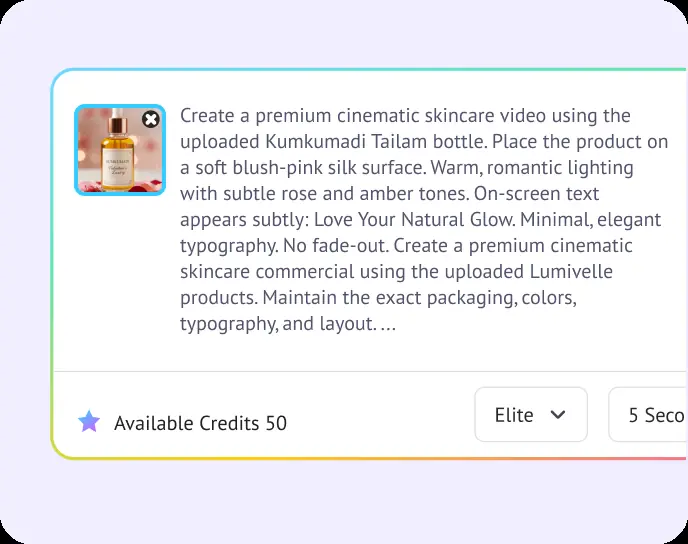
Image to video generator
Adds animation, movement, and audio to static photos based on text prompts without requiring manual keyframing.
Use caseAn e commerce creative lead animates still product catalog photos into short video advertisements in under an hour.
From steve.ai/products/ai-image-to-video · image from Steve AI -
AI motion effects generator
Applies camera movements, zooms, and kinetic text animations to still visuals to build dynamic motion graphic scenes.
Use caseA social media manager animates product shots and screenshots to create promotional video clips for trends.
From steve.ai -
Audio to video generator
Transforms recorded voice tracks and audio files into finished videos complete with relevant scenes and visuals.
Use caseA podcaster uploads an audio recording up to five minutes long to build a visual video version of the episode.
From steve.ai
Written from Steve AI's own website, checked . Each feature links to the page it comes from; images are Steve AI's own.
Every plan
| Plan | Monthly | Billed yearly | Per | What it includes |
|---|---|---|---|---|
| Free | Free | $0 | per account | 5 voice overs; 5 video generation credits; watermark |
| Basic | $20 | $10 | per account | 100 AI video min; 800 AI images/stock; 720p; no watermark |
| Starter | $60 | $30 | per account | 100 AI video min; 800 AI images/stock; 1080p |
| Pro | $80 | $40 | per account | 300 AI video min; 2,400 images/stock; 2K |
| Generative AI | $80 | Not listed | per account | 400 AI video min; 3,200 images/stock; 15 min generative credits; 2K |
| Enterprise | Not listed | Not listed | per account | contact sales |
From Steve AI's own pricing page, checked . Prices are in US dollars per month; "billed yearly" is the monthly price when you pay for a year up front. Some of these figures came from third party reports and could not be confirmed on the official page.
Before you pay
- Commercial use
- Enterprise plan includes commercial & reselling rights.
What Steve AI says
Commercial & Reselling Rights No Steve AI Watermark AI Data Privacy & Advanced Security Customized Onboarding
Source page - Export your data
- Yes, downloadable in .mp4 format on paid plans and custom on Enterprise
- Support
- Email, ticketing system, community (Slack Channel), help center / FAQ
What Steve AI says
Please contact our support team at team@steve.ai If you have any questions
Source page
Only what Steve AI's own pages state, with the quote behind each answer. Anything they don't publish is left out rather than guessed.
Getting started with Steve AI
- Select the Animation tab on the dashboard and click Start in the Script to Animation Video section.
- Enter your script or select one from the script library, and enter a keyword to describe the video.
- Select your desired music, voice over, and auto highlight options, then click Next.
- Select a template for your video.
- Edit each scene on the Workspace as required.
- Click Publish, preview your video, and click Download.
Written from Steve AI's own help pages: steve.ai/tutorials
Steve AI video tutorials
Independent creators on YouTube, not Steve AI or us. The video loads from YouTube only when you press play.
What the free plan includes
5 voiceovers, 5 video credits/
Questions people ask about Steve AI
How much does Steve AI cost?
Paid plans start at $20 a month (Basic). 6 plans are listed above, from Steve AI's own pricing page.
Is Steve AI free?
Yes, there is a free plan: 5 voiceovers, 5 video credits/mo, 720p.
Can I use Steve AI output commercially?
Enterprise plan includes commercial & reselling rights. Source
Does Steve AI have an API?
Yes (enterprise).
Works with
- Languages
- English, Español, Português, Français, Deutsch
Where this came from
Plans, prices and limits were copied from Steve AI's own pages, then checked .
How we collect prices and rank tools · Is something wrong? Correct this listing
Others that do the same job
 Flikifliki.ai
Text and blogs to narrated videos with lifelike AI voices in 80+ languages.
- Green flag: Free plan
- Green flag: Cancel online
- Green flag: No card for trial
- Red flag: Free plan watermark
 Pictorypictory.ai
Converts scripts, blog URLs, slides and recordings into short branded videos.
- Green flag: No card for trial
 Revid.airevid.ai
Creates and auto publishes short form videos from ideas, links or viral templates.
- Green flag: No card for trial
- Red flag: No free plan
 Zebracatzebracat.ai
Faceless short form and marketing videos from text, blogs or ideas.
- Green flag: Free plan
- Green flag: No card for trial
- Green flag: Refunds within 7 days
 InVideo AIinvideo.io
Prompt or script to a fully edited video with stock, AI voiceover and generative clips.
- Green flag: Free plan
- Red flag: Credits reset monthly
 Vislavisla.us
Turns scripts, ideas or recordings into edited business videos with stock and avatars.
- Green flag: Free plan
- Red flag: Free plan watermark