
Visla
Turns scripts, ideas or recordings into edited business videos with stock and avatars.
Best for Small business and corporate teams
Used Visla and liked it? Upvote it. One upvote per person. Upvotes come from visitors, not from us, and never change "Our ranking".
What it does
Visla is a video production platform designed for teams across marketing, sales, training, and product development. Users can input ideas, scripts, documents, screen captures, or existing recordings to automatically produce polished videos with narration, stock media, and avatars. It provides automated generation tools and scene editing so businesses can produce video content without editing expertise.
Read more: 6 features and how people use themShow less
-
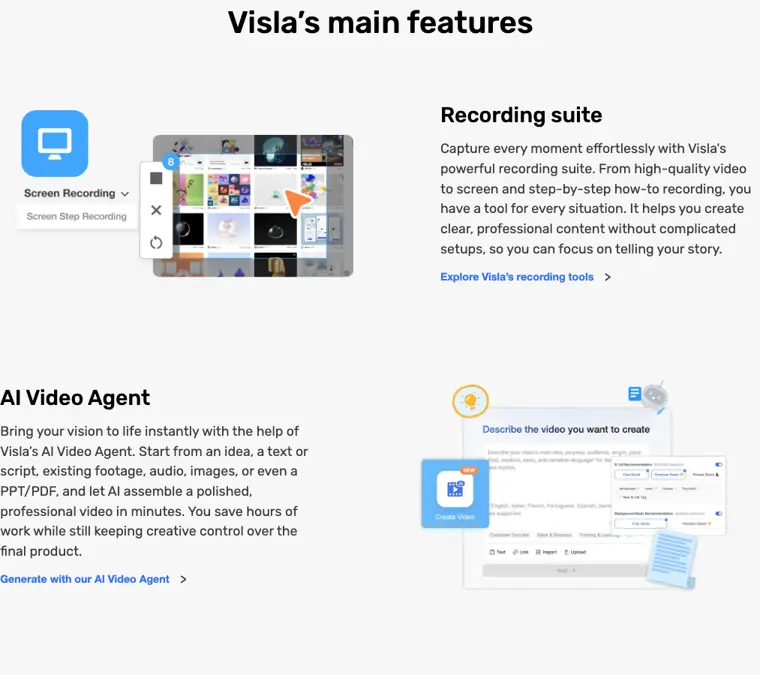
AI Video Agent
Assembles a full video draft containing narration, visuals, scenes, and transitions from an idea, script, text, audio, images, or documents.
Use caseA corporate trainer turns existing training documents into onboarding videos for new hires.
From visla.us · image from Visla -
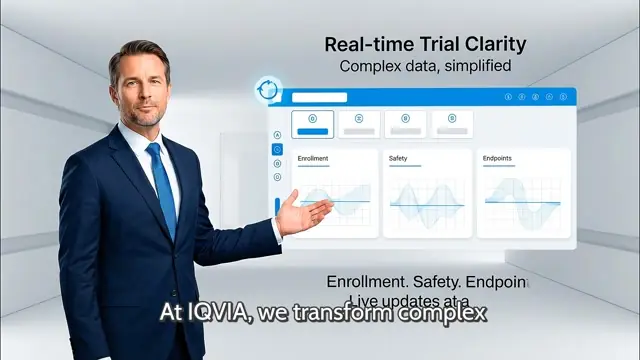
AI personalization
Provides access to over one hundred public avatars, custom avatar creation, and voice cloning to narrate video content.
Use caseA sales representative uses a cloned voice and custom avatar to deliver personalized video pitches to prospects in different markets.
From visla.us · image from Visla -
Recording suite
Captures screen activity, camera feeds, and step by step actions on desktop or mobile devices without complex equipment.
Use caseA product manager records a product demo and screen walkthrough to demonstrate new release features.
From visla.us -
Auto Cut
Removes unwanted filler words, awkward pauses, and bad takes from recorded footage automatically using AI.
Use caseA marketer cleans up an unscripted talking head video by removing repeated takes and silent pauses before editing scenes.
From visla.us/solutions/product-team -
Scene based video editing
Enables shot by shot refinement of video drafts by adjusting text overlays, graphics, branding, pacing, and scene arrangements.
Use caseA marketer adjusts branding, cuts scenes, and moves shots around to finalize an explainer video.
From visla.us -
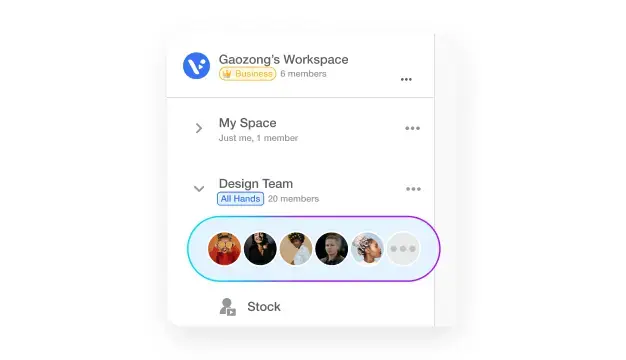
Workspaces and Teamspaces
Organizes video assets and footage in a shared hub where team members can co edit projects, leave feedback, and handle signoffs.
Use caseA sales team shares footage assets and coordinates review signoffs together on a customer case study video.
From visla.us · image from Visla
Written from Visla's own website, checked . Each feature links to the page it comes from; images are Visla's own.
Every plan
| Plan | Monthly | Billed yearly | Per | What it includes |
|---|---|---|---|---|
| Free | Free | Not listed | per account | 2,000 credits/mo; 1080p; 3GB/1hr uploads; public avatars only; watermark |
| Pro | $18 | Not listed | not specified | 10,000 credits; 2 custom avatars; watermark removal; 1080p |
| Business | $59 | Not listed | not specified | 20,000 credits; 3 custom avatars; 3 voice clones; 4K; brand kit |
| Enterprise | Contact sales | Not listed | custom | contact sales |
From Visla's own pricing page, checked . Prices are in US dollars per month; "billed yearly" is the monthly price when you pay for a year up front. A few figures (often the yearly price) are derived rather than printed on the page.
Before you pay
- Watermark on the free plan
- Yes
- Export your data
- Yes
- SOC 2
- Yes
What Visla says
Visla has successfully completed the SOC 2 Type II audit, confirming that our security practices meet the SOC 2 standards.
Source page
Only what Visla's own pages state, with the quote behind each answer. Anything they don't publish is left out rather than guessed.
Getting started with Visla
- Start by recording your screen, camera, or both using Visla's built in capture tools.
- Kick things off with an idea, script, text, link, clip, image, audio, or PDF/PPT for the AI to analyze.
- Control the video's duration, pace, aspect ratio, libraries for footage and music, and select an AI voiceover and Avatar.
- Let the AI Video Agent generate a fully formed video with narration, visuals, scenes, and transitions.
- Refine the video draft in the Scene Based Editor by adding overlays, graphics, cut scenes, or adjusting wording.
- Share the completed video by downloading it, getting a share link, or copying an embed code.
Written from Visla's own help pages: visla.us/
Visla video tutorials
Independent creators on YouTube, not Visla or us. The video loads from YouTube only when you press play.
What the free plan includes
Monthly credits, 1080p
Questions people ask about Visla
How much does Visla cost?
Paid plans start at $18 a month (Pro). 4 plans are listed above, from Visla's own pricing page.
Is Visla free?
Yes, there is a free plan: Monthly credits, 1080p.
Does the Visla free plan add a watermark?
Yes, free plan output carries a watermark or branding. Source
Does Visla have an API?
Yes.
Where this came from
Plans, prices and limits were copied from Visla's own pages, then checked .
- visla.us/
- visla.us/soc2-compliance
- visla.us/solutions/customer-success-teams
- visla.us/solutions/product-team
How we collect prices and rank tools · Is something wrong? Correct this listing
Others that do the same job
 Flikifliki.ai
Text and blogs to narrated videos with lifelike AI voices in 80+ languages.
- Green flag: Free plan
- Green flag: Cancel online
- Green flag: No card for trial
- Red flag: Free plan watermark
 Pictorypictory.ai
Converts scripts, blog URLs, slides and recordings into short branded videos.
- Green flag: No card for trial
 Revid.airevid.ai
Creates and auto publishes short form videos from ideas, links or viral templates.
- Green flag: No card for trial
- Red flag: No free plan
 Zebracatzebracat.ai
Faceless short form and marketing videos from text, blogs or ideas.
- Green flag: Free plan
- Green flag: No card for trial
- Green flag: Refunds within 7 days
 InVideo AIinvideo.io
Prompt or script to a fully edited video with stock, AI voiceover and generative clips.
- Green flag: Free plan
- Red flag: Credits reset monthly
 Steve AIsteve.ai
Scripts, blogs or audio into animated, live action or avatar videos.
- Green flag: Free plan