
Pictory
Converts scripts, blog URLs, slides and recordings into short branded videos.
Best for Content marketers repurposing blogs/webinars
Used Pictory and liked it? Upvote it. One upvote per person. Upvotes come from visitors, not from us, and never change "Our ranking".
What it does
Pictory is a cloud based video creation platform that turns text, scripts, blog URLs, images, presentations, and audio files into completed videos. The system automatically structures scenes, adds stock visuals or generated media, applies captions, and inserts AI voiceovers. It is designed for creators, marketers, educators, and teams who want to make videos without cameras or editing experience.
Read more: 5 features and how people use themShow less
-
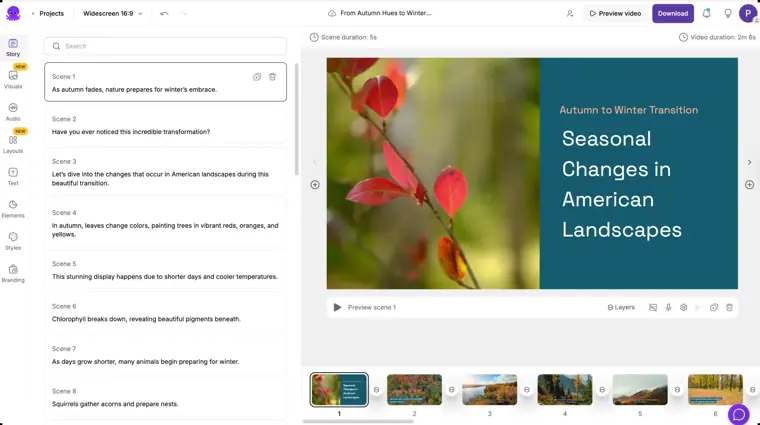
Script to video
Converts written scripts into video scenes complete with matched stock visuals, captions, and AI narration.
Use caseA course creator turns written lecture notes into an educational video without filming.
From pictory.ai · image from Pictory -
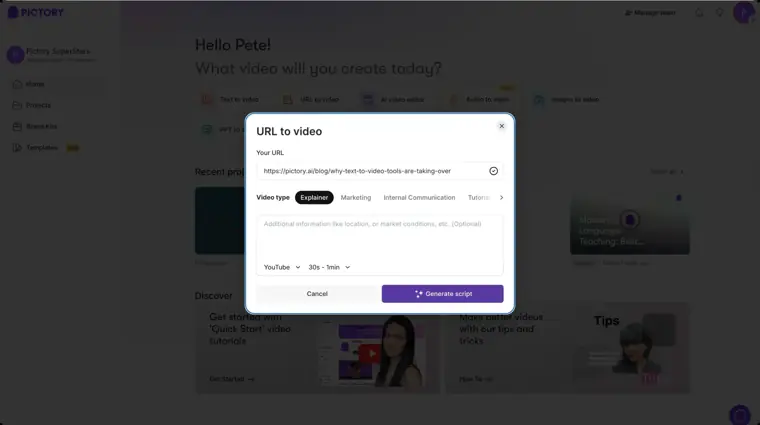
Blog post to video
Pulls content directly from a web article link and extracts key sentences into a storyboard paired with media and music.
Use caseA personal blogger inputs a published article URL to create a summary video to increase audience reach.
From pictory.ai · image from Pictory -
AI avatars
Inserts digital human characters into scenes to speak your script using synthetic voice narration.
Use caseA corporate trainer adds a digital presenter to explain internal onboarding steps without recording on camera.
From pictory.ai -
Image to video
Animates still pictures and text prompts into dynamic video scenes with natural movement using visual models.
Use caseA product marketer animates static photos of a product to produce motion video clips for marketing.
From pictory.ai -
AI video editor
Modifies existing footage using text transcripts to trim recordings and extract key highlight moments.
Use caseA video creator trims long webinar recordings down to short highlight clips by editing the transcript text.
From pictory.ai/pricing
Written from Pictory's own website, checked . Each feature links to the page it comes from; images are Pictory's own.
Every plan
| Plan | Monthly | Billed yearly | Per | What it includes |
|---|---|---|---|---|
| Free Trial | Free | Not listed | per account | 14 days; 15 video min; 720p; 5 min max video; 50 AI credits |
| Starter | $29 | $25 | per user | 200 video min/mo; 1 user; 5 GB; 1 brand kit; 100 AI credits; 60 ElevenLabs min; 1080p |
| Professional | $59 | $35 | per user | 600 video min/mo; 20 GB; 5 brand kits; 500 AI credits; 120 ElevenLabs min; voice cloning, custom avatars |
| Team | $199 | $119 | per team (3+ users) | 1,800 video min/mo; 100 GB; 10 brand kits; 2,400 AI credits; shared workspace |
| Enterprise | Not listed | Not listed | per team (10+ users) | contact sales |
From Pictory's own pricing page, checked . Prices are in US dollars per month; "billed yearly" is the monthly price when you pay for a year up front. A few figures (often the yearly price) are derived rather than printed on the page.
Before you pay
- Card needed for the trial
- No
- Data retention
- Users can request access, corrections, or deletion of their personal information by contacting support.
What Pictory says
To review, access or update your personal information, review its accuracy, or request deletion please contact us at info@pictory.ai.
Source page - Export your data
- Yes (MP4, SCORM)
- SOC 2
- Yes
What Pictory says
Our platform is SOC 2 compliant, ensuring your client’s data is protected at every level
Source page - GDPR
- Yes
Only what Pictory's own pages state, with the quote behind each answer. Anything they don't publish is left out rather than guessed.
Getting started with Pictory
- Type an idea, paste a script, or drop in a blog post or link.
- Pick the platform and video length to let Pictory generate a script.
- Choose a caption style and apply your brand kit.
- Edit scenes, swap visuals, or change the voiceover, then download the MP4.
Written from Pictory's own help pages: pictory.ai/social-media-video-maker?el=2033&h...
Pictory video tutorials
Independent creators on YouTube, not Pictory or us. The video loads from YouTube only when you press play.
The free trial
Trial only: 14 day trial, 3 projects, 720p
Questions people ask about Pictory
How much does Pictory cost?
Paid plans start at $29 a month (Starter). 5 plans are listed above, from Pictory's own pricing page.
Is Pictory free?
There is a free trial but no free plan: 14 day trial, 3 projects, 720p.
Do I need a credit card to try Pictory?
No, you can start without a credit card. Source
Does Pictory have an API?
Yes.
How can I add more credits to my plan?
Additional credits can be added to each plan as necessary. The self serve plan is 120 credits for $49. Source
How many credits do I get?
The Self Serve plan comes with 120 credits per month, 1000 credits annually. With the enterprise plan you can customize the number of credits you use. Source
Do I need an account or special permissions?
You'll need a Pictory account, an API key and third party credentials for most integrations, and sufficient permissions and credits on voice tools. Source
Works with
- Integrations
- Zapier, Make, Shopify, N8N, Slack
- Languages
- 29 languages for ElevenLabs AI voices, 7 languages for standard voices
Where this came from
Plans, prices and limits were copied from Pictory's own pages, then checked .
- pictory.ai/pricing
- pictory.ai/?el=2000b&htrafficsource=pictoryblog
- pictory.ai/pricing/?el=5000&htrafficsource=pictoryblog
- pictory.ai/pictory-api-integrations?el=9998&htrafficsource=pictoryblog
- pictory.ai/pictory-api-pricing?el=9998&htrafficsource=pictoryblog
- pictory.ai/social-media-video-maker?el=2033&htrafficsource=featurepage
- pictory.ai/privacy-policy?el=6611&htrafficsource=featurepage
- pictory.ai/pictory-ai-copyright?el=6612&htrafficsource=featurepage
- kb.pictory.ai/en/
- pictory.ai/terms-of-service
How we collect prices and rank tools · Is something wrong? Correct this listing
Others that do the same job
 Flikifliki.ai
Text and blogs to narrated videos with lifelike AI voices in 80+ languages.
- Green flag: Free plan
- Green flag: Cancel online
- Green flag: No card for trial
- Red flag: Free plan watermark
 Revid.airevid.ai
Creates and auto publishes short form videos from ideas, links or viral templates.
- Green flag: No card for trial
- Red flag: No free plan
 Zebracatzebracat.ai
Faceless short form and marketing videos from text, blogs or ideas.
- Green flag: Free plan
- Green flag: No card for trial
- Green flag: Refunds within 7 days
 InVideo AIinvideo.io
Prompt or script to a fully edited video with stock, AI voiceover and generative clips.
- Green flag: Free plan
- Red flag: Credits reset monthly
 Vislavisla.us
Turns scripts, ideas or recordings into edited business videos with stock and avatars.
- Green flag: Free plan
- Red flag: Free plan watermark
 Steve AIsteve.ai
Scripts, blogs or audio into animated, live action or avatar videos.
- Green flag: Free plan