
Kapwing
Collaborative browser editor with AI subtitles, smart cut, repurposing and dubbing.
Best for Teams repurposing content; beginner friendly
Used Kapwing and liked it? Upvote it. One upvote per person. Upvotes come from visitors, not from us, and never change "Our ranking".
What it does
Kapwing is an online video editing and creation platform built for creative teams. Users can import media, record inside the browser, or turn text prompts into complete videos with audio, overlays, and subtitles. It is designed for storytellers across marketing, education, and corporate communications who need to collaborate on content pipelines.
Read more: 4 features and how people use themShow less
-
Smart Cut
Detects and cuts out silent parts from your recordings automatically to speed up the video editing process.
Use caseAn educator records a long lecture and removes dead air automatically before publishing the lesson.
From kapwing.com/pricing -
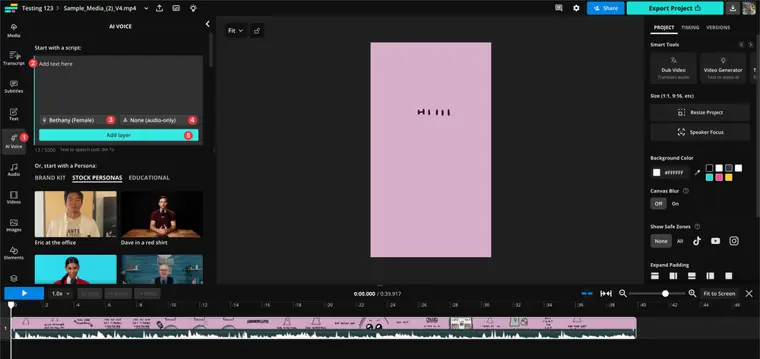
Text to speech and dubbing
Converts written text layers into spoken audio tracks using AI voices and provides tools to dub projects across languages.
Use caseAn HR professional adds spoken narration to an onboarding presentation without recording their own voice.
From kapwing.com/pricing · image from Kapwing -
Video background remover
Isolates the subject in your video footage and removes the background in a single click to produce a transparent backdrop.
Use caseA creator isolates themselves in a webcam recording to place custom graphics and overlays behind them.
From kapwing.com/pricing -
Clean Audio
Filters out background noise, normalizes loudness levels, and cuts down on popping sounds across your media files.
Use caseA communications specialist cleans up an interview recorded in a noisy room to make the speech clear.
From kapwing.com/pricing
Written from Kapwing's own website, checked . Each feature links to the page it comes from; images are Kapwing's own.
Every plan
| Plan | Monthly | Billed yearly | Per | What it includes |
|---|---|---|---|---|
| Free | Free | $0 | 10 credits | 720p, 4 min exports, 30 min export/month, watermark, 3 day storage |
| Pro | $24 | $16 | per member; 1,000 credits/month | 4K, 120 min exports, no watermark, 200GB, subtitles 1,000 min/mo |
| Business | $64 | $50 | per member; 4,000 credits/month | 4K, 800GB, custom voice clones, subtitles 4,000 min/mo |
| Enterprise | Contact sales | Not listed | custom | contact sales |
From Kapwing's own pricing page, checked . Prices are in US dollars per month; "billed yearly" is the monthly price when you pay for a year up front.
Before you pay
- Refunds
- Kapwing does not issue refunds for subscriptions once upgraded to a paid plan.
What Kapwing says
Because we offer a free version of Kapwing to all users, we do not issue refunds for subscriptions once you decide to upgrade to a paid Kapwing Plan.
Source page - How to cancel
- Go to the Settings of the workspace, select the Billing tab, and click Cancel Subscription near the bottom of the page.
What Kapwing says
Go to the Settings of the workspace with the paid plan you want to cancel. 2. Click the "Billing" tab. Workspace Settings > Billing screenshot 3. Click “Cancel Subscription”
Source page - Cancel online yourself
- Yes
What Kapwing says
Kapwing customers can manage their subscriptions and cancellations by going to their Workspace Settings.
Source page - Renews automatically
- Yes
- Unused credits roll over
- No
What Kapwing says
You can buy multiple packs of 500 credits, but please note these credits do not roll over. If there are remaining credits at the end of the month, they will be removed
Source page - Failed generations cost credits
- No
What Kapwing says
When limits fail, our system will automatically issue back credits. For example, if you dub a 5 minute video, we will deduct the 100 credits before the dubbing, but after the failure is processed, our system will automatically re issue those 100 credits.
Source page - Watermark on the free plan
- Yes
What Kapwing says
A watermark is added to projects made by users in Free Plan workspaces, but users in Paid Plan workspaces can export unlimited watermark free content.
Source page - Data retention
- Project files are stored for 3 days on the Free plan, for the duration of the subscription on paid plans, or indefinitely while subscribed.
What Kapwing says
Storage duration How long project files are stored in your workspace 3 days Duration of subscription Duration of subscription Duration of subscription
Source page - Export your data
- Yes, export and download projects as MP4, PNG, JPG, MP3, GIF, SRT, and VTT
What Kapwing says
Export as MP4, PNG, JPG, MP3, GIF Export and download projects as videos, images, audio, and GIF files
Source page - Discounts
- Kapwing offers a Kapwing for Education account for eligible students and educators.
What Kapwing says
If you are verified for a Kapwing for Education account, we may collect information relating to your educational status such as your school name, school mailing address, school address
Source page - Support
- Email, help center, report a problem form in app
What Kapwing says
If a technical issue occurs please contact Kapwing's support team or select "Report a Problem" from the "Help" icon within the project or workspace
Source page
Only what Kapwing's own pages state, with the quote behind each answer. Anything they don't publish is left out rather than guessed.
Getting started with Kapwing
- Create a free account to set up your team workspace.
- Go to Workspace Settings and select the Settings tab to customize your team name and logo.
- Navigate to the Members tab and click Invite Members to add teammates by email or by sharing a direct link.
- Open Brand Kit in the top left corner of your workspace to upload brand media, colors, and fonts.
- Create a new project or start from a saved Brand Template to edit in real time with teammates.
- Export your project or share the project link to review and leave time stamped comments.
Tips
- Workspace folders are visible to everyone on your team, while My Folders are only visible to you.
- To comment at a different time stamp in the video, scrub to that point before writing your comment.
- Create Brand Templates in Brand Kit to reuse formats and speed up your workflow instead of starting from scratch.
Written from Kapwing's own help pages: kapwing.com/help/getting-started-with-teams/
Kapwing video tutorials
Independent creators on YouTube, not Kapwing or us. The video loads from YouTube only when you press play.
What the free plan includes
720p, 4 min exports, 30 export min/
Questions people ask about Kapwing
How much does Kapwing cost?
Paid plans start at $24 a month (Pro). 4 plans are listed above, from Kapwing's own pricing page.
Is Kapwing free?
Yes, there is a free plan: 720p, 4 min exports, 30 export min/mo.
Can I get a refund from Kapwing?
Kapwing does not issue refunds for subscriptions once upgraded to a paid plan. Source
How do I cancel Kapwing?
Go to the Settings of the workspace, select the Billing tab, and click Cancel Subscription near the bottom of the page. Source
Do unused Kapwing credits roll over?
No, unused credits do not carry over to the next month. Source
Does Kapwing charge credits for failed generations?
No, failed generations are not charged. Source
Does the Kapwing free plan add a watermark?
Yes, free plan output carries a watermark or branding. Source
Does Kapwing have a student or other discount?
Kapwing offers a Kapwing for Education account for eligible students and educators. Source
Can I have a free trial for Kapwing's paid plans?
Kapwing's tools are available for free to try before upgrading, and paid plans do not currently offer a free trial. Source
Can I switch from paying annually to paying monthly?
An annual plan cannot be switched to monthly until the annual cycle ends and is canceled; you must resubscribe to monthly afterward. Source
Can I get a refund of credits if there's an error?
Kapwing automatically re issues credits when tools fail, but does not refund successful AI generations that were not the desired result. Source
Can I buy more credits on the Business plan?
Business plan customers can purchase packs of 500 credits for $50 USD, though unused credits do not roll over. Source
Works with
- Languages
- Over 60 languages
Where this came from
Plans, prices and limits were copied from Kapwing's own pages, then checked .
- kapwing.com/help/subscription-faq-2/
- kapwing.com/
- kapwing.com/help/how-to-switch-from-monthly-to-annual/
- kapwing.com/help/getting-started-with-teams/
- kapwing.com/help/cancel-subscription/
- kapwing.com/help/how-do-kapwing-credits-work/
- kapwing.com/policies/refund
- kapwing.com/pricing
- kapwing.com/policies/privacy
How we collect prices and rank tools · Is something wrong? Correct this listing
Others that do the same job
 Descriptdescript.com
Edit video and podcasts by editing the transcript, with AI audio cleanup.
- Green flag: Free plan
- Green flag: Cancel online
- Green flag: No card for trial
- Red flag: Free plan watermark
 VEEDveed.io
Browser editor with AI subtitles, avatars, translation and generation tools.
- Green flag: Free plan
 Adobe Premiere Proadobe.com/products/premiere.html
Industry standard editor with Firefly AI: Generative Extend, text based editing, search.
- Green flag: Refunds within 14 days
 Canva (video editor)canva.com/video-editor
Template driven video editing inside Canva with AI captions, background removal, beat sync.
- Green flag: Free plan
- Green flag: No card for trial
- Red flag: Credits reset monthly
 Riversideriverside.com
Remote studio recording, then transcript editing and auto social clips.
- Green flag: Free plan
- Green flag: No card for trial
- Red flag: Free plan watermark
 Wondershare Filmorafilmora.wondershare.com
Desktop timeline editor with drag and drop effects plus AI captions, music and cutout.
- Green flag: Free plan
- Green flag: Cancel online
- Red flag: Free plan watermark